Solved

How to show an invoice as paid

  • December 17, 2021
  • 32 replies
  • 1484 views

Show first post

32 replies

nathantrauscht
Semi-Pro II
Forum|alt.badge.img

@ChandraM I was wrong - I ran the report with the subreport on a test invoice with two payments. It brings in the 1st applied payment. It also duplicated the one line item. I am stumped.


Forum|alt.badge.img+8
  • Semi-Pro I
  • October 25, 2023

Hi @rwhetsell77 I attached the zip file as  I was unable to upload .rpx file( report file). I have submitted.a topic in this community to allow .rpx files.


Did you try unzipping the file? Where are you stuck in downloading the zip file.

Thanks


nathantrauscht
Semi-Pro II
Forum|alt.badge.img

@rwhetsell77 I’ve had trouble downloading zip in community posts as well, especially when using Google Chrome. When using Edge I can click on the attachment and downloads the zip no problem.


rwhetsell77
Freshman II
Forum|alt.badge.img
  • Freshman II
  • October 25, 2023

Hi @rwhetsell77 I attached the zip file as  I was unable to upload .rpx file( report file). I have submitted.a topic in this community to allow .rpx files.


Did you try unzipping the file? Where are you stuck in downloading the zip file.

Thanks


Yea, Chrome was not being cooperative before, but tried again and it worked. Reviewing per previous comment.


rwhetsell77
Freshman II
Forum|alt.badge.img
  • Freshman II
  • October 25, 2023

@ChandraM Ok, validated the relationships and still getting the same results. Going to step away from this until tomorrow, been looking at it too much today. Thanks for all the assistance!


Forum|alt.badge.img
  • Freshman II
  • August 11, 2026

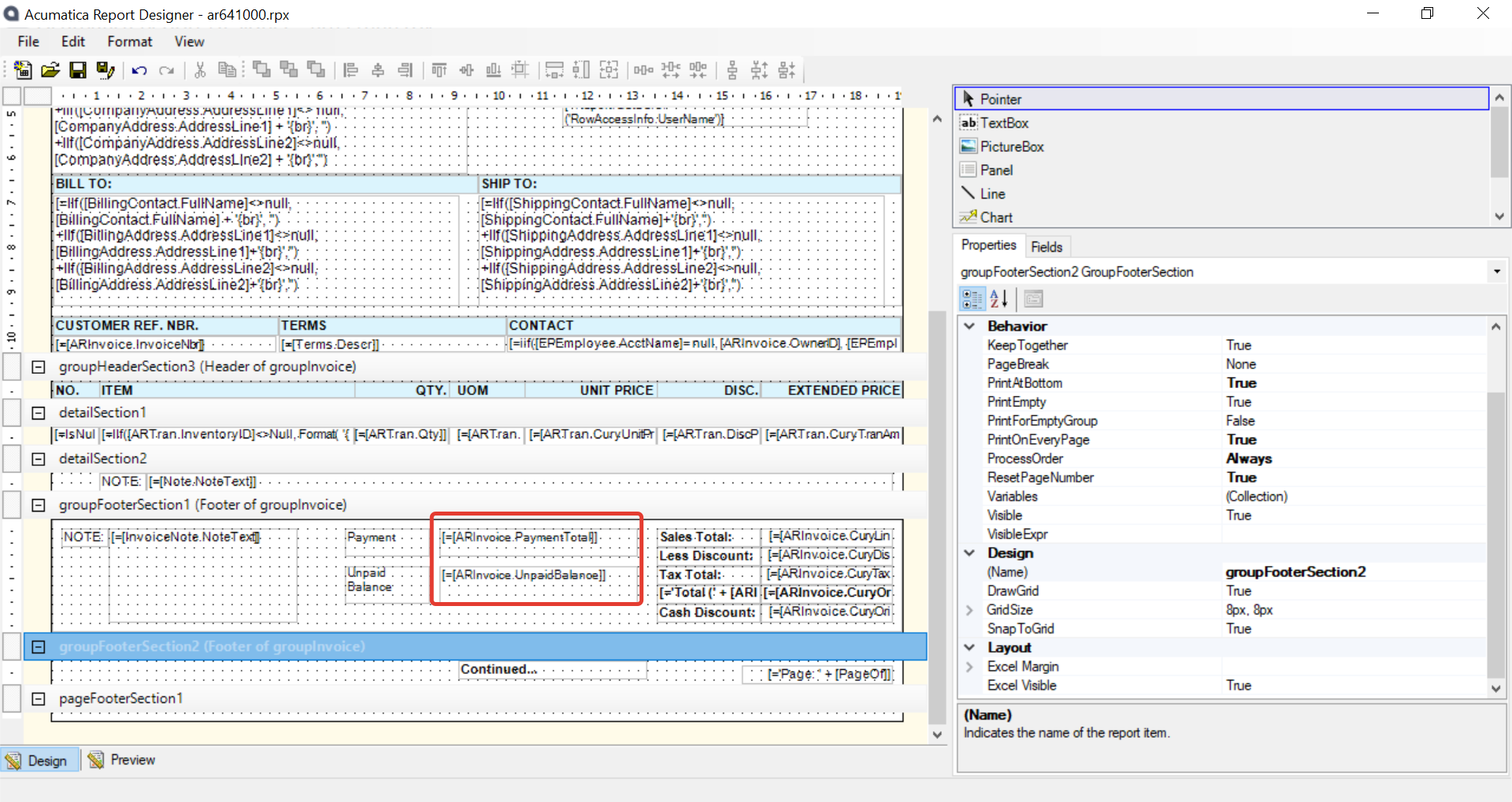
This is helpful but seems like above mentioned field ARInvoice.PaymentTotal is not the correct one any more. The new correct field seems to be =[ARInvoice.CuryPaymentTotal]


Forum|alt.badge.img+8
  • Semi-Pro I
  • August 12, 2026

Just to share some additional information for the benefit of new community members:

Acumatica supports multi‑currency functionality. For amount‑related fields (such as Total Amount, ExtPrice, LineAmt, etc.), the system maintains two values—one in the base currency and the other in the transaction currency. This design allows Acumatica to seamlessly switch and display amounts in the base currency equivalent (for example, USD in the U.S.) when working with transactions in other currencies.

Fields that begin with “Cury” represent transaction currency amounts. If the transaction is in the base currency, or if the merchant does not use multiple currencies, then both fields (for example, [ARInvoice.CuryPaymentTotal] and [ARInvoice.PaymentTotal]) will hold the same values.

Conclusion: In a multi‑currency enabled Acumatica environment, always decide based on client requirements whether to use the base currency amount or the transaction currency amount.