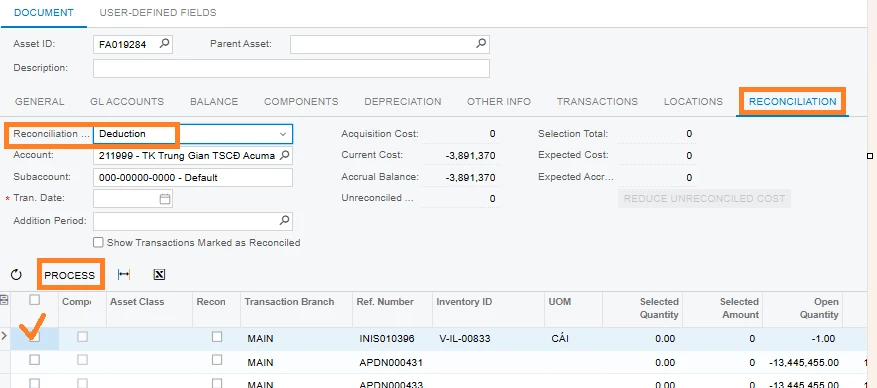
I have map my fixed asset with wrong transaction Reconciliation Type Deduction, my step as details:
Open Fixed Asset → Click Tab Reconciliation → Choose Reconciliation Type Deduction
Check the corresponding transaction on the grid → click Process
Click Save
System generate a FA transaction type Reconciliation -.
However, I check a wrong transaction but havent no how to fix. If I do reverse that GL, it’s not update on FA.
Thank for your advice!
Yen Chi
Best answer by nickcerri32
@Christine - You can do a Reversing entry on the original GL transaction. Acumatica would give you a warning if the transaction originated in AP but will let you reverse it anyway. However, this will only update the GL entry and not make any changes to the AP or FA docs.
Here’s what you can do, let me know if this works.
Perform the GL Reversal
Note the account that was debited in the Reversing GL Entry.
On the Reconciliation tab, select Addition as the Reconciliation Type and use the account noted in 2. above. This will, at the very least create a Reconciliation+ and cancel out the original transaction.
@Christine - You can do a Reversing entry on the original GL transaction. Acumatica would give you a warning if the transaction originated in AP but will let you reverse it anyway. However, this will only update the GL entry and not make any changes to the AP or FA docs.
Here’s what you can do, let me know if this works.
Perform the GL Reversal
Note the account that was debited in the Reversing GL Entry.
On the Reconciliation tab, select Addition as the Reconciliation Type and use the account noted in 2. above. This will, at the very least create a Reconciliation+ and cancel out the original transaction.