Answer

Depreciation error message

  • January 4, 2024
  • 9 replies
  • 334 views

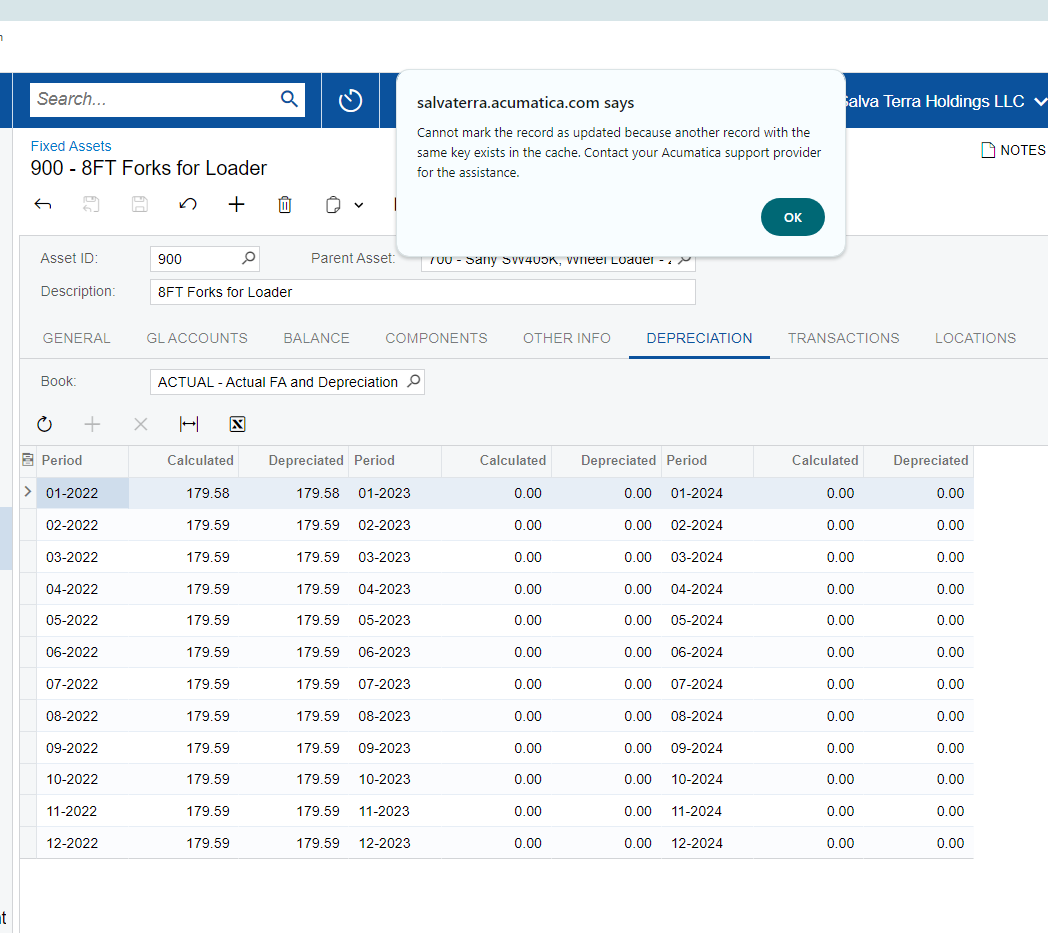
Received this error when trying to calculate depreciation for this asset.  

Best answer by Robert Sternberg

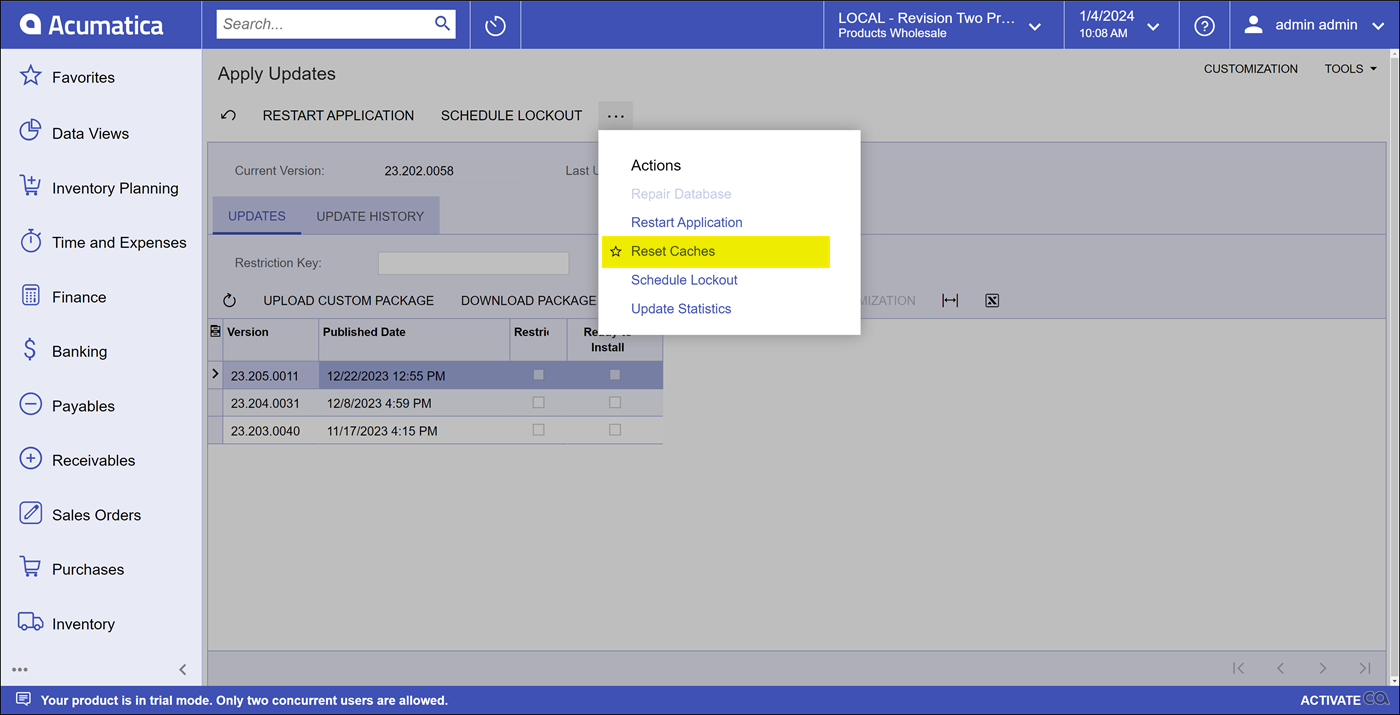
Could you please try to reset the system cache on apply updates?
 

9 replies

dcomerford
Captain II
Forum|alt.badge.img+15
  • Captain II
  • January 4, 2024

Have you checked you dont have the record open in another session. You could try clearing your browser cache or trying it using a different browser and see if that works.

If not i would log a support case with Acumatica.

One other thing worth checking is do you have any customisations that might be affecting this area of the system


Robert Sternberg
Captain II
Forum|alt.badge.img+7

Could you please try to reset the system cache on apply updates?


Manikanta Dhulipudi
Captain II
Forum|alt.badge.img+15

Hi @joanne3501 


AC-206477: In some cases, if a customization package was published on an instance, confirming a shipment could lead to data inconsistency, which made it impossible to further process the shipment. Fix Description: If data is corrupted due to customizations applied to an instance, the system now shows the following error message: Cannot mark the record as updated because another record with the same key exists in the cache. Contact your Acumatica support provider for the assistance

SImilary this may  impacted on fixed asset module, Please reach out to Acumatica.


Robert Sternberg
Captain II
Forum|alt.badge.img+7

Hi @joanne3501 


AC-206477: In some cases, if a customization package was published on an instance, confirming a shipment could lead to data inconsistency, which made it impossible to further process the shipment. Fix Description: If data is corrupted due to customizations applied to an instance, the system now shows the following error message: Cannot mark the record as updated because another record with the same key exists in the cache. Contact your Acumatica support provider for the assistance

SImilary this is impacted on fixed asset module, Please reach out to Acumatica.

Is there a Known Issue number for the Fixed Assets Module?


  • Author
  • Freshman I
  • January 8, 2024

@Robert Sternberg 

Clearing the cache worked!  Thank you so much! 


Robert Sternberg
Captain II
Forum|alt.badge.img+7

Great news!


patrickg58
Freshman II
  • Freshman II
  • January 11, 2024

I have tried Reset Cache and Restart Application. However, I am getting the same error on Create Purchase Orders (PO505000): “Cannot mark the record as updated because another record with the same key exists in the cache. Contact your Acumatica support provider for the assistance.” on build 23.205.0011. We have a customization with a PXGraphExtension<POOrderEntry> which is doing a PXSelect<INItemPlan> within method: FieldUpdated<POLine, POLine.inventoryID>. It appears just doing the Select a nothing else is causing the error. Also, I can not load the symbols to debug CreatePO as it appears the pdb files don't currently match the App_Data source for 23.205.0011. I have open a Dev Case ID: 347231, but I thought I would also post here incase anyone else has come across this issue.


ngerst
Freshman II
Forum|alt.badge.img
  • Freshman II
  • March 19, 2024

I have tried Reset Cache and Restart Application. However, I am getting the same error on Create Purchase Orders (PO505000): “Cannot mark the record as updated because another record with the same key exists in the cache. Contact your Acumatica support provider for the assistance.” on build 23.205.0011. We have a customization with a PXGraphExtension<POOrderEntry> which is doing a PXSelect<INItemPlan> within method: FieldUpdated<POLine, POLine.inventoryID>. It appears just doing the Select a nothing else is causing the error. Also, I can not load the symbols to debug CreatePO as it appears the pdb files don't currently match the App_Data source for 23.205.0011. I have open a Dev Case ID: 347231, but I thought I would also post here incase anyone else has come across this issue.

Any update on this? I have the same issue right now for a Requisition trying to Create a Purchase Order. Tried Reset Cache and restarting the application. Nothing has worked. This is within 2023R2 Build 6, which we are planning on upgrading to this weekend if I can get this issue resolved. 


patrickg58
Freshman II
  • Freshman II
  • March 19, 2024

@ngerst The solution was to change the PXSelect<INItemPlan> to PXSelectReadonly<INItemPlan>.