Question

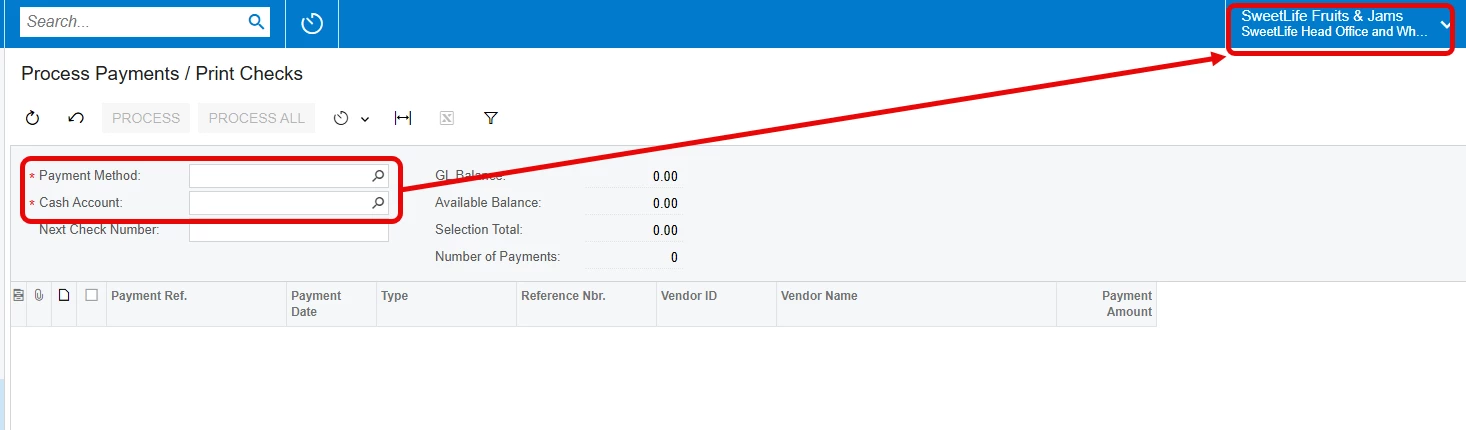
Default Payment Method and Cash Account on the Process Payments / Print Checks (AP505000) screen

  • October 2, 2026
  • 2 replies
  • 19 views

nickcerri32
Captain II
Forum|alt.badge.img+7

Hey, gang - short of a customization is there any way to default the Payment Method and Cash Account fields based on the selected branch on the Process Payments / Print Checks screen (AP505000)?  Curious what ideas anyone here may have.  
 

2 replies

Laura03
Captain II
Forum|alt.badge.img+20
  • Captain II
  • October 2, 2026

Hi Nick,

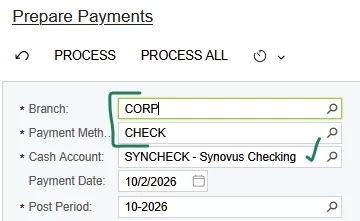
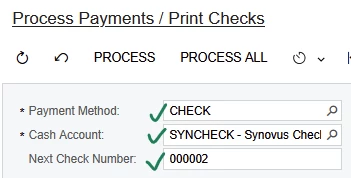
The user is coming to Process Payment/Print checks from what screen?  I notice in the natural AP processing workflow of Prepare Payments → Process Payments → Release Payments naturally defaults with no action taken by the user and no customization required:

  1. User Selects Company/Branch & Payment method in Prepare Payments. 
    Cash Account Defaults based on choice of Company + Payment Method.

    Cash Account Defaults based on choice of Company + Payment Method.

  2. Upon clicking Process or Process All, Acumatica advances to Process Payments/Print Checks with three fields correctly defaulted:

    When advancing from Prepare Payments to Process screen… Method, Account and auto-number default.


elijahr83
Jr Varsity II
Forum|alt.badge.img
  • Jr Varsity II
  • October 2, 2026

Hey ​@nickcerri32 

I actually ran into a similar issue myself when trying to show the payments screen to a prospect. After some research and testing in 26R1, it looks like the Cash Account can be defaulted by branch once the Payment Method is selected, using the AP/PR Default setup on the payment method.

What I couldn’t find was a standard way to have the active branch also default the Payment Method itself on AP505000. Switching branches still left that field blank in my testing.

So short of customization, I think you can get the Cash Account piece there, but not both fields purely from the branch selection.