Answer

Customer Rental activity

  • November 22, 2022
  • 12 replies
  • 137 views

alexx
Jr Varsity II
Forum|alt.badge.img

I have a customer requesting a report of everything they have rented from us, with prices included. Is there a report out there that has this information on one report?

Best answer by Kandy Beatty

Hi @alexx 

I am not sure what an RI order type is but you can write a GI for that and filter based on what is needed. 

Here is a GI you could use to get you started, you can set parameters for what you need or just filter on the actual GI. 
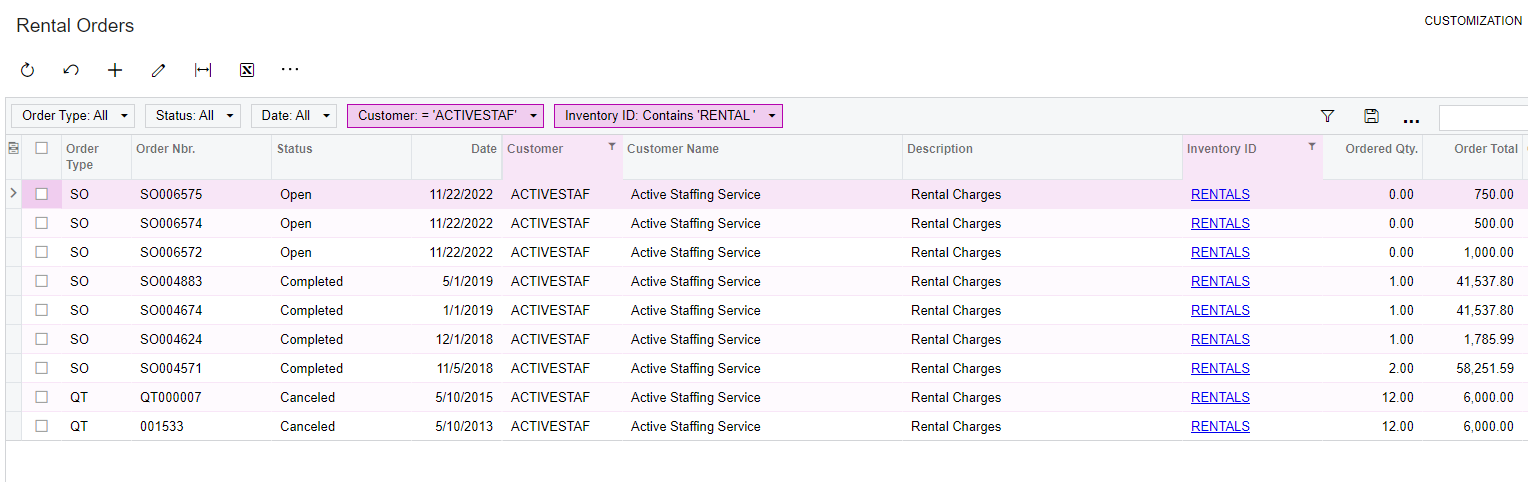


12 replies

Kandy Beatty
Captain II
Forum|alt.badge.img+17
  • Captain II
  • November 22, 2022

HI @alexx 

How are you charging them? Is it on a sales order, AR Invoice or Proforma?


alexx
Jr Varsity II
Forum|alt.badge.img
  • Author
  • Jr Varsity II
  • November 22, 2022

HI @alexx 

How are you charging them? Is it on a sales order, AR Invoice or Proforma?

Hi! 

We are charging them by the RI sales order type. Does that help?


Kandy Beatty
Captain II
Forum|alt.badge.img+17
  • Captain II
  • Answer
  • November 22, 2022

Hi @alexx 

I am not sure what an RI order type is but you can write a GI for that and filter based on what is needed. 

Here is a GI you could use to get you started, you can set parameters for what you need or just filter on the actual GI. 



Robert Sternberg
Captain II
Forum|alt.badge.img+7

Hi @alexx I have attached a GI to help with this request.  It will automatically filter to the RI order type and will leave you a selector box for Customer ID lookup.  You can then export the results directly to excel to provide the customer the list of Rental Order history. 


alexx
Jr Varsity II
Forum|alt.badge.img
  • Author
  • Jr Varsity II
  • November 22, 2022

@kbeatty21 @rsternberg96 


Thank you both. We are fairly new to Acumatica. So, we’re getting to know our way around.

I’m not sure what a GI is and how do I use this GI script?


Kandy Beatty
Captain II
Forum|alt.badge.img+17
  • Captain II
  • November 22, 2022

@kbeatty21 @rsternberg96 


Thank you both. We are fairly new to Acumatica. So, we’re getting to know our way around.

I’m not sure what a GI is and how do I use this GI script?

Here are the steps you can take:

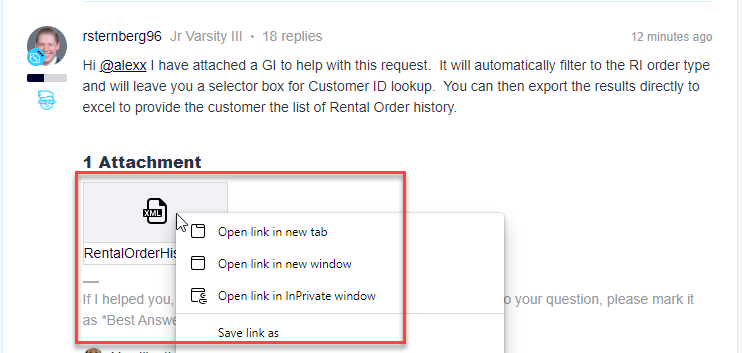
  1. Right click on the Attachment and chose> Save Link As:
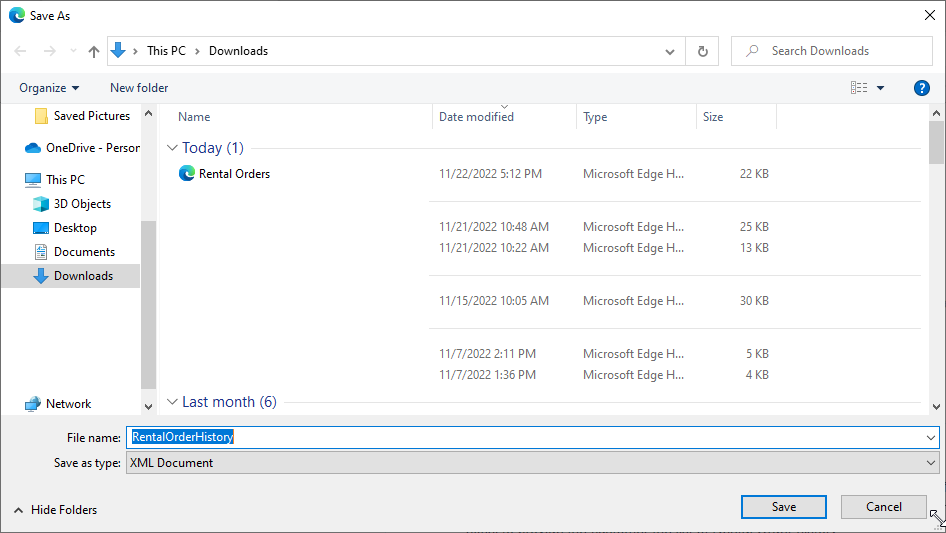
  1. Save as a download and it will be an XML document


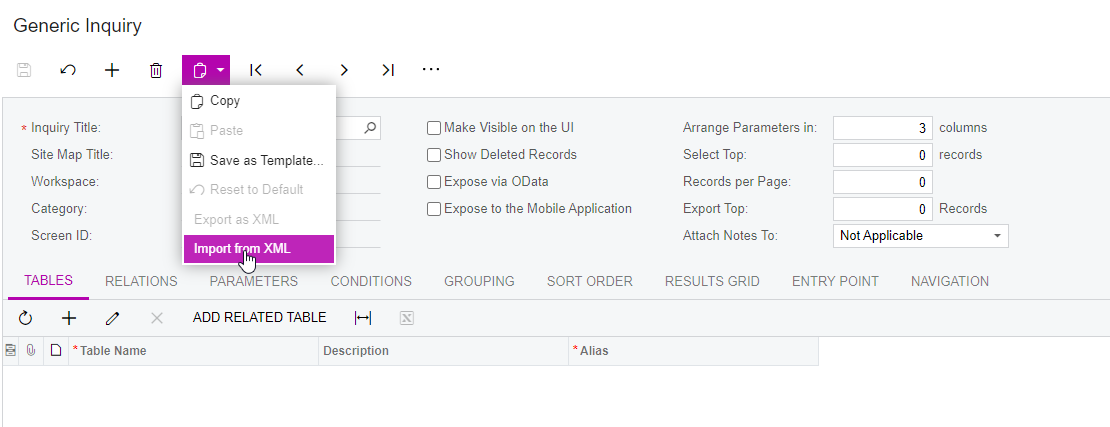
  1. In Acumatica, go to Generic Inquiries and you click the clipboard and chose Import from XML:


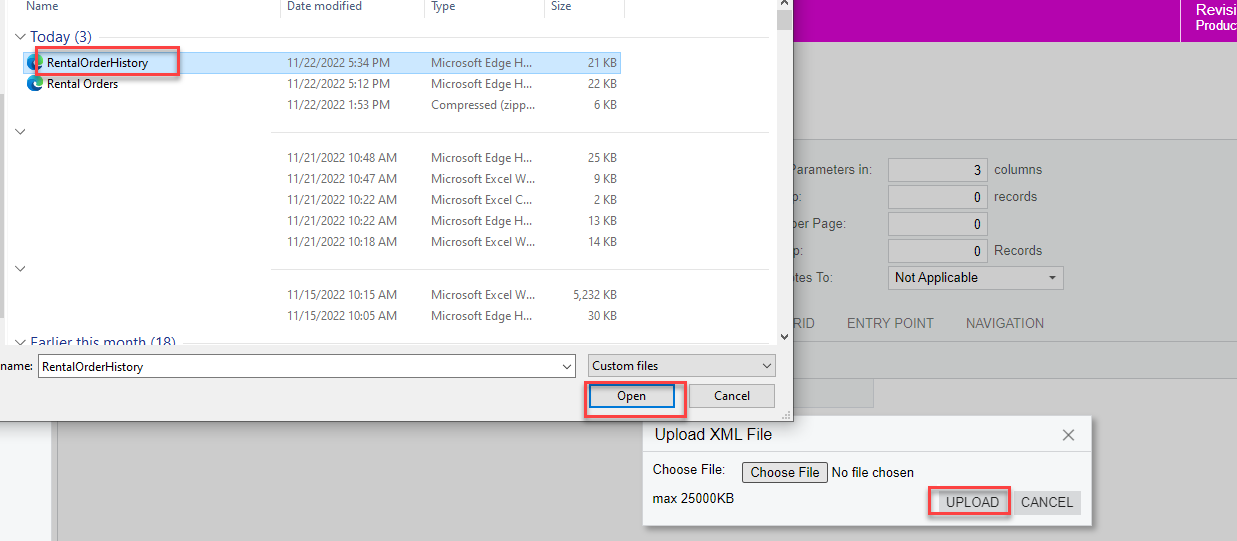
  1. You Choose the File, then Click Open. Then you click Upload File:


The system will import that file for you. 


alexx
Jr Varsity II
Forum|alt.badge.img
  • Author
  • Jr Varsity II
  • November 22, 2022

@kbeatty21 

Awesome! So, after it uploads, is there anything I need to do? How do I get to the “Rental Orders” like you showed in the first comment?


Kandy Beatty
Captain II
Forum|alt.badge.img+17
  • Captain II
  • November 22, 2022

@kbeatty21

Awesome! So, after it uploads, is there anything I need to do? How do I get to the “Rental Orders” like you showed in the first comment?

You simply click the View Inquiry green button. The system saves it for you.


alexx
Jr Varsity II
Forum|alt.badge.img
  • Author
  • Jr Varsity II
  • November 22, 2022

@kbeatty21

Awesome! So, after it uploads, is there anything I need to do? How do I get to the “Rental Orders” like you showed in the first comment?

You simply click the View Inquiry green button. The system saves it for you.

I see that you have a column called “Inventory ID.” I don’t see that as a choice for under Results Grid under the Generic Inquiry. Is there a table I need to change for my data that I have?


Kandy Beatty
Captain II
Forum|alt.badge.img+17
  • Captain II
  • November 22, 2022

@kbeatty21

Awesome! So, after it uploads, is there anything I need to do? How do I get to the “Rental Orders” like you showed in the first comment?

You simply click the View Inquiry green button. The system saves it for you.

I see that you have a column called “Inventory ID.” I don’t see that as a choice for under Results Grid under the Generic Inquiry. Is there a table I need to change for my data that I have?

Which GI are you using? Mine or @rsternberg96 ? 


alexx
Jr Varsity II
Forum|alt.badge.img
  • Author
  • Jr Varsity II
  • November 22, 2022


@kbeatty21

Awesome! So, after it uploads, is there anything I need to do? How do I get to the “Rental Orders” like you showed in the first comment?

You simply click the View Inquiry green button. The system saves it for you.

I see that you have a column called “Inventory ID.” I don’t see that as a choice for under Results Grid under the Generic Inquiry. Is there a table I need to change for my data that I have?

Which GI are you using? Mine or @rsternberg96 ? 

@rsternberg96  is the file that I saved. But I tried yours. And now there seems to be something that isn’t enabled on my end. I get an error when I click “view inquiry” on yours; error message says “object reference not set to an instance of an object. screen: GI.98.89.76


Kandy Beatty
Captain II
Forum|alt.badge.img+17
  • Captain II
  • November 23, 2022

Hi @alexx 

Can you share the error in screenshots?