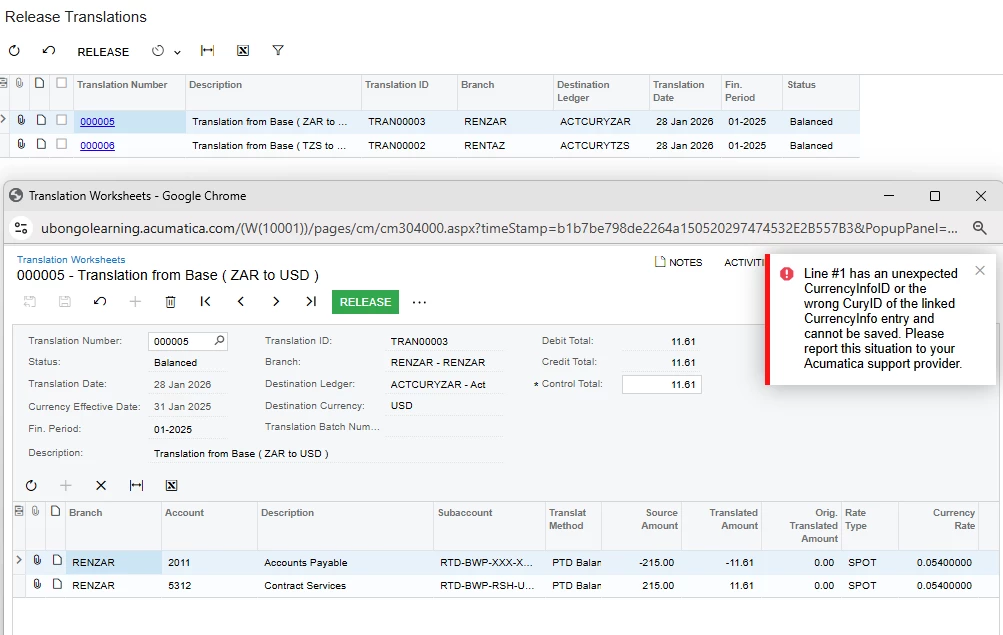
I have received this error with currency translation worksheets :
Line #1 has an unexpected CurrencyInfoID or the wrong CuryID of the linked CurrencyInfo entry and cannot be saved. Please report this situation to your Acumatica support provider.
I have received this error with currency translation worksheets :
Line #1 has an unexpected CurrencyInfoID or the wrong CuryID of the linked CurrencyInfo entry and cannot be saved. Please report this situation to your Acumatica support provider.
Best answer by VaheGhazaryan
This error means that one or more lines in the Translation Worksheet are linked to an incorrect CurrencyInfo record (the CuryID in CurrencyInfo does not match the document currency).
This usually happens if the worksheet was partially created, modified after creation, or affected by a customization/import that reused or manually set CurrencyInfoID.
You may want to try deleting the Translation Worksheet and recreating it from the Translation Definition, as this often resolves issues caused by an inconsistent CurrencyInfo.
If the issue persists, you could also check whether any customizations or imports interact with currency-related fields (CuryID, CurrencyInfoID).
Enter your E-mail address. We'll send you an e-mail with instructions to reset your password.