

Question

Control account module on chart of accounts

  • October 26, 2026
  • 3 replies
  • 19 views
  • Translate All

Forum|alt.badge.img

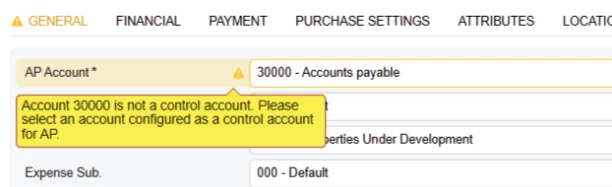
When setting up vendors we use 30000 as the Ap Account however have been getting this warning. We have had this account be the AP account for vendors since set up 4 years ago - will it effect anything (reports etc) if we set the control account module to ‘AP’ for this account in order to get rid of the warning? or should we just leave it blank as is and just ignore the warning

3 replies

mblassingame35
Pro III
Forum|alt.badge.img+6

It will not hurt anything to change the account to a control account for AP. I would suggest you set all of your control accounts so you don’t run into any issues with transactions being made to control accounts through GL. 

Translate

Laura03
Captain II
Forum|alt.badge.img+20
  • Captain II
  • October 26, 2026

Hello ​@Garbhanm4 ,

I agree with above poster.  You want to identify account 30000 as the AP Control and Do Not Check the box to “Allow Manual Entry”.  This combination of two settings will prohibit posting to account 30000 via GL, and will cause your AP Aging report to consistently balance to the GL: making month end reconciliation easy!  

Best regards,


Laura

Translate

Forum|alt.badge.img

Hi ​@Garbhanm4 

If an account is set to AP but is not configured as a control account, the system will display the warning message: "Account is not a control account."

This warning indicates that a control account is expected for the selected subledger. It is recommended to either select a different account that is configured as a control account or to configure account as a control account to avoid discrepancies between the general ledger and subledger balances. 

Translate


