


Question

Cannot export batch ACH payment

  • October 13, 2026
  • 2 replies
  • 29 views
  • Translate All

xkylewrightx
Semi-Pro I
Forum|alt.badge.img+1

Hello-

On 2025R2 we are encountering the same issue as the known issue linked below.


After the payment is prepared under Prepare Payments screen (AP503000), Batch Payments (AP305000) fails to export with the following error:
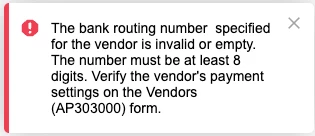

The batch is for 1 vendor, and both the Vendor record and the Bills on the batch are configured for the same payment method:

  • Settings for use in AP > Export Scenario = Export AP Payment to ACH Balanced v2
  • Settings for use in AP > Payment Method Details capture the beneficiary name, account, and routing number with default validation but no masks. 
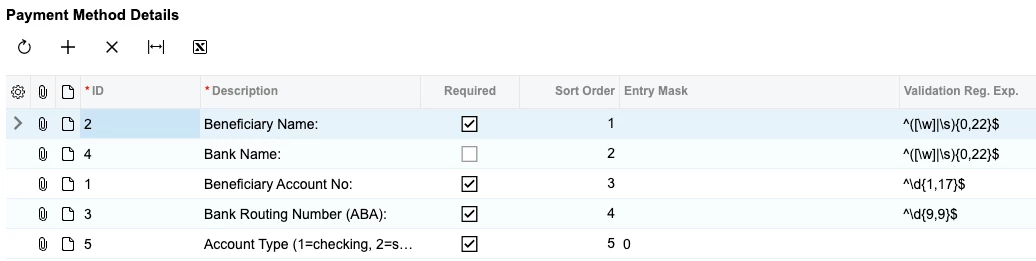
 

The routing number configured under the vendor is confirmed to be 9 digits and accurate.

This error persists when attempting to export a payment for a different vendor & bill. 

Any help appreciated, TYVM!!

2 replies

Steve Milner
Varsity III
Forum|alt.badge.img+4

@xkylewrightx the known issue you linked says this message can come from the cash account's remittance details, not only the vendor's. Since 2022 R1 a check runs before the export and names the empty field, but it only covers rows that exist on the payment method and are marked Required. Your vendor rows 1, 2 and 3 are Required, so a blank vendor routing number would have stopped at that check with a "payment instruction is empty" message. You got the old one, which points at the cash account side. Your error also has nothing between "routing number" and "specified", and that gap is where the message prints the value it read.

Export AP Payment to ACH Balanced v2 reads the cash account's remittance details by ID, not description: 3 is your bank's routing number, 7 is the offset routing number for the balancing entry, 8 is the offset account. The plain ACH v2 scenario never reads 7 or 8. I reproduced your exact message on 2026 R1 with a valid 9-digit vendor routing number by running Balanced v2 against a cash account that has IDs 1 to 6 and no 7.

Open Payment Methods (CA204000), Remittance Settings tab, and make sure 7 and 8 exist and are Required. Then on Cash Accounts (CA202000), Remittance Settings tab, pick this payment method and fill them in.

Translate

xkylewrightx
Semi-Pro I
Forum|alt.badge.img+1

@xkylewrightx the known issue you linked says this message can come from the cash account's remittance details, not only the vendor's. Since 2022 R1 a check runs before the export and names the empty field, but it only covers rows that exist on the payment method and are marked Required. Your vendor rows 1, 2 and 3 are Required, so a blank vendor routing number would have stopped at that check with a "payment instruction is empty" message. You got the old one, which points at the cash account side. Your error also has nothing between "routing number" and "specified", and that gap is where the message prints the value it read.

Export AP Payment to ACH Balanced v2 reads the cash account's remittance details by ID, not description: 3 is your bank's routing number, 7 is the offset routing number for the balancing entry, 8 is the offset account. The plain ACH v2 scenario never reads 7 or 8. I reproduced your exact message on 2026 R1 with a valid 9-digit vendor routing number by running Balanced v2 against a cash account that has IDs 1 to 6 and no 7.

Open Payment Methods (CA204000), Remittance Settings tab, and make sure 7 and 8 exist and are Required. Then on Cash Accounts (CA202000), Remittance Settings tab, pick this payment method and fill them in.


Thank you Steve I really appreciate it.
Fortunately we got it working, unfortunately I do not know what the problem was.


The remittance settings on both the Payment Method and the Cash Account were already configured and did not change. The only thing i know of that changed between it not working and working is that I toggled ‘required’ on Account Type field under Payment Method Details, but now it still works in either state.

Seems like a bug at this point not a config issue, but I will keep looking as I hate to have a post without a solution

Translate