Solved

Can you add % of Sales column to a P&L financial statement?

  • February 22, 2023
  • 11 replies
  • 351 views

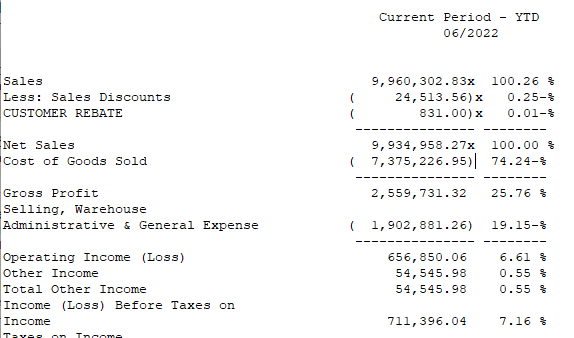
I’m trying to add a column to my customer’s P&L that will show the % of Sales for each row on the report (e.g., Sales = 100.0%, COGS = 36.2%, etc.). I can add calculations between columns (e.g., (F-E)/E), but not within the same column. Is this possible with the standard financial reports?

Best answer by Laura03

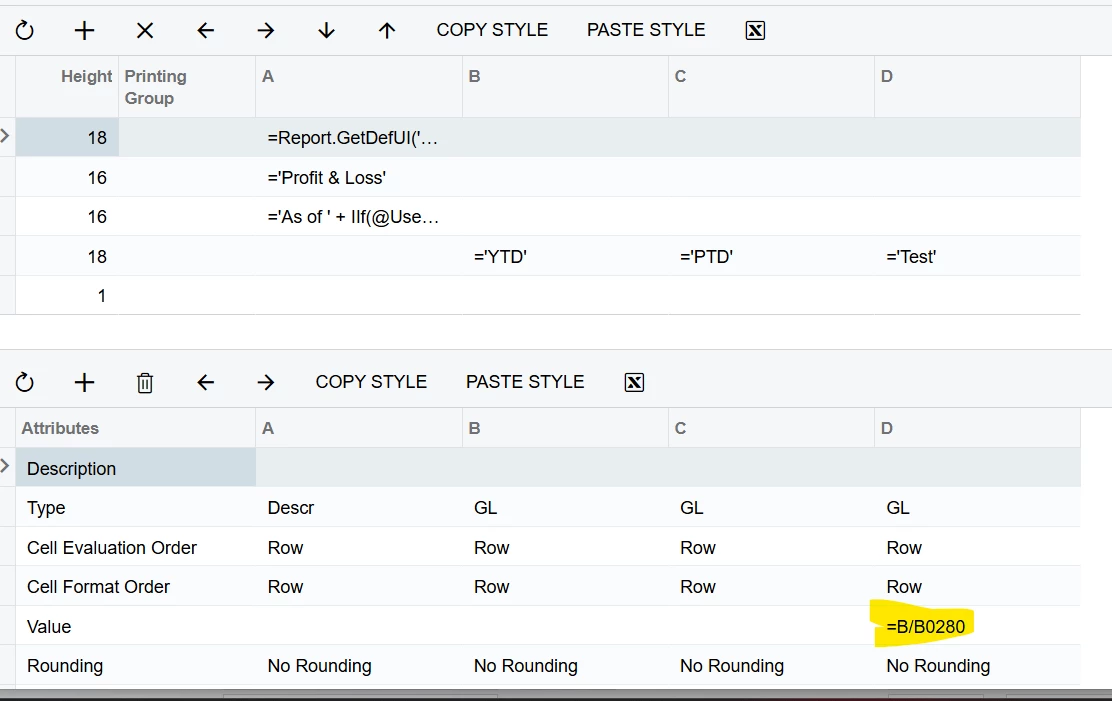
Yes, we can have the % in a separate column.  Add a column to the Column set with the calculation for % of sales. The calculation will be something like this: =B/B01260  (using my own total revenue row number as the denominator in the example).

11 replies

Laura03
Captain II
Forum|alt.badge.img+20
  • Captain II
  • February 22, 2023

Hello @JerryMonahan ,

We can have % of sales in its own column, as you noted, or we can configure % of sales in its own Row.

Here is an example where the COGS as % of sales is in a separate row (same column as the total COGS). In this calculation, “100% of sales” is in row @01260.


The result looks like:

% of revenue in its own column is faster to configure. Calculating row by row requires multiple line configurations.


  • Author
  • Freshman I
  • February 22, 2023

Thanks, this cusotmer is really looking for a separate column so each row will display the % of sales as shown below. Is that possible?


Laura03
Captain II
Forum|alt.badge.img+20
  • Captain II
  • Answer
  • February 22, 2023

Yes, we can have the % in a separate column.  Add a column to the Column set with the calculation for % of sales. The calculation will be something like this: =B/B01260  (using my own total revenue row number as the denominator in the example).


  • Author
  • Freshman I
  • February 22, 2023

Thanks!


jyounes
Jr Varsity II
Forum|alt.badge.img+1
  • Jr Varsity II
  • September 4, 2026

Was this able to work for you?

I’m currently on 2025R2 and not able to get this to work with the provided answer =B/B01260 (=Column/Row set code #).


  • Author
  • Freshman I
  • September 4, 2026

We are also in 25R2, and the formula I use is =B/B0115 and it works great. However, we are still running in the Classic UI. With the changes to Modern UI, I’d imagine this may change a bit. I have not had a need to address that as of yet.


Laura03
Captain II
Forum|alt.badge.img+20
  • Captain II
  • September 4, 2026

Was this able to work for you?

I’m currently on 2025R2 and not able to get this to work with the provided answer =B/B01260 (=Column/Row set code #).

Hello JYounes, what is “not working”?  It’s helpful to know if you are seeing incorrect $ figures, an error message, blank …


Laura


jyounes
Jr Varsity II
Forum|alt.badge.img+1
  • Jr Varsity II
  • September 4, 2026

Im still on the Classic UI as well.  Do I have the formula in the correct spot?


jyounes
Jr Varsity II
Forum|alt.badge.img+1
  • Jr Varsity II
  • September 4, 2026

Was this able to work for you?

I’m currently on 2025R2 and not able to get this to work with the provided answer =B/B01260 (=Column/Row set code #).

Hello JYounes, what is “not working”?  It’s helpful to know if you are seeing incorrect $ figures, an error message, blank …


Laura

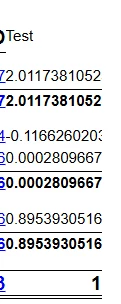
The value its returning is Zero.


Laura03
Captain II
Forum|alt.badge.img+20
  • Captain II
  • September 4, 2026

Thank you!  Try changing Row type from GL to Calc. and let us know.

Laura


jyounes
Jr Varsity II
Forum|alt.badge.img+1
  • Jr Varsity II
  • September 4, 2026

Thank you!  Try changing Row type from GL to Calc. and let us know.

Laura

That looks like it worked, need to format it now,


Thanks,