Question

Best practice for automating Bank Reconciliation release (CA302000) with a business event?

  • October 19, 2026
  • 4 replies
  • 36 views
  • Translate All

Hi everyone,

We want your input on automating the release of bank reconciliations in Acumatica, or your reasons for keeping this step manual.

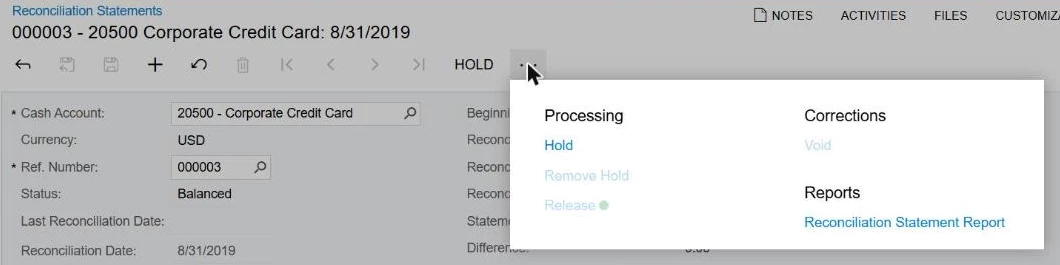
We set up a business event to trigger when a reconciliation status changes to Balanced. The event calls an import scenario on CA302000. The scenario searches the record by Cash Account and Reference Number, confirms the popup dialog, saves, and runs Release.

After go-live, our team hit two issues. The Release action became disabled on some reconciliations. The Delete action stopped working. Acumatica Support advised us to deactivate the business event, and we did. 

Before our next step, we would value your experience on these points:

  1. Have you seen Release become disabled and Delete stop working on CA302000 after a business event or import scenario ran on the record? If yes, what caused the problem and how did you clear the record?
  2. Do you recommend automating bank reconciliation release? Or does your team keep release as a manual review and sign-off step?
  3. If you automated release, what trigger condition do you use? Our Balanced trigger seems to fire before the reviewer is ready to release. Does an approval step, a Difference = 0.00 check, or a custom “Ready to Release” checkbox work better?
  4. What is the safest import scenario mapping for CA302000? How do you handle the two-key lookup on CashAccountID and ReconNbr? Do you avoid cancel steps and automatic dialog confirmations (?? = ‘OK’)?
  5. Have you built a lower-risk alternative? Examples include a business event to send an email when a statement reaches Balanced, or a dashboard listing unreleased reconciliations.

We run 2025 R1 across multiple cash accounts. Working configuration examples, screenshots, or reasons you chose not to automate would help us a lot.

4 replies

willhowardnz
Freshman I

Hii ​@AKR2025 ,


I’m an implementer, not an end user, but my question is:
What audit process is your business using for their bank reconciliations if you’re automating the release of the reconciliations?


Reconciling bank accounts is partially an anti-fraud measure, since you’re veriifying that transactions match what was processed through your actual bank.  They’re a step I’d be really cautious about automating.

Adding a GI/Widget to a dashboard to remind whoever has to sign off the reconciliation that there’s one waiting would be my recommendation, rather than trying to fully automate the process via business event, just because it means someone is actually looking at the process to approve it.

Translate

  • Author
  • Jr Varsity II
  • October 20, 2026

Hi ​@willhowardnz 


Thank you for sharing your perspective, and you have made a very valid point.

Our actual reconciliation preparation, clearing of checks/deposits, and matching against bank records is already fully manual and verified by our accounting team. In addition, we have a multi-tier approval map configured where both our Accounting Manager and VP of Finance review and approve the reconciliation before it reaches Balanced status.

The intention behind the business event was never to bypass that manual review or verification. It was only meant to handle the final button click after all human checks and approvals were already stamped.


Translate

Steve Milner
Varsity III
Forum|alt.badge.img+6

@AKR2025 I rebuilt your setup on a 2025 R1 tenant using the scenario in your CA302000-CAReconBE.xml, and it locked the statement on the first run.

The scenario's Release does release the statement. The save that should then move it to Closed fails, and the business event's history logs it: "0 records of 1 have been processed. The last error was Another process has updated the 'CARecon' record. Your changes will be lost." That leaves a released statement still showing Balanced. In that state the form turns off Release and Delete, and Void only shows up once a statement is Closed, so there's no way out from the screen. Ask Support to set the affected statements to Closed, since the release itself already went through.

To find them, put CARecon in a quick GI with Status and Reconciled. The stuck ones show Balanced with Reconciled checked.

Your two-key lookup is fine. It found the right statement. You can drop the ?? = 'OK' line, though. Release doesn't raise a dialog, and the only confirmation in that screen's code is Void's.

Your trigger is fine too. With the approval map on, a statement only reaches Balanced on the final Approve.

I'd keep the last click manual for now. Point the same business event at an email subscriber, or use the dashboard widget @willhowardnz suggested. Don't plan on releasing from the GI either. Release on CA302000 throws a cast error when it runs as a mass action.

Translate

  • Author
  • Jr Varsity II
  • October 20, 2026

Hi ​@Steve Milner 

Thank you so much for taking the time to rebuild this in a 2025 R1 tenant and for providing such an exact diagnosis of that background race condition error. Your breakdown of why the screen deadlocked and why the mass-action cast error occurs was incredibly helpful.


We took your recommendation and pivoted entirely to a safe, low-risk workflow. We permanently deactivated the automated execution scenario, and instead pointed the business event to an email subscriber template to notify our controller when statements reach a finalized Balanced status.

Translate