

Answer

ARM Report Column Calculation not applying to Total Rows

  • June 18, 2021
  • 5 replies
  • 676 views

Forum|alt.badge.img

We have a P&L report in Acumatica where we have a column that calculates the percent of budget used. This column works for all lines except totals that add/subtract more than one line. The only reason I could suspect this is happening is because the system runs the line calculation after the column? I’m not entirely sure. I have tried creating an additional line that points at the total line but unfortunately it still does not calculate. Any thoughts? 

Best answer by Laura03

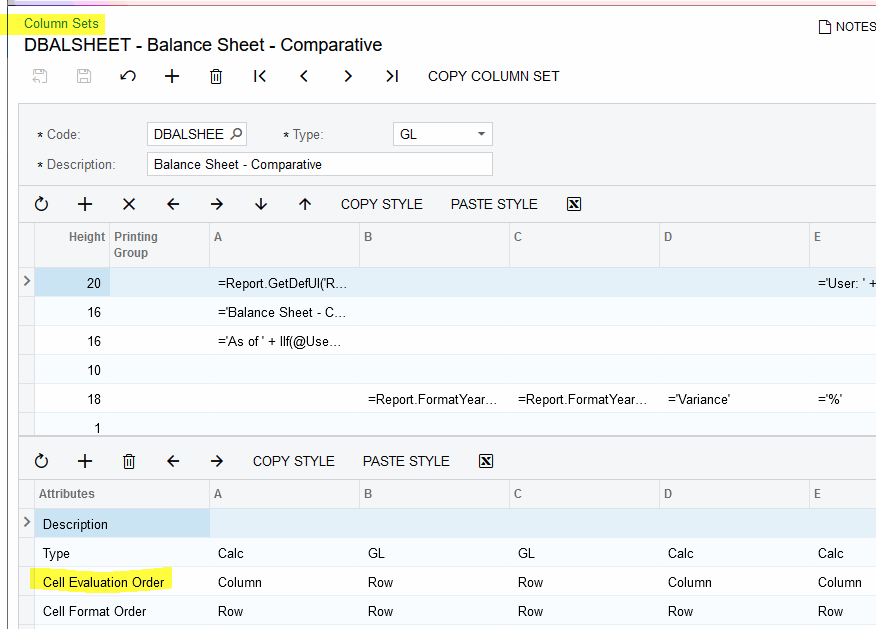
Hello, Try changing the Cell Evaluation order in the Column Set for your report.
 

5 replies

Forum|alt.badge.img
  • Freshman II
  • July 31, 2022

Hi Acumatica,

Hope this concern has an answer. I am having issues computing percentage if the row is set as total.. 

Thank you..


Laura03
Captain II
Forum|alt.badge.img+19
  • Captain II
  • Answer
  • August 2, 2022

Hello, Try changing the Cell Evaluation order in the Column Set for your report.


Forum|alt.badge.img
  • Freshman II
  • August 2, 2022

Thank you Miss Laura.


Forum|alt.badge.img

Thanks for the answer! Its honestly been so long, I don’t remember what we did to resolve that issue. We probably found a workaround or just went about it a different way. Good to know there is an answer out there!


Forum|alt.badge.img

Hi, I tried the solution from Laura01 but I am getting an error message. There is nothing in the Trace to help me. I have this formula in the column value: =iif(B=0,0,B/Value(@BaseRowCode, 'B')).    Has anyone used the Cell evaluation order = Column with the @baserowcode? Thanks,

