


In the initial set-up of Acumatica and Vendor Classes, a cash account was entered in the “Default Financial Settings” for each class. Now, we are using a new cash account to pay vendors. We have removed the default cash account in all classes so feel new Vendors added will not have a default cash account. We were able to mass update the cash account for all open AP bills using GI. We would now like to update all Vendor records either by removing the old cash account default (i.e. default cash account would be blank) or the new cash account. We tried using GI, adding the “location” data to the Vendor record but were unsuccessful in creating the needed relations to accomplish the mass update. Any and all help to get this update completed as a mass update is appreciated.
Solved
AP Vendor Cash Account update
Best answer by Laura03
Hello,
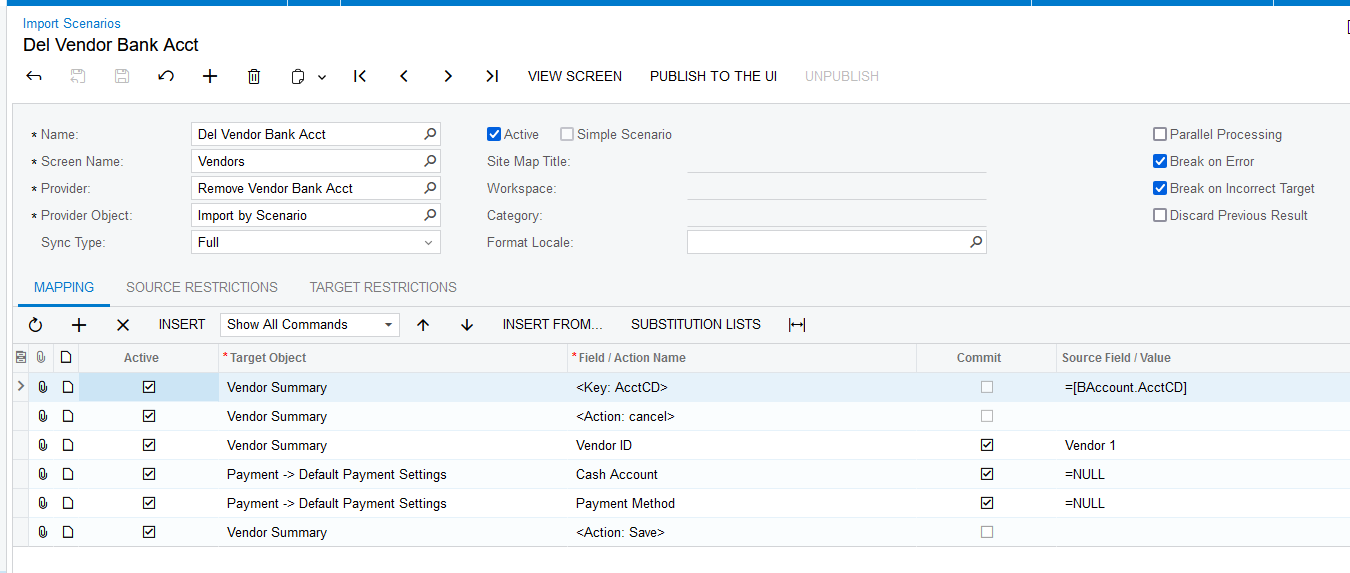
Import Scenarios can be used to remove the Default Bank Account from Vendors. This simple example uses an Excel sheet with one column labeled “Vendor 1” that contains vendor ID’s:
Laura



Enter your E-mail address. We'll send you an e-mail with instructions to reset your password.