Solved

AP Debit adjustment Apply not including original document

  • April 7, 2025
  • 6 replies
  • 248 views
  • Translate All

Forum|alt.badge.img

Hi,


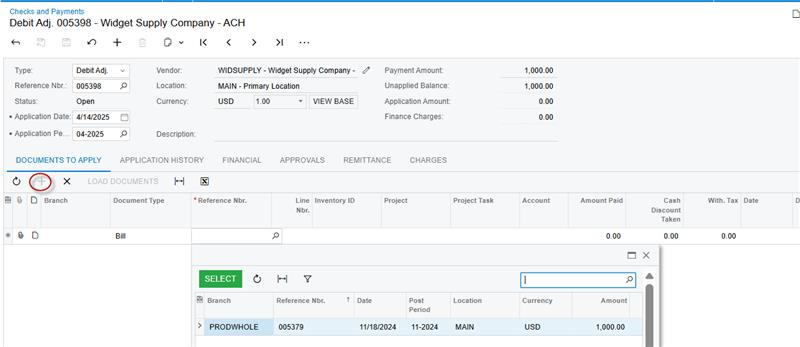
A client has several AP invoices that need to be reversed. Reversing a bill to create a debit adjustment record works fine and links the original document to the new debit record however when clicking apply on the debit adjustment record, the resulting payment record only shows the debit adjustment line to apply by default. Is there any way that the corresponding invoice get added as a line automatically as well via some sort of setup?


Regards,


Andrew

Best answer by Ankita Tayana

Hi ​@asnell64.

Thanks for your clarification!

You can vote for this idea posted in community as this can be a upcoming feature in Acumatica future versions.

https://community.acumatica.com/ideas/bills-when-reversed-and-still-open-should-be-auto-applied-to-the-reversing-document-2598

View original

6 replies

valentynbeznosiuk
Varsity I
Forum|alt.badge.img+5

Hi ​@asnell64 ,

Could you please clarify, and if possible provide some screenshots to better describe your question?

Translate

ricoybanez
Jr Varsity III
Forum|alt.badge.img+5
  • Jr Varsity III
  • April 13, 2025

​@asnell64 

Please check the video process for Debit Memo Application. The last part of the process is the selection of the the Invoice to where this Debit memo be applied.

Debit Memo Application (Accounts Payable)

Translate

Forum|alt.badge.img+6

Hi ​@asnell64,

Need more clarification, a screenshot will help to understand better.

If you are referring that AP Invoice has been reversed and a debit memo is created but once you click on apply it will navigate to Checks & Payments screen where in grid you can select the particular Invoice which is reversed and click save and release. In case you are not finding that particular invoice the possible reason may be it's payment has been created. Please check the application history of invoice and reverse application/void that payment first and then you can find that bill to be applied to newly created debit memo.


Hope this helps!

Translate

Forum|alt.badge.img
  • Author
  • Freshman II
  • April 14, 2025

Hi everyone, 


My issue is not that I can’t find the invoice line, I’m asking if that can be done automatically with setup so all I have to do is press save after clicking Apply on the generated payments screen. After all, the debit is already linked to the invoice when you reverse, why wouldn't it automatically add both lines on apply by default?

Translate

valentynbeznosiuk
Varsity I
Forum|alt.badge.img+5

​@asnell64 

Making the Bill to be added there automatically will require a minor customization.

Translate

Forum|alt.badge.img+6

Hi ​@asnell64.

Thanks for your clarification!

You can vote for this idea posted in community as this can be a upcoming feature in Acumatica future versions.

https://community.acumatica.com/ideas/bills-when-reversed-and-still-open-should-be-auto-applied-to-the-reversing-document-2598

Translate