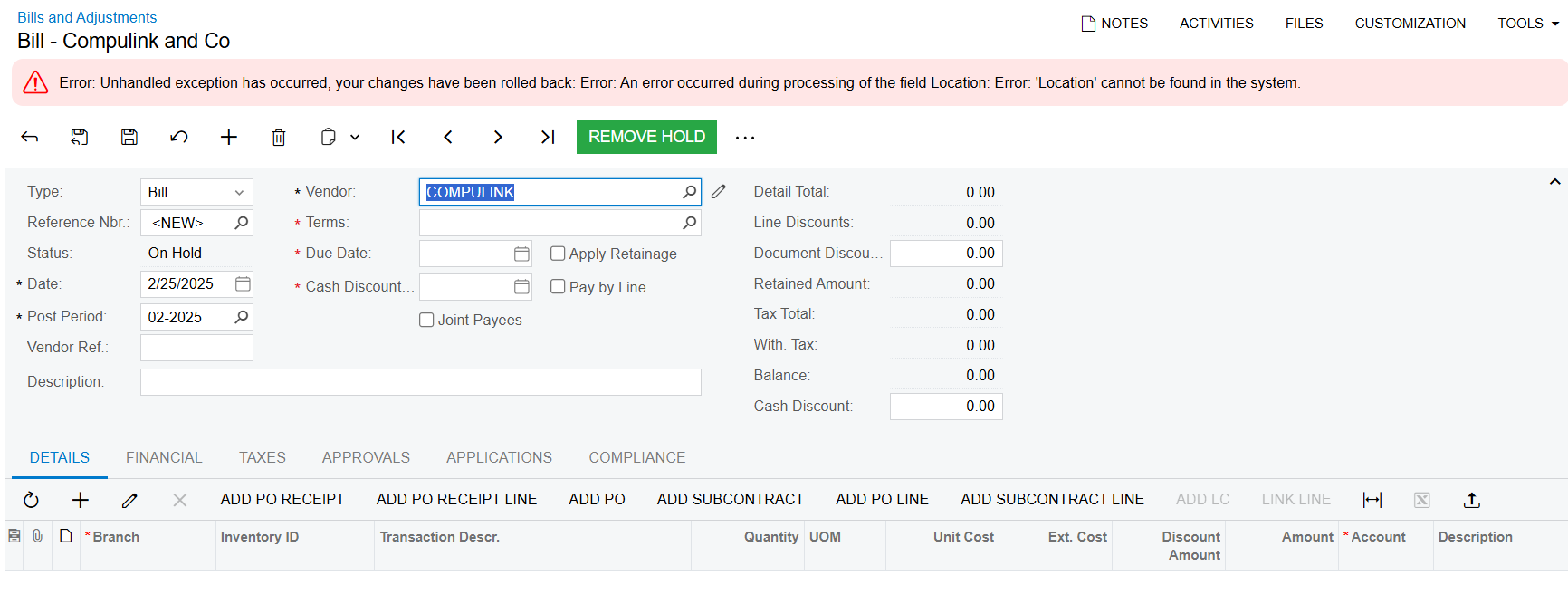
Answer

AP

  • February 25, 2025
  • 3 replies
  • 60 views

Forum|alt.badge.img

Please kindly advise about error case. Thanks so much 

Best answer by AmaanFazeer11

Hello ​@nthea23 

1.Check if the location specified for the Vendor is specified and configured in the “Vendor Locations” screen

2.Is this issue only for a specific Vendor?

3.Could be a data corruption issue

Hope this helps

Regards,

Amaan

3 replies

Forum|alt.badge.img+2
  • Acumatica Employee
  • Answer
  • February 25, 2025

Hello ​@nthea23 

1.Check if the location specified for the Vendor is specified and configured in the “Vendor Locations” screen

2.Is this issue only for a specific Vendor?

3.Could be a data corruption issue

Hope this helps

Regards,

Amaan


Manikanta Dhulipudi
Captain II
Forum|alt.badge.img+15

@nthea23 Does the vendor has locaiton and active?


hdussa
Jr Varsity I
Forum|alt.badge.img+1
  • Jr Varsity I
  • February 26, 2025

Hello ​@nthea23 ,


The bills screen has Location field below the Vendor field and it is missing in the screenshot. Assuming you customized the screen, ensure the Vendor Location field has value before saving the bill document.


Hope this helps!