Answer

All deposits not appearing

  • October 13, 2022
  • 4 replies
  • 148 views

Forum|alt.badge.img

Is there a known issue for all bank deposits not appearing.  I have 200+ ach transactions valued at $200,000 for deposit but only 172 for $160,000 are showing up.  What would be the reason for all transactions not showing up on the deposit?

Best answer by Laura03

Hello,

It’s possible to look up known issues if we know the Acumatica version and the name of the screen.

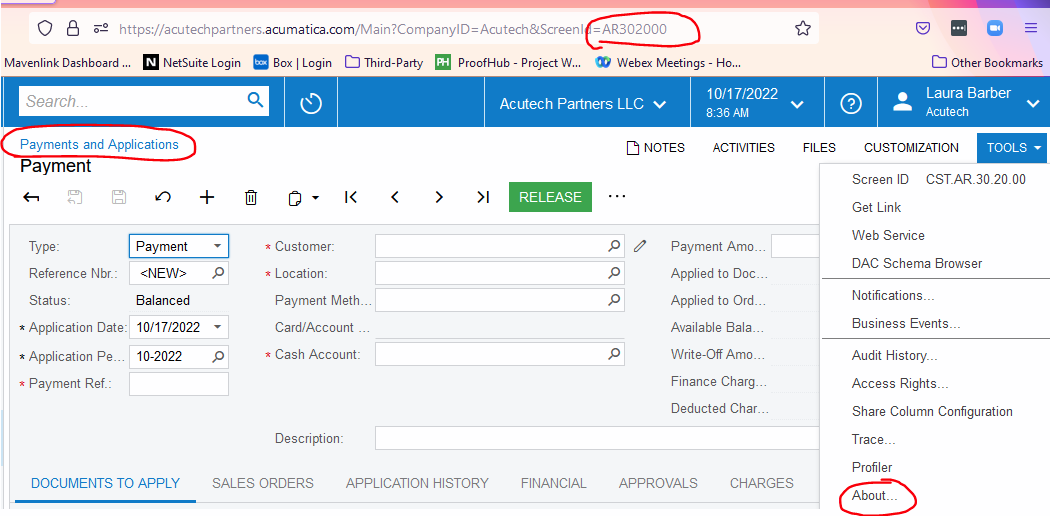
What is your version?  In what screen are you selecting the payments that need to be processed?    Screen shots are always helpful as they help us identify the screen and whether the screen is standard or customized. Below is an example showing where to find the screen name and number.

Aside from known bugs, does the behavior change if you try a second browser, a different device, or clear out browser cache?  Sometimes when we see odd behavior, it goes away when we use a different browser or clear cache (erase browsing history). A true bug would happen in any browser, for all users, and even after clearing cache.

 

4 replies

Laura03
Captain II
Forum|alt.badge.img+19
  • Captain II
  • October 13, 2022

Hello,

Are we discussing the Banking → Deposits screen?

  1. Maybe all deposits are not released yet?
  1. Is it possible the transactions have rolled to a second page?  See whether the Paging buttons are active in the lower right, and if so, whether you can advance with > to see the rest of your transactions.

If I’ve guessed wrong, please provide screen shots. Thank you.


Forum|alt.badge.img
  • Author
  • Freshman I
  • October 13, 2022

Let me change the question:  When trying to select the payments that need to be processed, I clicked select all but when I went to the second page those transactions weren’t selected if I clicked them and went back to the first page those were deselected.  I was able to eventually able to get both pages selected and saved but is this a known issue.  Why would this happen when using the select all option?


Laura03
Captain II
Forum|alt.badge.img+19
  • Captain II
  • Answer
  • October 13, 2022

Hello,

It’s possible to look up known issues if we know the Acumatica version and the name of the screen.

What is your version?  In what screen are you selecting the payments that need to be processed?    Screen shots are always helpful as they help us identify the screen and whether the screen is standard or customized. Below is an example showing where to find the screen name and number.

Aside from known bugs, does the behavior change if you try a second browser, a different device, or clear out browser cache?  Sometimes when we see odd behavior, it goes away when we use a different browser or clear cache (erase browsing history). A true bug would happen in any browser, for all users, and even after clearing cache.



Laura03
Captain II
Forum|alt.badge.img+19
  • Captain II
  • October 17, 2022

Hello,

I’m sorry, I promised a screen shot and then didn’t post one.  Here is a screen shot showing where to find the Name and Number of an Acumatica screen, as well as your version.

Did you have the same results in a second browser, and/or after clearing browser cache?  Thank you.