Question

2026 R1: sub-report parameter [@QuoteNbr] is empty when the report is launched from a screen action

  • Oct 21, 2026 6:29 PM UTC
  • 3 replies
  • 47 views
  • Translate All

After upgrading to 2026 R1, the Print action on Project Quotes (PM304500) fails for a customized report (PM604500, 16 sub-reports). The same .rpx files work in a 2025 R2 tenant, and the report also works in 2026 R1 when I run it from the Reports screen with the same quote number.

Trace: Cannot perform the '=' operation on System.Int32 and System.String at textBox13 in groupFooterSection12.

Cause I found: textBox13 is hidden/shown with =$Discipline ='Stone'. $Discipline comes from the sub-report pmdiscipline.rpx ([InventoryItem.ItemClassID_description]), which is filtered by @QuoteNbr. When the report is launched from the Print action, that sub-report returns no rows, so $Discipline stays at the integer 0 and the comparison fails.

Workaround: in the main report I changed the sub-report parameter from the report parameter to the record field:


Before: <ValueExpr>=[@QuoteNbr]</ValueExpr>

After: <ValueExpr>=[PMQuote.QuoteNbr]</ValueExpr>

With that change the report prints correctly from the Print action in 2026 R1.

Questions:

  1. Did 2026 R1 change how report parameters (such as QuoteNbr) are passed to sub-reports when a report is launched from a screen action (PXReportRequiredException)?
  2. Is there a release note or documentation for this? I could not find one.
  3. Is binding to the record field the recommended approach going forward?

Environment: 2025 R2 (works) vs 2026 R1 build 26.101.0225, Modern UI.

Thanks!

3 replies

Steve Milner
Varsity III
Forum|alt.badge.img+8
  • Varsity III
  • Oct 21, 2026 7:23 PM UTC

@mhkhan, your fix is the right one, and it's the binding I'd keep going forward.

It isn't the sub-report hand-off. In 26.101 the main report's own @QuoteNbr is blank when you come in from Print. PMQuoteMaint.PrintQuote passes the quote as a single key, PMQuote.QuoteNbr. The report loader only fills a parameter when a key matches its name exactly, so QuoteNbr gets nothing. The PMQuote.QuoteNbr key becomes a filter on the main report instead, and the report's own PMQuote.QuoteNbr = @QuoteNbr filter is switched off. The quote prints, and every sub-report fed from [@QuoteNbr] gets a blank. From the Reports screen you type the number into the parameter, which is why it works there.

I couldn't find a release note either, and I can't confirm whether the 25 R2 Print action sent the bare QuoteNbr key. Binding to the record field is the long-standing answer for this pattern. It came up in 2021 with Print Pick List from Shipments and was fixed the same way, with [SOShipment.ShipmentNbr]:
https://community.acumatica.com/reports-and-generic-inquires-115/subreport-for-kits-only-sometimes-is-being-passed-to-pick-list-6448

Send passes the same PMQuote.QuoteNbr key, so emailed quotes have the same gap. Any of your other 15 sub-reports bound to [@QuoteNbr] also gets a blank quote number from Print, just without an error like the one $Discipline raises. Switch all of them to [PMQuote.QuoteNbr].

Translate

  • Author
  • Freshman I
  • Nov 23, 2026 10:00 PM UTC

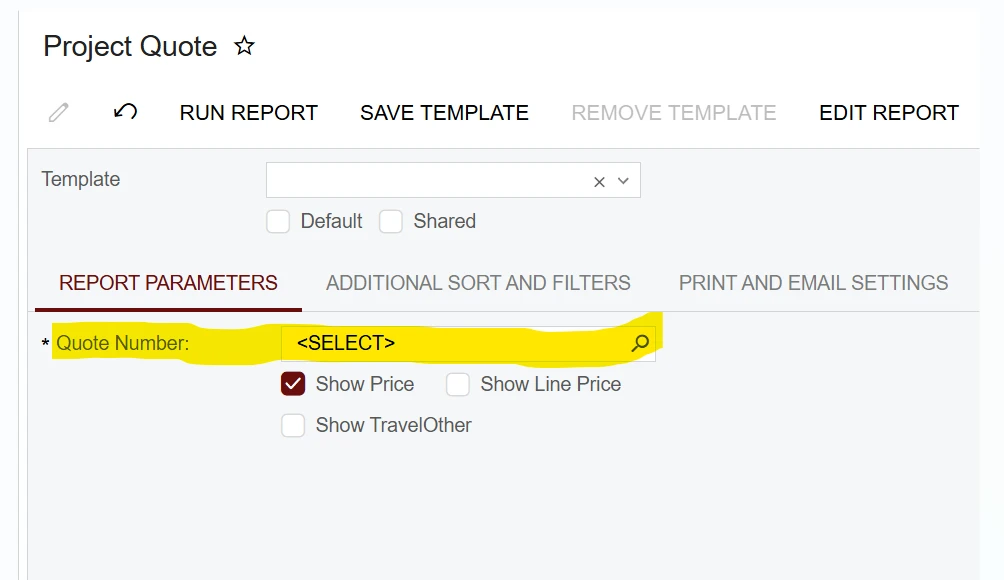
I have one follow-up about the Quote Number field on the report screen.

In 2026 R1, when I open a project quote on PM304500 and click the existing Print button, the Quote Number field on PM604500 still shows <SELECT>. I tried setting the QuoteNbr parameter’s Default Value to =[PMQuote.QuoteNbr] in Report Designer, but the field still doesn’t show the current quote number.

I already have a C# solution that fills it in. Is there a no-code way to make the existing Print button populate that field with the current quote number,


Translate

KrunalDoshi
Pro II
Forum|alt.badge.img+9

Hi ​@mhkhan ,

Existing Print button on Project Quote screen should automatically load the QuoteNbr when you click on it and directly run the quote report. Unless there is any customization for that screen or the report is itself customized. As a troubleshoot, unpublish any customization and run the report from out of box. This should not matter but I would also remove all the default templates from the report settings.

Hope this helps!

Translate