Solved

What causes inventory items to auto "mark for PO" on appointment?

  • February 24, 2026
  • 4 replies
  • 72 views

I am probably missing something simple here, but we are struggling with inventory items be auto marked for PO on appointments when when the tech has the item along and there is plenty of inventory available. Only some items do this. Is there a setting in the inventory Item that is affecting this?

 

Best answer by thinkinkllc

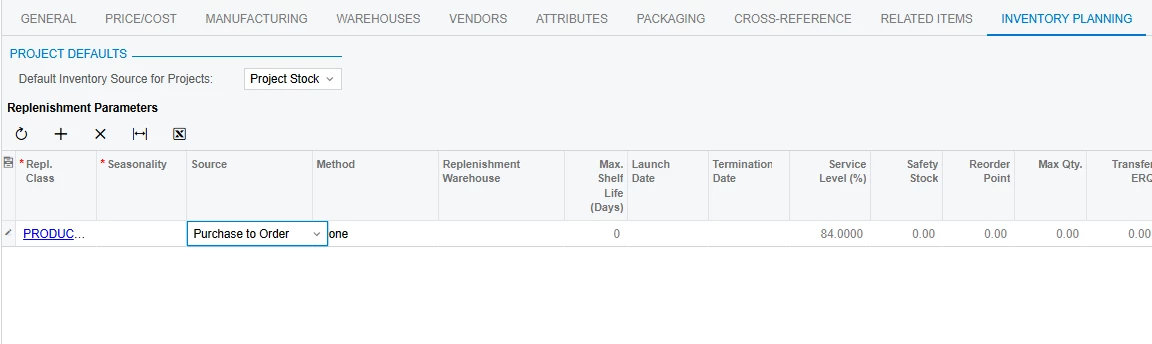
Thank you. I did not have any Inventory Planning set, but when I add a replenishment and set source to none, it doesnt auto check it anymore.

4 replies

dcomerford
Captain II
Forum|alt.badge.img+16
  • Captain II
  • February 24, 2026

Check the Inventory Planning settings on the the Item are they set to Purchase to Order 


  • Author
  • Freshman II
  • Answer
  • February 27, 2026

Thank you. I did not have any Inventory Planning set, but when I add a replenishment and set source to none, it doesnt auto check it anymore.


  • Freshman II
  • March 10, 2026

Hi ​@thinkinkllc,

Since you are facing this issue only for some items, it may be because they belong to different Item Classes with different Availability Calculation Rules. Please review this in (IN201500) and let me know if that resolves the issue.


  • Author
  • Freshman II
  • March 16, 2026

I was not able to consistently duplicate the same issue, we ended up changing the way we process service orders a bit so this isnt an issue anymore