Answer

SIGNED APPOINTMENT

  • April 2, 2025
  • 3 replies
  • 104 views

Forum|alt.badge.img

Is there a way to move just the signature from the original appointment over to the edited version one once we have made our updates/changes to it?

Best answer by vdiaz

Hi ​@CAMORRISON !

For privacy and security reasons, it's not possible to move or modify the original signature file in any way. This is to ensure the integrity of the signed record — once a signature is captured, it's sort of encripted into the PDF file attached to the appointment it was collected on. Allowing edits or transfers could compromise the authenticity of the signature, which is why the system is designed to keep it locked to its original context.


3 replies

vdiaz
Acumatica Moderator
Forum|alt.badge.img+2
  • Acumatica Moderator
  • Answer
  • April 21, 2025

Hi ​@CAMORRISON !

For privacy and security reasons, it's not possible to move or modify the original signature file in any way. This is to ensure the integrity of the signed record — once a signature is captured, it's sort of encripted into the PDF file attached to the appointment it was collected on. Allowing edits or transfers could compromise the authenticity of the signature, which is why the system is designed to keep it locked to its original context.


sgaspar72
Jr Varsity II
Forum|alt.badge.img+1
  • Jr Varsity II
  • July 23, 2025

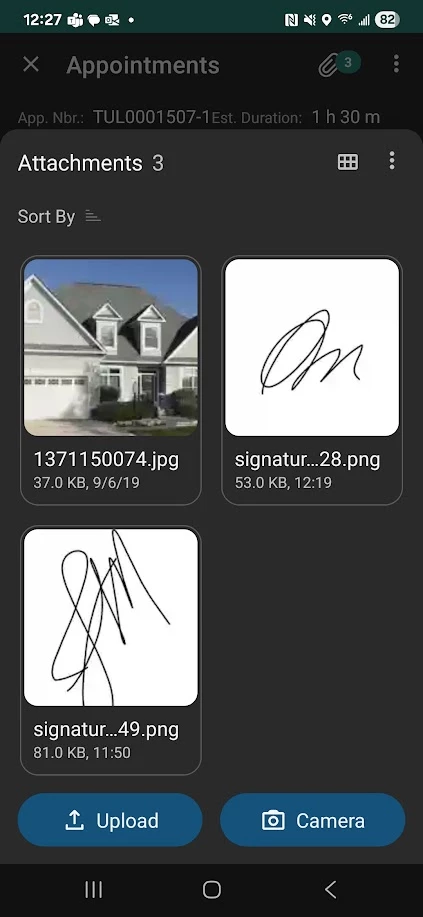
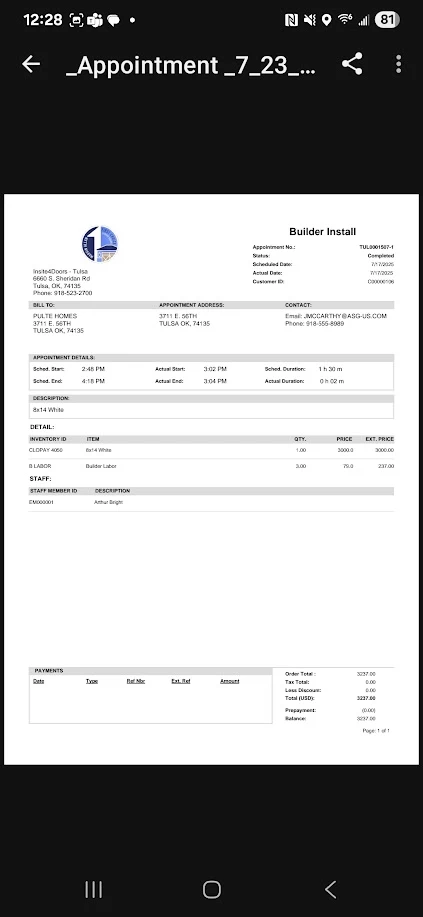
For some reason this is no longer the workflow since the update of the mobile app.  Originally (in previous revisions) Acumatica used to attach the signature as a PNG file to the appointment transaction. Then, for the reasons ​@vdiaz mentions above, it was automatically embedded in the PDF copy. Now, for some reason since the app has been updated, the signature simply attaches as a PNGs again, and the “Appointment Summery” document does not have a signature embedded. 

Was there a reason for the reversion back to the previous PNG attachments and removal of the signature from the generated form?


vdiaz
Acumatica Moderator
Forum|alt.badge.img+2
  • Acumatica Moderator
  • July 24, 2025

For some reason this is no longer the workflow since the update of the mobile app.  Originally (in previous revisions) Acumatica used to attach the signature as a PNG file to the appointment transaction. Then, for the reasons ​@vdiaz mentions above, it was automatically embedded in the PDF copy. Now, for some reason since the app has been updated, the signature simply attaches as a PNGs again, and the “Appointment Summary” document does not have a signature embedded. 

Was there a reason for the reversion back to the previous PNG attachments and removal of the signature from the generated form?

Hi ​@sgaspar72!

We haven’t made any changes to this functionality, so if it’s not working as intended it’s a bug.

Have you reported this issue to Acumatica support?