Question

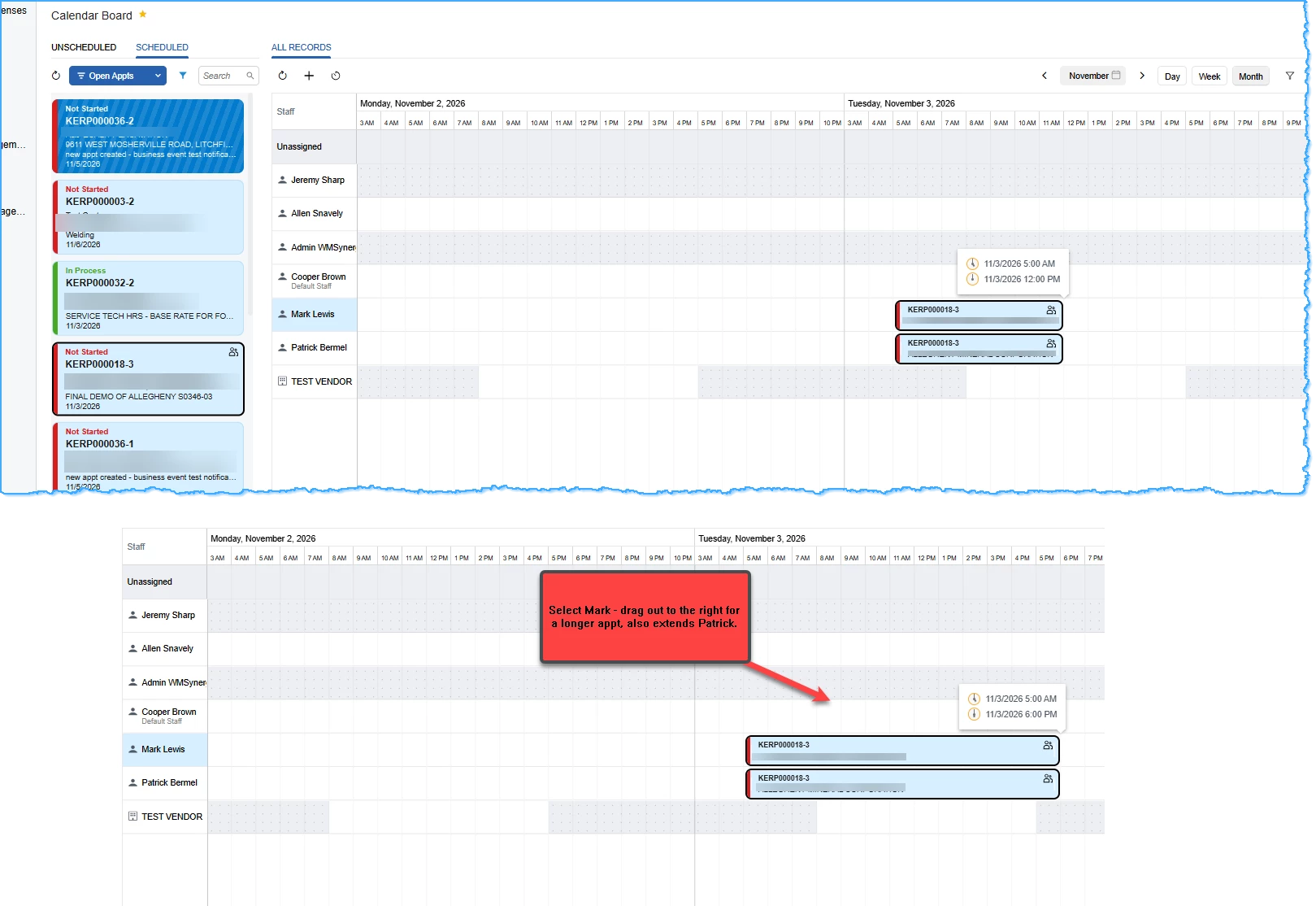
Service Calendar Board - Multiple Staff - different start/stop times

  • Nov 9, 2026 6:59 PM UTC
  • 2 replies
  • 20 views
  • Translate All

debbiereed72
Varsity II
Forum|alt.badge.img

Using the Calendar Board (Modern UI - 26R1) seems that if I want to change start/stop time of an appointment, it forces all techs to have the same start/stop.  How can I use the calendar board where each staff (tech) is managed individually?


2 replies

Steve Milner
Varsity III
Forum|alt.badge.img+7

@debbiereed72 The board can't split one appointment's times between techs. The scheduled start and end belong to the appointment, and the staff lines on it don't have scheduled times of their own. KERP000018-3 is one appointment with two staff assigned, so Mark's row and Patrick's row are both drawing the same appointment. Resizing either bar changes the appointment's scheduled start and end. Selecting Mark first doesn't change what gets updated.

To schedule each tech separately, give each one their own appointment on the service order. Right-click the tile and choose Clone, then leave one tech on each appointment and size them independently. Clone copies both techs and the service and item lines, so the same services end up on both appointments. Take the extra tech off each copy on the Staff tab and adjust the lines to what each tech is doing.

If the techs are on one job and only their actual hours differ, one appointment is fine. The Log tab keeps a separate start and end for each staff member.

Translate

debbiereed72
Varsity II
Forum|alt.badge.img
  • Author
  • Varsity II
  • Nov 10, 2026 5:34 PM UTC

Hi ​@Steve Milner - thank you for the suggestion.  I had considered separate appointments.  Seems this is the only way to manage it.

Translate