Solved

Is there a way to prevent the same technician from starting the same appointment that already has a log that's still In process ?

  • August 20, 2026
  • 4 replies
  • 69 views

Forum|alt.badge.img

Hi Everyone,

I have noticed that users are able to start an appointment more than once even if the previous log is still In process, this is not ideal because the user might end up tapping on the start button more than once thinking his logs aren’t being captured yet there, which causes inaccurate reporting, I have attached a screenshot with an example, in this case the user ended up starting the same appointment twice on the same date without noticing that his log was captured as twice in process and when he completed the appointment the next day, they were both completed at the same time.

I don’t know if it’s a bug or there’s a setting I am missing?

Best answer by vdiaz

@lorach Hi!

The behavior you observe is not a defect — what's happening is that two different Start actions are getting conflated.

Different start actions:

  • The Start at the header of the appointment is unavailable once the appointment is In Process, so the appointment itself can't be started twice.
  • The per-service Start action on the Details tab are separate, and they only appear once the appointment is In Process. With your time-behavior automations cleared, that's the intended manual flow: start the appointment, then start each service individually.

The gap is that the line-level Start doesn't check whether a log is already running for that line and that staff member. It's available either way. So a second tap creates a second In Process log, which is what your screenshot shows.

Your conclusion holds: there is no setting or out-of-the-box functionality prevents overlapping logs. Interestingly the system does guard the other end — an appointment can't be completed while any log is In Process — which is why both of yours closed at once. It just doesn't guard creation.

What to do:

  • The training point worth making explicit is that the header Start and the service Starts are different actions doing different things. A technician tapping the second one after the first looks like a user error but is a predictable one. Techs can be trained to use the Pause instead of re-tapping Start.
  • For visibility, a generic inquiry can be created over the appointment log filtered to In Process, grouped by appointment and staff, flagging counts above one, plus a Business Event to alert dispatchers before overlapping time cards are created on the log completion. No code needed.
  • A genuine hard stop means a customization validating the line-level Start against existing In Process logs for that staff member and line. You can reach out to your partner or trusted ISV and explore possibilities. 

I suggest you raise a Product Idea to improve the behavior: the line-level Start should check for concurrent log for the same staff member on the same line and raise an error or at least a warning.


4 replies

mohammadnawaz51
Varsity I
Forum|alt.badge.img+7

@lorach 

Hi!There are settings under Service Order Types → Time Behavior that control what happens when the appointment is started, including options such as Start Logging for Services and Assigned Staff (If Any) and Start Logging for Unassigned Staff. Those settings can explain why logs are automatically created, but they do not appear intended to allow duplicate concurrent In Process logs for the same technician simply because Start was tapped twice.

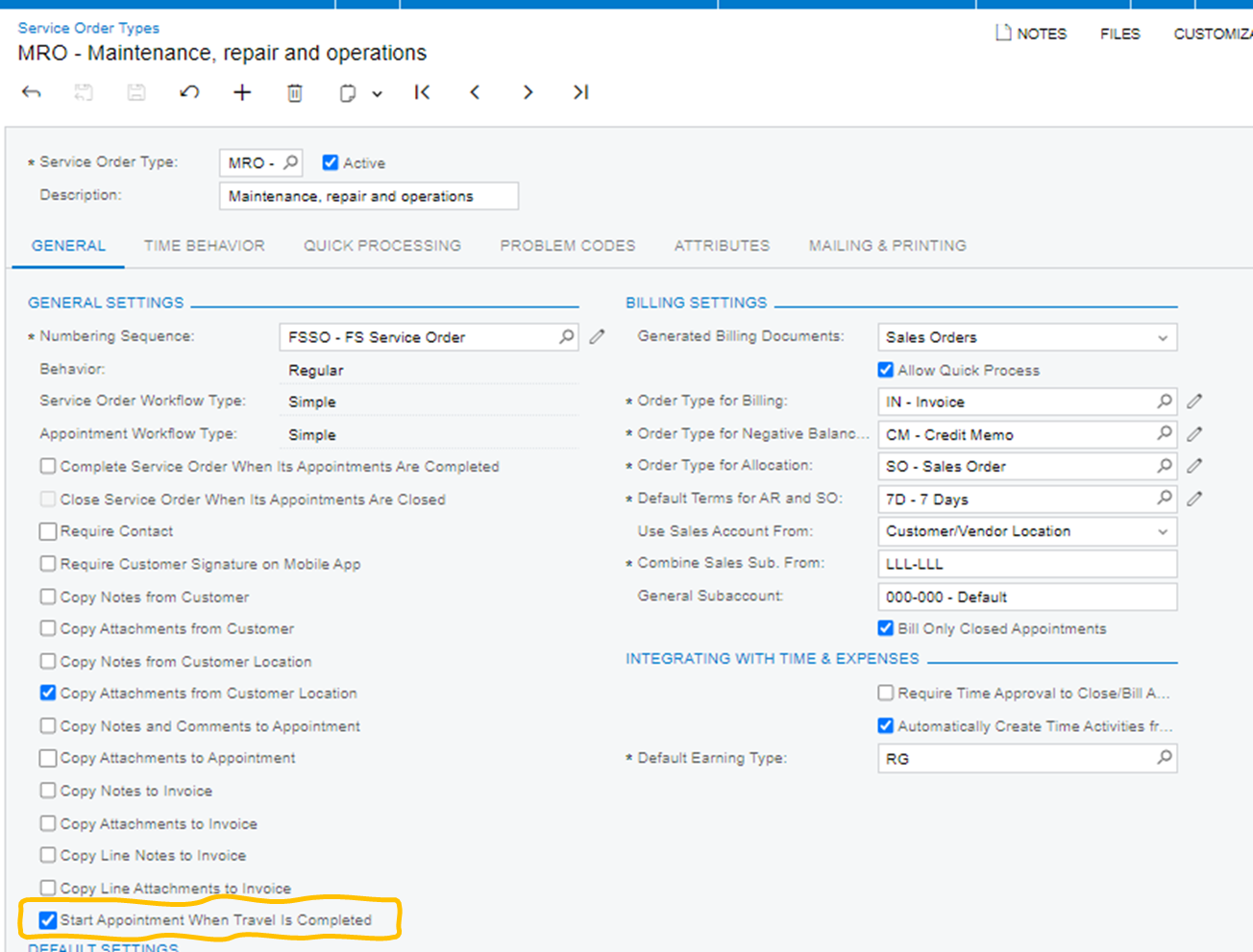
The setting you are looking for is this one: “Start Appointment When Travel is Completed”:


This checkbox makes the system start the appointment automatically after the Arrive action. Probably, like other contributors mentioned, there are other automation settings on the service order type, that apart from starting the appointment will make the system register logs (Start Logging for Services and Assigned Staff (If Any) and Start Logging for Unassigned Staff), I advise you to turn those off too if you don’t want the Start action (start appointment) starts the logs for everyone. 


Forum|alt.badge.img
  • Author
  • Jr Varsity III
  • August 24, 2026

Hi ​@mohammadnawaz51 , thank you for your response.

Though these check boxes were turned off initially, because we want the users to start the log by themselves manually but the issue here is that, let's assume Technician A was assigned Appointment A, he will go ahead and start it at 11:41 which creates the intended first log, by users being users, for some reason he taps on start again without pausing his previous log, the system creates another log for same appointment A with a new start time of 11:42, so the appointment records two logs in process with two different start time, ideally I believe if technician A already has a registered log in process for appointment A, the system shouldn’t allow the user to registered another log unless the precious one is completed or paused.


vdiaz
Acumatica Moderator
Forum|alt.badge.img+2
  • Acumatica Moderator
  • Answer
  • September 17, 2026

@lorach Hi!

The behavior you observe is not a defect — what's happening is that two different Start actions are getting conflated.

Different start actions:

  • The Start at the header of the appointment is unavailable once the appointment is In Process, so the appointment itself can't be started twice.
  • The per-service Start action on the Details tab are separate, and they only appear once the appointment is In Process. With your time-behavior automations cleared, that's the intended manual flow: start the appointment, then start each service individually.

The gap is that the line-level Start doesn't check whether a log is already running for that line and that staff member. It's available either way. So a second tap creates a second In Process log, which is what your screenshot shows.

Your conclusion holds: there is no setting or out-of-the-box functionality prevents overlapping logs. Interestingly the system does guard the other end — an appointment can't be completed while any log is In Process — which is why both of yours closed at once. It just doesn't guard creation.

What to do:

  • The training point worth making explicit is that the header Start and the service Starts are different actions doing different things. A technician tapping the second one after the first looks like a user error but is a predictable one. Techs can be trained to use the Pause instead of re-tapping Start.
  • For visibility, a generic inquiry can be created over the appointment log filtered to In Process, grouped by appointment and staff, flagging counts above one, plus a Business Event to alert dispatchers before overlapping time cards are created on the log completion. No code needed.
  • A genuine hard stop means a customization validating the line-level Start against existing In Process logs for that staff member and line. You can reach out to your partner or trusted ISV and explore possibilities. 

I suggest you raise a Product Idea to improve the behavior: the line-level Start should check for concurrent log for the same staff member on the same line and raise an error or at least a warning.


Forum|alt.badge.img
  • Author
  • Jr Varsity III
  • September 18, 2026

Hi ​@vdiaz , 

Thank you for sharing your insights and recommendations.