
Solved

Inventory Used on Appointments

  • Apr 22, 2025 2:55 PM UTC
  • 2 replies
  • 135 views
  • Translate All

Forum|alt.badge.img

How can I see where an inventory item was used? I want to be able to see what service order it was used on not just the project. Is there a way to do this?

Best answer by vdiaz

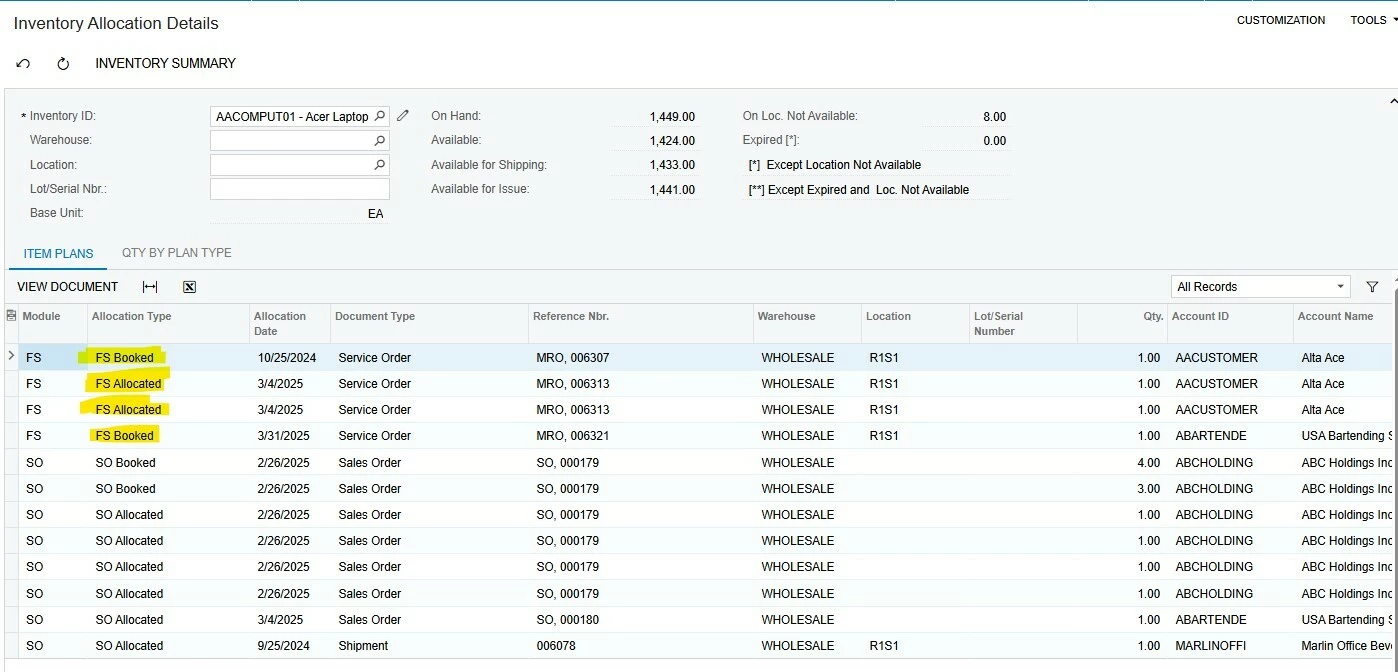
​@CAMORRISON You can also use the Inventory Allocation Details screen. It shows all the documents (service orders, sales orders, etc) that include a specific item as long as the documents are open. Pay attention to Allocation types that start with FS (Fs Booked, FS Allocated, etc).


Hope that help! 

View original

2 replies

Forum|alt.badge.img+2
  • Semi-Pro I
  • Apr 22, 2025 8:15 PM UTC

Quickest answer is the Service Order Details by Inventory Item Report.

Translate

vdiaz
Acumatica Moderator
Forum|alt.badge.img+2
  • Acumatica Moderator
  • Answer
  • Apr 22, 2025 10:15 PM UTC

​@CAMORRISON You can also use the Inventory Allocation Details screen. It shows all the documents (service orders, sales orders, etc) that include a specific item as long as the documents are open. Pay attention to Allocation types that start with FS (Fs Booked, FS Allocated, etc).


Hope that help! 

Translate