
Question

Create Service Order from Sales Order

  • July 20, 2023
  • 3 replies
  • 237 views

Troy Vars
Semi-Pro II
Forum|alt.badge.img+3

Has anyone figured out how to get this to show the correct address on the Service Order?


I have noticed that when creating a Service Order (SVO) from a Sales Order.

If the sales order includes a Location that is not MAIN one of two things happen

  1. The SVO type has the AppAddressSource (Take Address and Contact Information From) set to Contact
    1. Then Acumatica creates the Service Order with the MAIN Location address even though the Location is not main (This is because the Contact is linked to the Business Account and not a Location)
  2. The SVO type has the APPAddressSource (Take Address and Contact Information From) set to Business Account
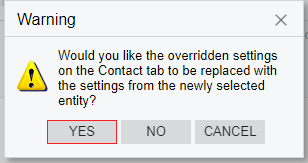
    1. Then Acumatica goes into an endless loop following this message

      1. This was a known issue way back in CRM with this 


    2. Dialogue box that sparks endless loop


3 replies

vdiaz
Acumatica Moderator
Forum|alt.badge.img+2
  • Acumatica Moderator
  • October 28, 2024

Did you figure this out? If this is a recurrent issue, I advise you to enter a support case for this. 


debbiereed72
Varsity I
Forum|alt.badge.img

Hi ​@vdiaz and ​@Troy Vars have either of you found a solution for this?  Thank you


vdiaz
Acumatica Moderator
Forum|alt.badge.img+2
  • Acumatica Moderator
  • June 26, 2026

@debbiereed72 ​@Troy Vars 

Hi Debbie,

Got to the bottom of the behavior. The key is which option the Service Order Type uses under Take Address and Contact Information From, because that determines where the address is takes from:

  • Contact reads the selected contact's own default address. That contact sits at the business-account level, so you get the account's Main address — it has no tie to the non-Main location on the Sales Order. That's why this setting always shows Main. This works as designed, unfortunately, it is not helpful for your scenario.
  • Business Account reads from the Location's default address and contact — so this is the option that actually honors a non-Main location. If you need the location address to flow onto the Service Order, this is the source to use.

So the workaround is to set the Service Order Type's source to Business Account rather than Contact.

Note that Business Account is the option that produced the confirmation-dialog loop Troy ran into. That confirmation prompt has since been changed in the product, so in the current version it may no longer loop — I'd retest it on your build first. If it still loops for you, that specific behavior is one to raise with Acumatica Support, referencing this thread.

And regardless of source, you can always check the Override Address on the created Service Order and key in the correct location address as a manual fallback.

I hope this helps. Let me know if this works.