

Solved

Appointment: stock items, does not allow using higher quantity than service order line

  • March 6, 2026
  • 5 replies
  • 53 views

Forum|alt.badge.img

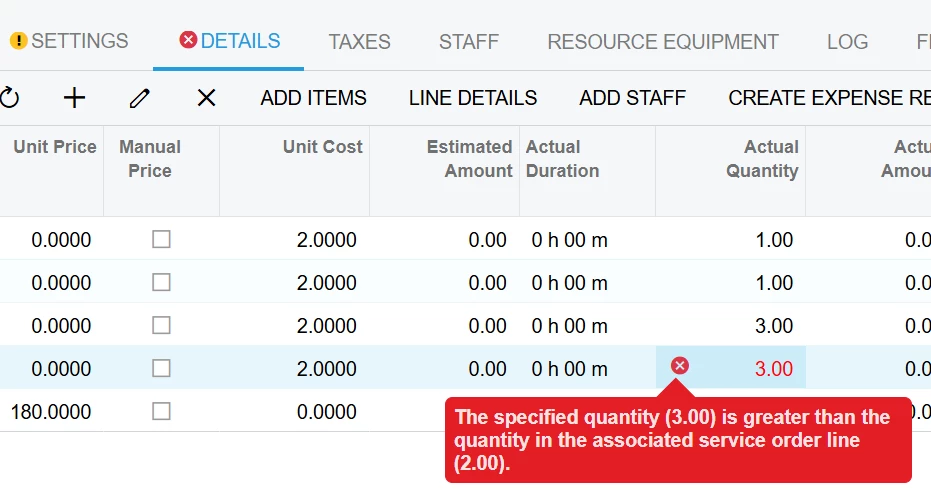
For a stock item part on the appointment screen, system does not allow using Estimate or Actual quantity that is higher than the quantity on the service order line.

I remember seeing the same issue in previous versions but then it was resolved. I now see it again in 2025R2 - Build 25.201.0213.1.

Anyone else coming across this and have any ideas how to get around this limitation? Field techs can certainly use more quantity on an appointment than planned on a service order. 
 

Best answer by saco86

Hi ​@eshahid05, Acumatica does not allow the quantity in the Appointment to exceed the quantity defined in the Service Order. You can either add a new line, which will automatically be added to the Service Order, or implement a customization to update the Service Order line quantity when the quantity is changed in the Appointment.

5 replies

  • Freshman II
  • Answer
  • March 10, 2026

Hi ​@eshahid05, Acumatica does not allow the quantity in the Appointment to exceed the quantity defined in the Service Order. You can either add a new line, which will automatically be added to the Service Order, or implement a customization to update the Service Order line quantity when the quantity is changed in the Appointment.


Forum|alt.badge.img
  • Author
  • Freshman I
  • March 10, 2026

@saco86 thanks for your response. I am aware of this behavior. But the issue is that even if the inventory item is added from the appointment screen, system does not allow updating the estimated or actual qty fields on the appointment. It’s because once the line is added on the appointment, it is auto added on the service order. 


vdiaz
Acumatica Moderator
Forum|alt.badge.img+2
  • Acumatica Moderator
  • March 13, 2026

@eshahid05 

This is expected behavior, not a bug. The key point is that the Service Order owns the line, particularly for stock items. Even if the part is added from the Appointment screen, the system also creates a matching line on the Service Order, and that is the line that controls the allowed quantity.

So the Appointment line cannot exceed the quantity on its related Service Order line. I understand this can feel limiting in real-life scenarios, but if the technician needs to use more than originally planned, the Service Order quantity has to be increased first.


Forum|alt.badge.img
  • Author
  • Freshman I
  • March 13, 2026

And couple this with ADD ITEMs button only allows qty of 1 on mobile app, appointment screen, the whole thing is very frustrating design for a consultant to explain to an end customer. 


  • Freshman I
  • March 16, 2026

We had a customization built to get around this functionality. We can run our daily processes 100% for the most part from the appointment only. Add/remove quantities, delete lines, add lines, etc. 

It’s gotten us about 95% of the way there with a few more things to work through like cancelling or closing deleted lines on the service order as it still double allocates these deleted appointment lines until its processed further, but for the most part we’ve simplified this frustrating process.

