Is there a setting that would allow the appointment confimed box to be checked automatically or a glitch in the calendar board? Recently our schedulers have been complaining that after moving appointments around the calendar board on tomorrows date from one tech to another they appear as confirmed without their knowledge. Is this possible? Can it be fixed so it does not happen?
Best answer by ranjithduraisamy72
@MFarnsworth10 A check box that indicates (if selected) that the appointment has been confirmed.This check box is automatically selected if the time range between the time the appointment was created and the scheduled start time of the appointment is less than or equal to (in terms of the number of days) the time range specified in the Appointment Auto-Confirm Time box on the Calendars and Maps tab of the Service Management Preferences (FS100100) form. That is, the check box is selected if there is insufficient time for the service personnel to confirm the appointment, based on the time range defined as sufficient in your system.
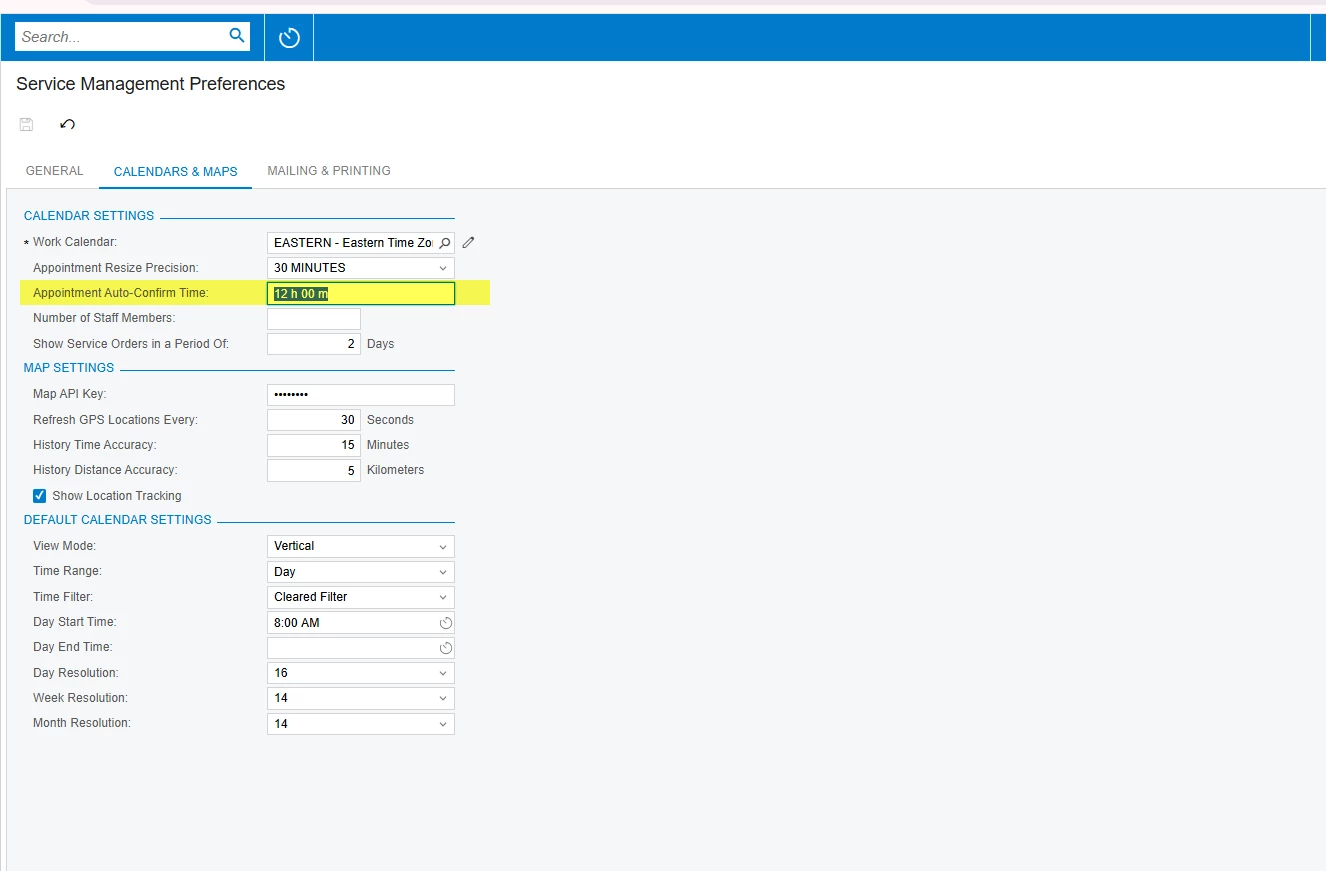
Above is the help information given in the acumatica help document. It should happen automatically, Please find the screen of Service management preference screen, based on highlighted field time range system will automatically confirm the appointment.
In Acumatica Field Service, there is no native, out-of-the-box setting that automatically checks the Confirmed box simply because an appointment is moved on the Calendar Board from one tech to another or rescheduled to tomorrow. The drag-and-drop action is only designed to update the scheduled date/time and the assigned staff member.
If your schedulers are seeing appointments automatically confirm under these conditions, it is almost certainly being caused by one of the following:
1. A Business Event or Customization (Most Likely)
Business Events: Someone in your organization may have set up a Business Event (on the SM302000 screen) that triggers when an appointment is modified (like when an Employee is assigned or the date changes to tomorrow). The subscriber action might be an Import Scenario that automatically updates the status to "Confirmed."
Custom Code: You may have a published Customization Project containing a Graph Extension that intercepts changes made on the Calendar Board or the Appointment screen, automatically setting Confirmed = true once a tech is assigned for the next day.
@MFarnsworth10 A check box that indicates (if selected) that the appointment has been confirmed.This check box is automatically selected if the time range between the time the appointment was created and the scheduled start time of the appointment is less than or equal to (in terms of the number of days) the time range specified in the Appointment Auto-Confirm Time box on the Calendars and Maps tab of the Service Management Preferences (FS100100) form. That is, the check box is selected if there is insufficient time for the service personnel to confirm the appointment, based on the time range defined as sufficient in your system.
Above is the help information given in the acumatica help document. It should happen automatically, Please find the screen of Service management preference screen, based on highlighted field time range system will automatically confirm the appointment.
@MFarnsworth10 — please take a look into @ranjithduraisamy72 's answer.
Small clarification so you don't spend time in the wrong place: there is a native out-of-the-box setting that does this, so a Business Event or customization isn't needed to explain what your schedulers are seeing.
Service Management Preferences (FS100100) → Calendars and Maps tab → Appointment Auto-Confirm Time. Per the Acumatica help for that field, the Confirmed check box is selected automatically when the gap between when the appointment was created and its scheduled start time falls inside that configured range. The reasoning is that there isn't enough lead time for anyone to confirm manually, so the system does it.