Answer

Where to find the perm for Cst_ContactMaint

  • August 22, 2025
  • 5 replies
  • 65 views

Forum|alt.badge.img

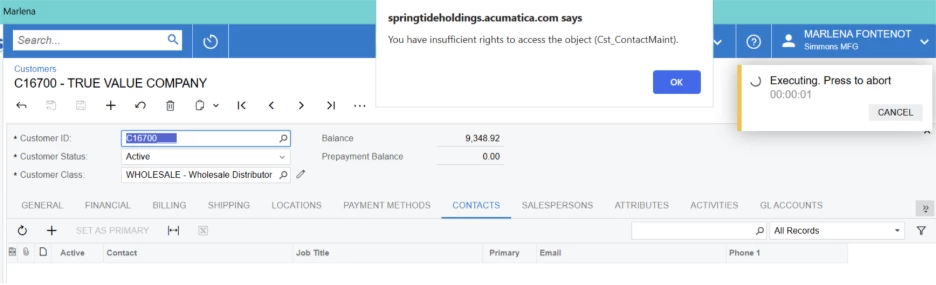
Does anyone know where this perm lies? I need to activate it so a user can edit a customer contact. I have searched in Sales Order, Receivables and Hidden but have yet to find the correct perm.

Best answer by aiwan

@ChantellBeaty 

It is the business logic controller (graph) behind the contacts screen, I would start with that.

5 replies

Manikanta Dhulipudi
Captain II
Forum|alt.badge.img+15

Hi ​@ChantellBeaty Could you please provide more context on this issue?


Forum|alt.badge.img
  • Author
  • Jr Varsity II
  • August 22, 2025

Here is the error received when trying to edit a contact on the contacts tab in Customers. This user is able to add a contact, but unable to edit the already established contact. 


Forum|alt.badge.img+8
  • Captain II
  • August 27, 2025

@ChantellBeaty 


You can find the permissions in “Access Rights By ….” there are a few screens there, Access Rights By Screen, Role, etc.


You will be able to toggle whether the user role has access to view only or perform insert or delete operations on the screen.


Forum|alt.badge.img
  • Author
  • Jr Varsity II
  • August 27, 2025

@aiwan I understand this. However, I cannot find this specific perm anywhere. I cannot find it in sales orders, receivables or in the hidden perms. I even opened contacts under customers and it still does not live there. 


Forum|alt.badge.img+8
  • Captain II
  • Answer
  • August 27, 2025

@ChantellBeaty 

It is the business logic controller (graph) behind the contacts screen, I would start with that.