Solved

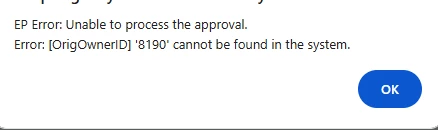
Unable to Remove Hold PO to Submit for Approval. Error: EP Error: Unable to process the approval. Error: [OrigOwnerID] '8190' cannot be found in the system.

  • September 2, 2026
  • 5 replies
  • 78 views

Hi,

I’m encountering the following error when Remving Hold of a PO to submit for approval. Thanks!


Best answer by Avishka

Hi All ​@Rakshanda, ​@mohammadnawaz51 & ​@Laura03.

What it was that I created an Approval Map in one Tenant & Exported out as XML & imported into another tenant (which I was having the issue on).

I beleive the Employee Record Database ID of the Approver did not match with each other.

So I Disabled the current approval map in the tenant that was I having issue on & recreated it from scratch without importing from XML which sorted out the error.

Thanks!

5 replies

Forum|alt.badge.img+5
  • Jr Varsity II
  • September 2, 2026

Hi ​@Avishka ,

This error is a standard Acumatica data validation error. It means that while Acumatica was evaluating the Approval Map to determine who should approve the Purchase Order, it attempted to assign the approval to an entity (usually an Employee, User, or Contact) with the ID 8190, but that record no longer exists in the system (it was likely deleted).

How to identify who 8190 was

If you have access to create Generic Inquiries (or SQL access), you can check the Contact or EPEmployee tables for ContactID = 8190. If no record is returned, the employee was definitively deleted.

Hope above helps!!


mohammadnawaz51
Varsity I
Forum|alt.badge.img+7

@Avishka

It appears the approver may be missing. Please complete the following checks:

  1. Open the purchase order and navigate to the Approval tab.
  2. Verify the approver’s name.
  3. Open the Employees screen and confirm that the approver is active.

As a temporary workaround, you can open Accounts Payable Preferences and disable the approval requirement to bypass the approval process. Please re-enable it after the issue is resolved


Laura03
Captain II
Forum|alt.badge.img+20
  • Captain II
  • September 2, 2026

Hello,

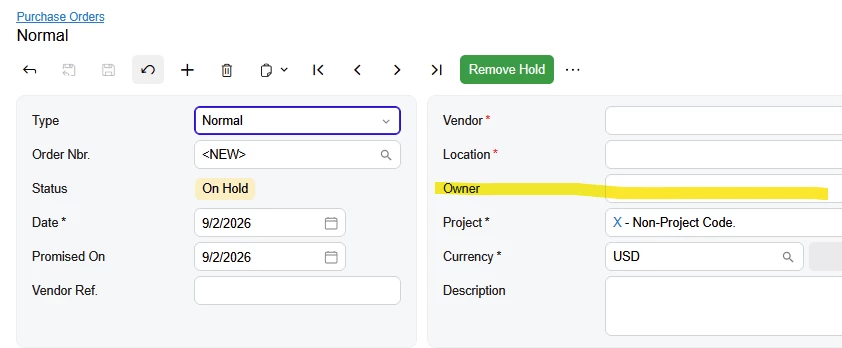
In addition to previous posters’ recommendations, check that the Owner of the PO is populated with an active employee:


  • Author
  • Freshman II
  • Answer
  • September 3, 2026

Hi All ​@Rakshanda, ​@mohammadnawaz51 & ​@Laura03.

What it was that I created an Approval Map in one Tenant & Exported out as XML & imported into another tenant (which I was having the issue on).

I beleive the Employee Record Database ID of the Approver did not match with each other.

So I Disabled the current approval map in the tenant that was I having issue on & recreated it from scratch without importing from XML which sorted out the error.

Thanks!


Chris Hackett
Community Manager
Forum|alt.badge.img
  • Acumatica Community Manager
  • September 3, 2026

Thank you for sharing your solution with the community ​@Avishka!