Answer

TX Error: Failed to get taxes from the external tax provider (Avalara)

  • December 5, 2024
  • 7 replies
  • 278 views

We’ve tested with one customer successfully and now with another we are getting this error:  TX Error:  Failed to get taxes from the external tax provider (Avalara).

I’ve confirmed the following:

  • Customer is set to Avalara
  • Tax Zone is set to Avalara
  • Shipping address is populated
  • Same GL accounts as previous customer with successful call

Any other settings that I should check?

Thanks

Best answer by TaxCSA

Thank you - yes that is what we ultimately did and used this to resolve the issue.  I appreciate your comment!

7 replies

Manikanta Dhulipudi
Captain II
Forum|alt.badge.img+15

@TaxCSA 

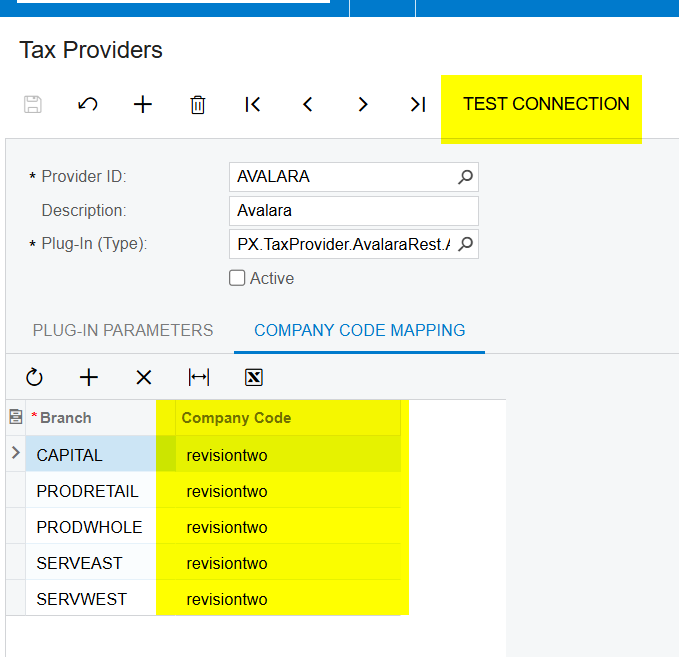
Have the avalara test connection is successfully? did you enter company code mapping?


  • Author
  • Freshman II
  • December 5, 2024

Test connection is successful and there are 2 branches that match the company code in Avalara


  • Author
  • Freshman II
  • December 10, 2024

@Manikanta Dhulipudi when creating a new invoice there is no issue calling Avalara, but when trying to create an Appointment, this is when the error occurs.

An appointment is created first and then after being completed “runs billing”

Do you have any suggestions?

Thanks!


KushaniPerera88
Acumatica Employee
Forum|alt.badge.img+3
  • Acumatica Employee
  • January 1, 2025

@TaxCSA Please attach a screenshot of the error trace. Sometimes error trace will provide us an idea what configuration is missing and the reason for the error. 


  • Author
  • Freshman II
  • Answer
  • January 2, 2025

Thank you - yes that is what we ultimately did and used this to resolve the issue.  I appreciate your comment!


Forum|alt.badge.img

Adding this error code because it was also solved by adding a new branch into this screen: 
TX Error: The Branch to Company Code mapping is not specified in the configuration of the external tax provider.


Forum|alt.badge.img+1
  • Acumatica Moderator
  • June 11, 2025

Be sure to also review :