


We have a couple of customers that require tiered discount terms. One of them is a very large international company, so I’m sure others have ran into this situation as well. If I have a customer that wants us to allow 4% discounts at Net 10 days that then trickle down daily to a 0% discount when the invoice hits 120 days, how do I make that happen? The only way I can see it working is creating terms that would allow the customer a 4% discount for paying at 120 days since the system will not allow for a discount to be even a penny more than listed when the invoice is created, in addition to there only being one discount date available on my screen, not multiple due dates. I just don’t know how to make this so that the customer doesn’t have the ability to take a 4% discount no matter what.
In addition, I have a customer that wants their tier to be 4% N30, 3% N60, 2% N90, 1% N120, 0% after that. Again, how do I accomplish this without the customer having the ability to take a 4% discount every time?
Tiered Credit Terms (Payment Discounts)
Best answer by suejohnson10
Hi there, below are my findings:
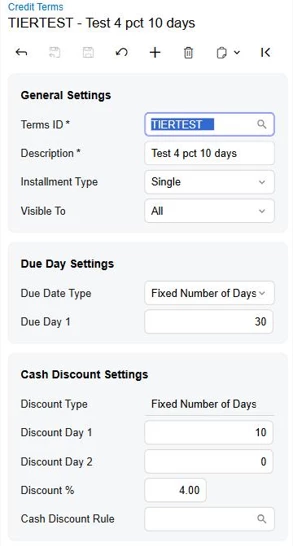
Standard credit terms can't build either of those schedules. Credit Terms (CS206500) holds one cash discount per set of terms: one Discount Type, one Discount Day and one Discount %. A cash discount is only available when Installment Type is Single (I switched a set of terms to Multiple and the Cash Discount Settings section disappeared). I couldn't find a way to step the discount down by date, in the documentation or on the screen.
I tested a manual workaround in a 2026 R1 sandbox that keeps the customer from taking the 4% every time:
1. Set up the terms with the top discount only. For your first customer: Single, Fixed Number of Days, Discount Day 10, Discount % 4. For the second customer: the same with Discount Day 30. On the invoice, Acumatica calculated the Cash Discount Date correctly. My invoice was dated 10/12, so the Cash Discount Date was 10/22.
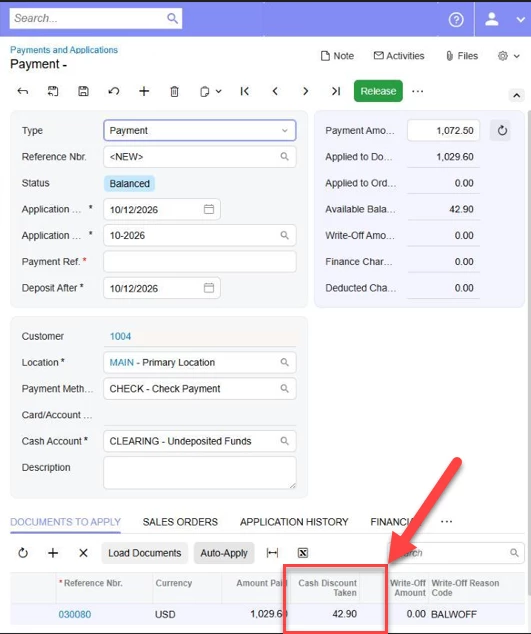
2. If the payment is applied on or before the Cash Discount Date (10/22 in my test), Payments and Applications (AR302000) fills in Cash Discount Taken for you. In my test it was 42.90 on a 1,072.50 invoice, which is 4% of the total including tax.
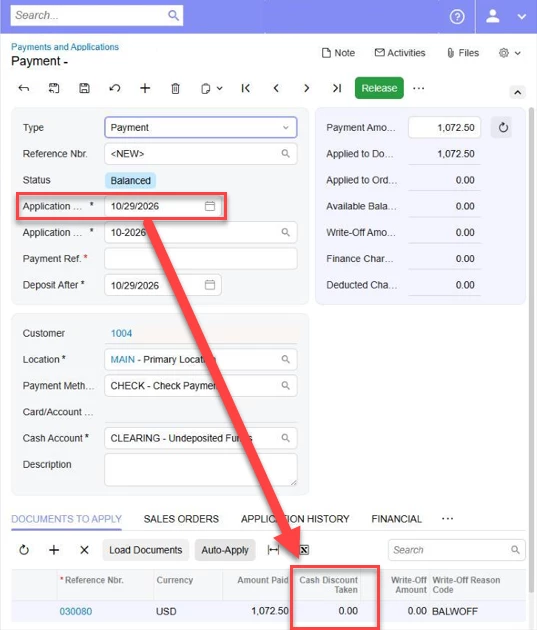
3. If the payment is applied after the Cash Discount Date, the system no longer fills it in. I applied a payment on 10/29 and Cash Discount Taken came up as 0.00.
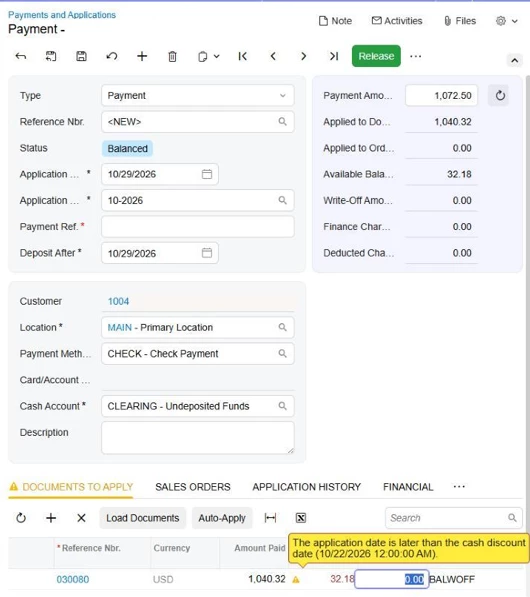
4. Your AR team can then type the lower amount into Cash Discount Taken by hand, for example the 3% or 2% for that period. In my test I entered 32.18 on a payment applied on 10/29, after the 10/22 Cash Discount Date. It showed a yellow warning ("The application date is later than the cash discount date"), but I could save it and release it, and the invoice closed with a zero balance.
So the 4% limit is enforced, but the step-down itself is a manual entry for your AR team, not an automatic schedule and not very helpful if you have a high volume of transactions. If you need the system to work out the 3/2/1% by date, you would need a customization. I looked through the Acumatica Marketplace and didn't find an add-on for tiered credit terms. You could also submit a feature request on the Product Ideas page with one of your schedules as the example.
Thanks, Sue





Enter your E-mail address. We'll send you an e-mail with instructions to reset your password.