

Solved

Text Search capability while creating new record

  • June 18, 2026
  • 2 replies
  • 32 views

Forum|alt.badge.img

Hello all,

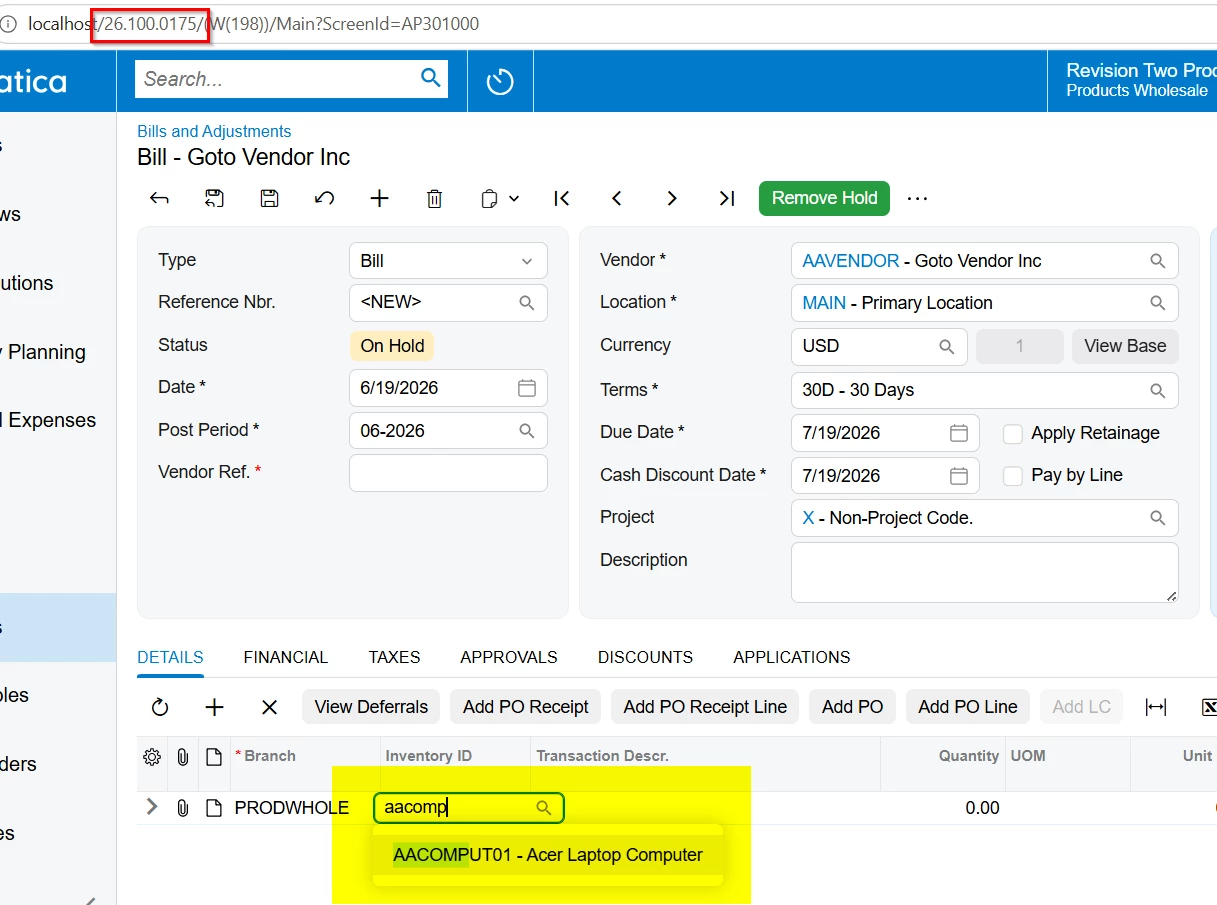
In the previous versions of Acumatica we had the functionality, for instance that if we have an item lets say AAComputer and if a user tries to add a new item in the Inventory ID field, as soon as the characters are entered Acumatica displays the relevant results. So if the user enters AACOMP, Acumatica displays the result for the existing item in the search result.

Here the user isnt making use of inventory lookup, but just typing in the characters and it displays the items that already has the keyword.

However in the current versions, its not working at all even after enabling the full text search. Is there anyone else facing the same issue?


Regards.
Best answer by RohitRattan88

@Harry 

What current versions you are referring to? I see this working for all new versions.


I suggest unpublishing all customizations to see if some customization is causing this behavior and troubleshoot accordingly.

2 replies

RohitRattan88
Acumatica Moderator
Forum|alt.badge.img+5
  • Acumatica Moderator
  • Answer
  • June 19, 2026

@Harry 

What current versions you are referring to? I see this working for all new versions.


I suggest unpublishing all customizations to see if some customization is causing this behavior and troubleshoot accordingly.


Forum|alt.badge.img
  • Jr Varsity III
  • June 19, 2026

@Harry Have you double checked to make suer that under your User Profile settings that “Lookup Box Suggestions” is checked? That can cause the Autofill dropdown to not show up.

