Question

Sync Activities to Outlook Calendar

  • August 11, 2026
  • 3 replies
  • 42 views

Hi All,

Is there a way we can sync Actvities Created in Acumatica to Outlook Calendar?


Thanks!

3 replies

Forum|alt.badge.img+5
  • Jr Varsity II
  • August 11, 2026

Hi ​@Avishka ,

Yes, Acumatica has built-in integration with Microsoft Outlook through the Exchange Integration feature. Here's how you can set it up:
Exchange Integration for Calendar Sync
1. Enable Exchange Integration
   - Navigate to Enable/Disable Features (CS100000) and make sure Exchange Integration is enabled.
2. Configure Exchange Server Settings
   - Go to Exchange Server Policies (SM206010) or Sync Policies depending on your version.
   - Set up the connection to your Microsoft Exchange / Office 365 tenant (OAuth 2.0 with Azure AD app registration is the modern approach).
3. Configure Sync Direction
   - You can configure whether sync is bidirectional, Acumatica-to-Exchange, or Exchange-to-Acumatica.
   - Activities/Events in Acumatica map to Calendar items in Outlook.
4. Assign Sync Policies to Users
   - On the Users or Employee screen, assign the Exchange sync policy so each user's activities sync to their Outlook calendar.


Documentation
For detailed setup steps specific to your version (USS25R1), check:
- Acumatica Help > Integration > Exchange Integration
- Or search for "Exchange Integration" in the built-in Help (the ? icon in Acumatica).


Hope above helps!!


  • Author
  • Freshman I
  • August 13, 2026

Hi ​@Rakshanda,

Thank you for much for this the Exchange Integration has already been setup for the site.

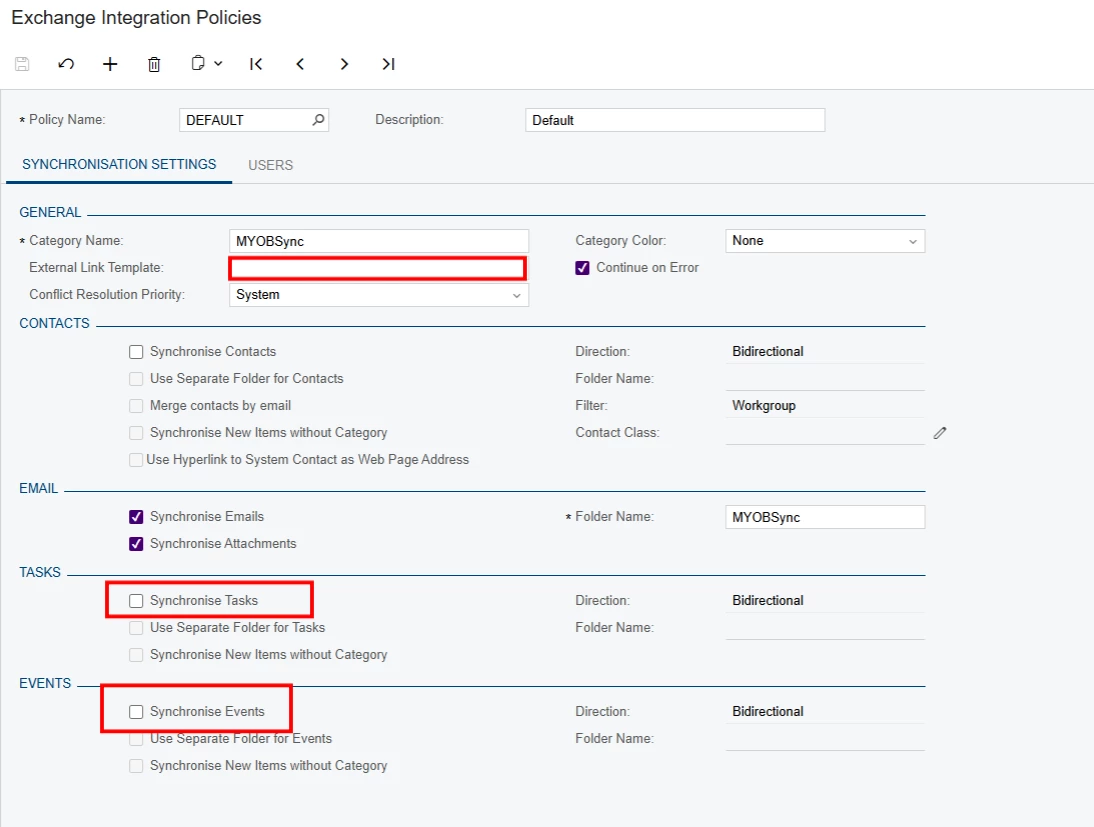
However as you mentioned we need to Turn on “Synchronise Tasks” & “Synchronise Events”


the purpose of this is when a salesperson creates an “Event” in Acumatica. i.e - Client Visit. What are the prequesites for this cofniguration. Thanks!


Forum|alt.badge.img+5
  • Jr Varsity II
  • August 17, 2026

Hi ​@Avishka ,

Can you verify below

Since your Exchange Integration is already set up, here are the prerequisites and configuration steps to enable Task/Event synchronization:
Prerequisites
1. Exchange Integration Policy (SM206530)
   - A policy must be defined that includes the user/salesperson mailboxes
   - The policy must have "Sync Tasks" and "Sync Events" checkboxes enabled
2. Employee/User Configuration
   - Each salesperson must have a User Account linked to their Employee record
   - The Employee must have a valid email address matching their Exchange mailbox
   - The user must be included in the Exchange Integration Policy's member list
3. Activity Types
   - The Activity Types used (e.g., "Event", "Client Visit") must be configured on the Activity Types (CR102000) screen
   - Ensure the relevant activity types have the "Synchronize" option enabled
4. Calendar Preferences
   - On User Calendar Preferences, the user should have calendar sync settings configured
5. Exchange Integration Policy Settings (SM206530)
   - Contact Sync should generally be active (Events reference contacts)
   - Under the Events/Tasks section:
     - Set the sync direction (Acumatica → Exchange, Exchange → Acumatica, or Bidirectional)
     - Define the date range for synchronization (how far back/forward to sync)
Key Configuration Steps
1. Navigate to Exchange Integration Policy (SM206530)
2. Select your policy
3. Check "Synchronize Events" and "Synchronize Tasks"
4. Set the sync direction (typically Bidirectional for salesperson use cases)
5. Confirm the salesperson's user account is listed as a policy member
6. Run "Process Exchange Sync" or wait for the scheduled sync


Hope above helps!!