

Question

Standard email account

  • Nov 3, 2026 2:48 AM UTC
  • 1 reply
  • 12 views
  • Translate All

Hello, I have created new standard accounts with updated external applications.  8 of them were able to successfully sign in with 2 facing errors. Secret keys are new and cant be expired. 
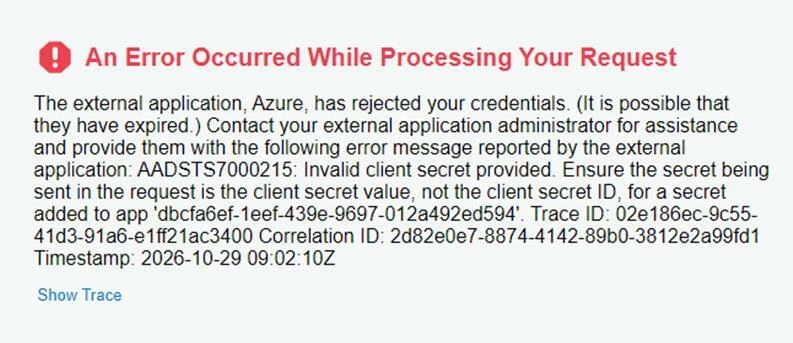
Has anyone faces this before/


Thanks

1 reply

Forum|alt.badge.img+8
  • Jr Varsity III
  • Nov 3, 2026 5:54 AM UTC

Hi ​@yusufkheder ,

Yes, this is a common one. AADSTS7000215 almost never means the secret expired. It means Azure got a value that doesn’t match any valid secret on that app registration. Since 8 of your 10 work, the problem is almost certainly how the secret was entered on the 2 that fail.

Most likely causes, in order:

  1. The Secret ID was pasted instead of the Value. Azure’s error message hints at this too. Under App registrations → Certificates & secrets, each secret has a Value column and a Secret ID column. Both look like long strings, so they’re easy to mix up. Acumatica needs the Value.
  2. The Value can’t be viewed again. Azure only shows the Value right after you create the secret. If someone went back later and copied what was showing, it was the masked text or the ID. If you don’t have the original Value saved, create a new secret and copy its Value straight away.
  3. The secret is from a different app registration. The error names app dbcfa6ef-1eef-439e-9697-012a492ed594. In the failing Acumatica records, check that the Client/Application ID is that app, and that the secret was created on that same registration. With 10 setups, it’s easy to pair one app’s Client ID with another app’s secret.

Quick fix: For the 2 failing accounts, open the app registration in Azure (the ID from the error) and create a new client secret. Copy its Value at once, paste it into the Client Secret field of the matching record in Acumatica’s External Identity Providers / OpenID Connect provider settings, save, and try signing in again.

If it still fails after that, compare the Client ID and Tenant ID field by field against one of the 8 working records. The difference usually shows up there.

Hope above helps!!

Translate
