Question

Resizing Blank Widgets in a Dashboard

  • August 14, 2023
  • 5 replies
  • 171 views

Michaelh
Pro I
Forum|alt.badge.img+2

I know how to make an empty widget using About:Blank on Embedded Page widget.

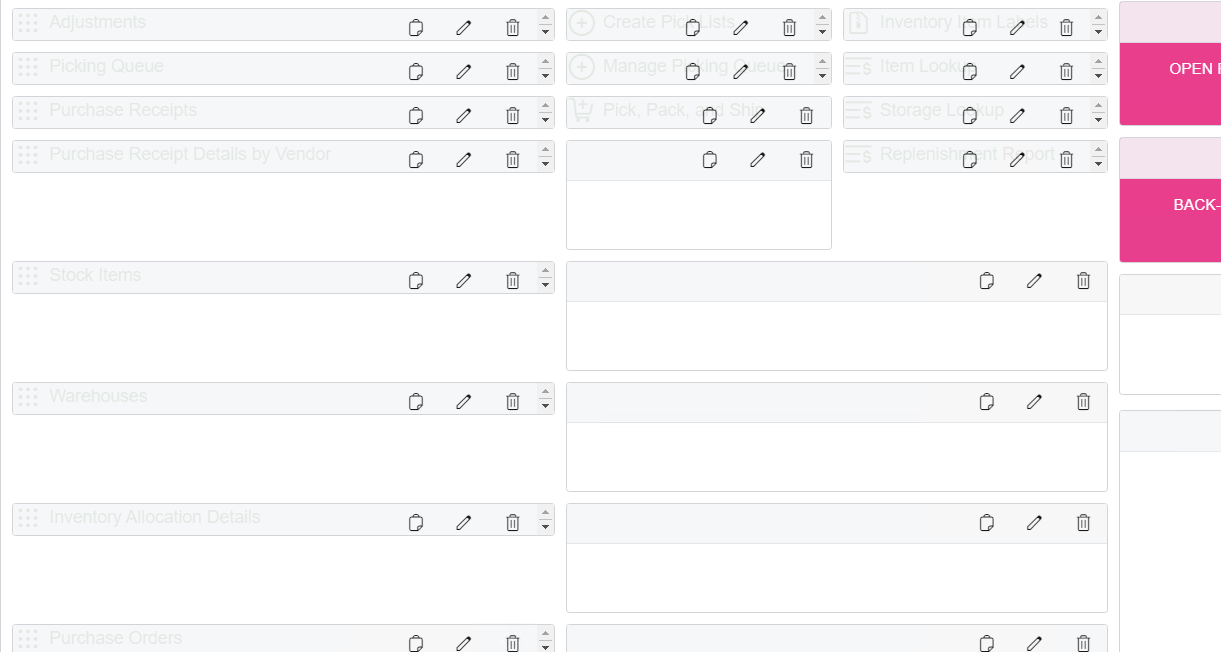
My issue now is that the Embedded Page widget refuses to scale down like the other widets. It’s gets small enough in width, but not nearly as short as the other widgets can, this makes my spacing look very jagged when I have a list of links who are tighly packed, but one overly long blank spacer next to them. How do I get this to shrink? I can certinaly make it longer than needed, but not shorter…


Thank you in advance for your help!

5 replies

Kandy Beatty
Captain II
Forum|alt.badge.img+17
  • Captain II
  • August 15, 2023

HI @Michael Hansen 

Can you share a screenshot of what you are seeing?


Robert Sternberg
Captain II
Forum|alt.badge.img+7

@Michael Hansen Does this happen when you add the About:Blank widget to any dashboard or only the current dashboard you are working to design?  


Thanks


Michaelh
Pro I
Forum|alt.badge.img+2
  • Author
  • Pro I
  • August 15, 2023
Center Column Has About:Blank Widgets


@kandybeatty49 - In the above, the links to screens are nice and tighly packed at the top. The middle column is the first to have a “Gap”. I can make the widget LONGER, but not shorter. You can see on the left how this creates very wide spacing on the other links.


@Robert Sternberg - Yes, this is a global issue on: 

Acumatica 2022 R1
Build 22.107.0022


Thanks again for your help everyone!


Chris Hackett
Community Manager
Forum|alt.badge.img
  • Acumatica Community Manager
  • September 12, 2023

Hi @Michael Hansen were you able to find a solution? Thank you!


Michaelh
Pro I
Forum|alt.badge.img+2
  • Author
  • Pro I
  • September 12, 2023

Nope, the about:blank widgets can only get bigger, not smaller like the other widgets. My image in the post above shows them at their smallest size.