Solved

Remove Predefined Filter Selection

  • February 28, 2025
  • 4 replies
  • 82 views
  • Translate All

Forum|alt.badge.img

Hello,


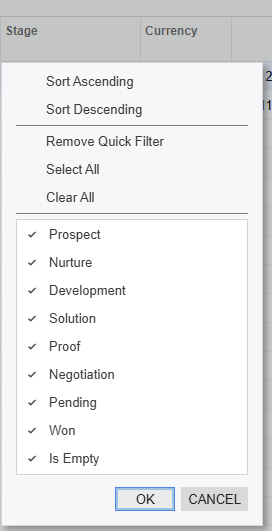
Does anyone know how to remove predefined selections from a drop down in a GI? This is from the opportunity screen. There are some of these items in this list we do not use and was requested for those not to be seen as they are not active in our setup or being used on the opportunity stages.


Best answer by BenjaminCrisman

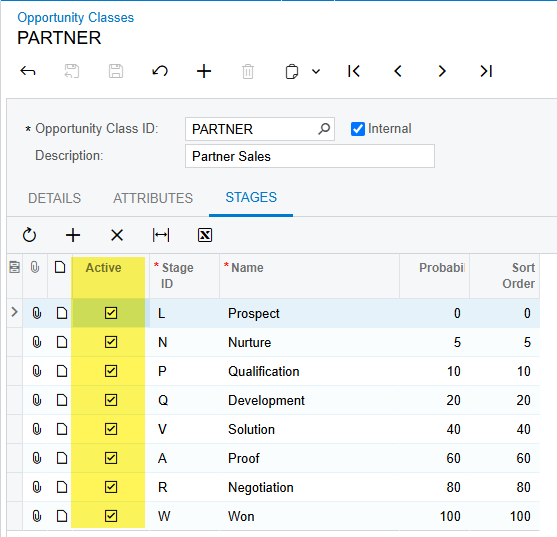
​@JReppard These are seen on the Opportunity Class:

You may need to deactivate/delete on multiple classes to make sure they are all weeded out.

View original

4 replies

BenjaminCrisman
Acumatica Employee
Forum|alt.badge.img+4

​@JReppard These are seen on the Opportunity Class:

You may need to deactivate/delete on multiple classes to make sure they are all weeded out.

Translate

Forum|alt.badge.img
  • Author
  • Varsity I
  • February 28, 2025

​@BenjaminCrisman - Thanks. That was easy. Appreciate the quick response 

Translate

Forum|alt.badge.img
  • Author
  • Varsity I
  • February 28, 2025

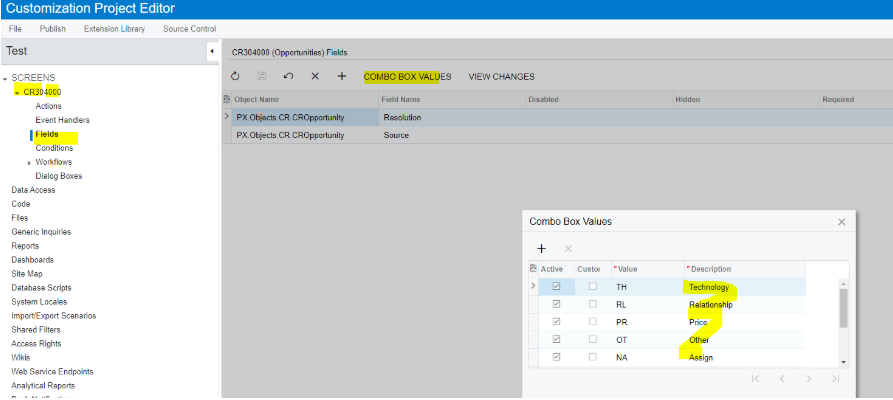
​@BenjaminCrisman - One other quick question: I assume to add or remove these options on an opportunity are done via a customization via the combo boxes? I just want to make sure I am not missing it somewhere else.

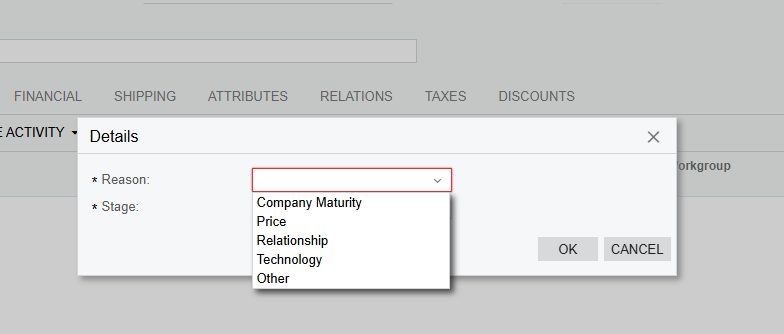
The below pops up when you are in an opportunity and choose “Close as Lost” under the “ … “


Translate

BenjaminCrisman
Acumatica Employee
Forum|alt.badge.img+4

​@JReppard Updating those would require a customization:


Translate