Solved

Notification Template Note Reference on Service Orders Page

  • December 17, 2021
  • 6 replies
  • 184 views
  • Translate All

Forum|alt.badge.img

I’m trying to print the contents of a Note for a Service Request in a Notification Template. Anybody know the field reference I should use on that page? I’ve tried the solution suggested in topic “Notification Template - Invoice.Note,” which is to use field ((Document.NoteText)), but that only produces a blank line. Thanks in advance.

Best answer by davidpoole21

Hi @davidpoole21  Yes, As I indicated above, please join with NOTE table in your Generic Inquiry and add that field to Notification template and verify. 

I didn’t see a good way to join to the NOTE table from the Service Orders screen, but I found a way to add FSServiceOrder.NoteText to my GI. Not sure how many, if any, of these fields are unique to my installation, but on mine it goes like this:

  • Service Orders page; click Customization > Edit Generic Inquiry
  • Results Grid tab
  • + Add a row
  • Object = FSServiceOrder
  • Click in the Data Field column to edit the field, but then click the Pencil icon, not the selector arrow (It’s not in the selector list).
  • Click Fields in the popup, double-click [FSServiceOrder.NoteText] in right-hand pane
  • Ok, Save
  • Go to the Notification Template; position the cursor where you want the Note text
  • Insert > Datafield > FSServiceOrder > =[FSServiceOrder.NoteText]
  • It will insert a formula where the Note text will appear.

View original

6 replies

jinin
Pro I
Forum|alt.badge.img+12
  • Pro I
  • December 18, 2021

Hi @davidpoole21 

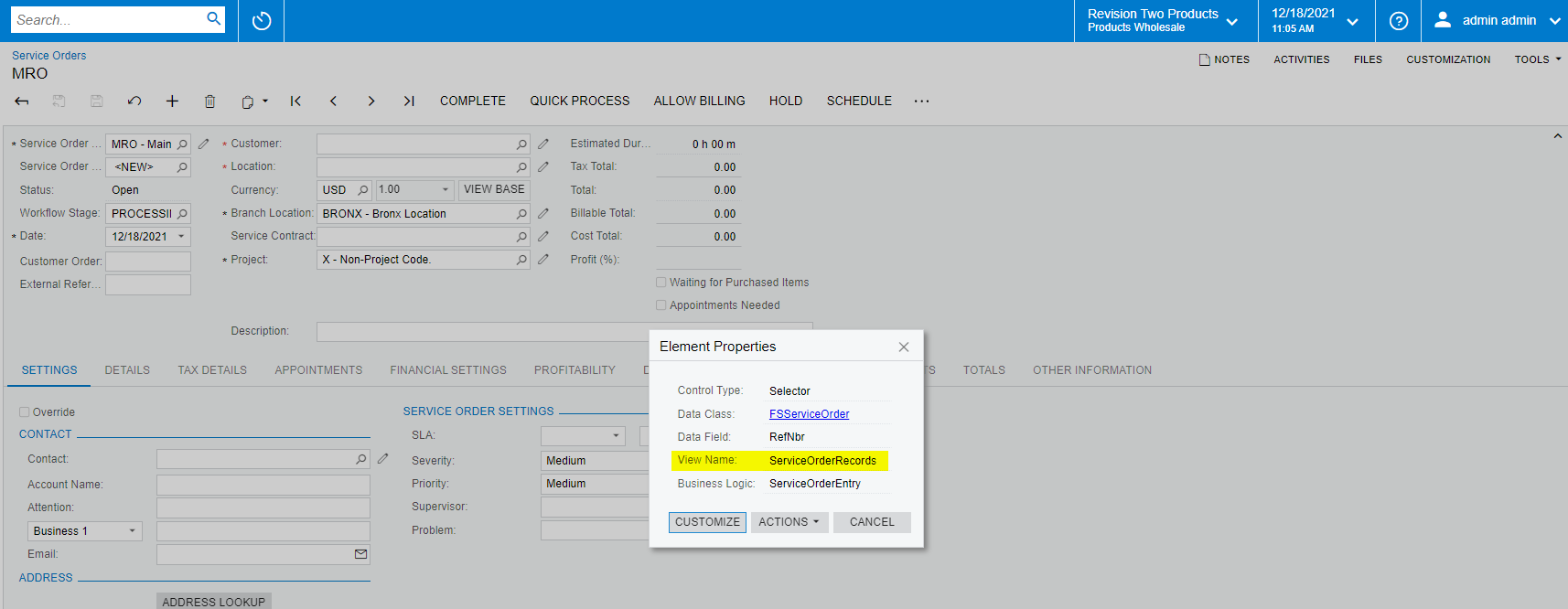
Can you please try with the screen header view name ?

As per the below screenshot, it should be ((ServiceOrderRecords.NoteText)).


Translate

Naveen Boga
Captain II
Forum|alt.badge.img+20

Hi @davidpoole21  I don’t see any direct option to get the Note Text value using Views/DACs.

We can create a Generic Inquiry and join with the NOTE table to fetch the note text value in the Notification templates.


Hope this helps!

Translate

Forum|alt.badge.img

Hi @davidpoole21 

Can you please try with the screen header view name ?

As per the below screenshot, it should be ((ServiceOrderRecords.NoteText)).


This didn’t work. Thanks for trying, though. Guess I’ll have to add it to my Generic Inquiry.

Translate

Naveen Boga
Captain II
Forum|alt.badge.img+20

Hi @davidpoole21  Yes, As I indicated above, please join with NOTE table in your Generic Inquiry and add that field to Notification template and verify. 

Translate

Forum|alt.badge.img
  • Author
  • Freshman II
  • Answer
  • December 20, 2021

Hi @davidpoole21  Yes, As I indicated above, please join with NOTE table in your Generic Inquiry and add that field to Notification template and verify. 

I didn’t see a good way to join to the NOTE table from the Service Orders screen, but I found a way to add FSServiceOrder.NoteText to my GI. Not sure how many, if any, of these fields are unique to my installation, but on mine it goes like this:

  • Service Orders page; click Customization > Edit Generic Inquiry
  • Results Grid tab
  • + Add a row
  • Object = FSServiceOrder
  • Click in the Data Field column to edit the field, but then click the Pencil icon, not the selector arrow (It’s not in the selector list).
  • Click Fields in the popup, double-click [FSServiceOrder.NoteText] in right-hand pane
  • Ok, Save
  • Go to the Notification Template; position the cursor where you want the Note text
  • Insert > Datafield > FSServiceOrder > =[FSServiceOrder.NoteText]
  • It will insert a formula where the Note text will appear.
Translate

Forum|alt.badge.img

Hi @davidpoole21  Yes, As I indicated above, please join with NOTE table in your Generic Inquiry and add that field to Notification template and verify. 

Naveen -- Thanks for your help!

Translate