Solved

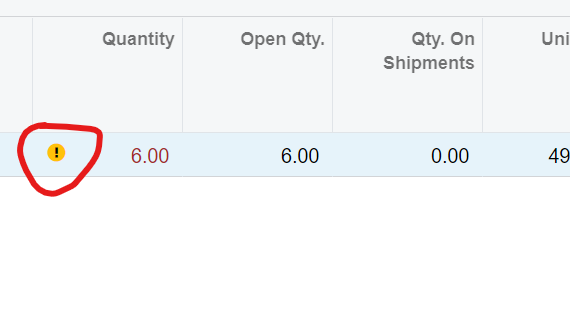
Negative Quantity only available for some users

  • Apr 19, 2022 7:11 PM UTC
  • 21 replies
  • 594 views
  • Translate All

bnaumann
Freshman I
Forum|alt.badge.img

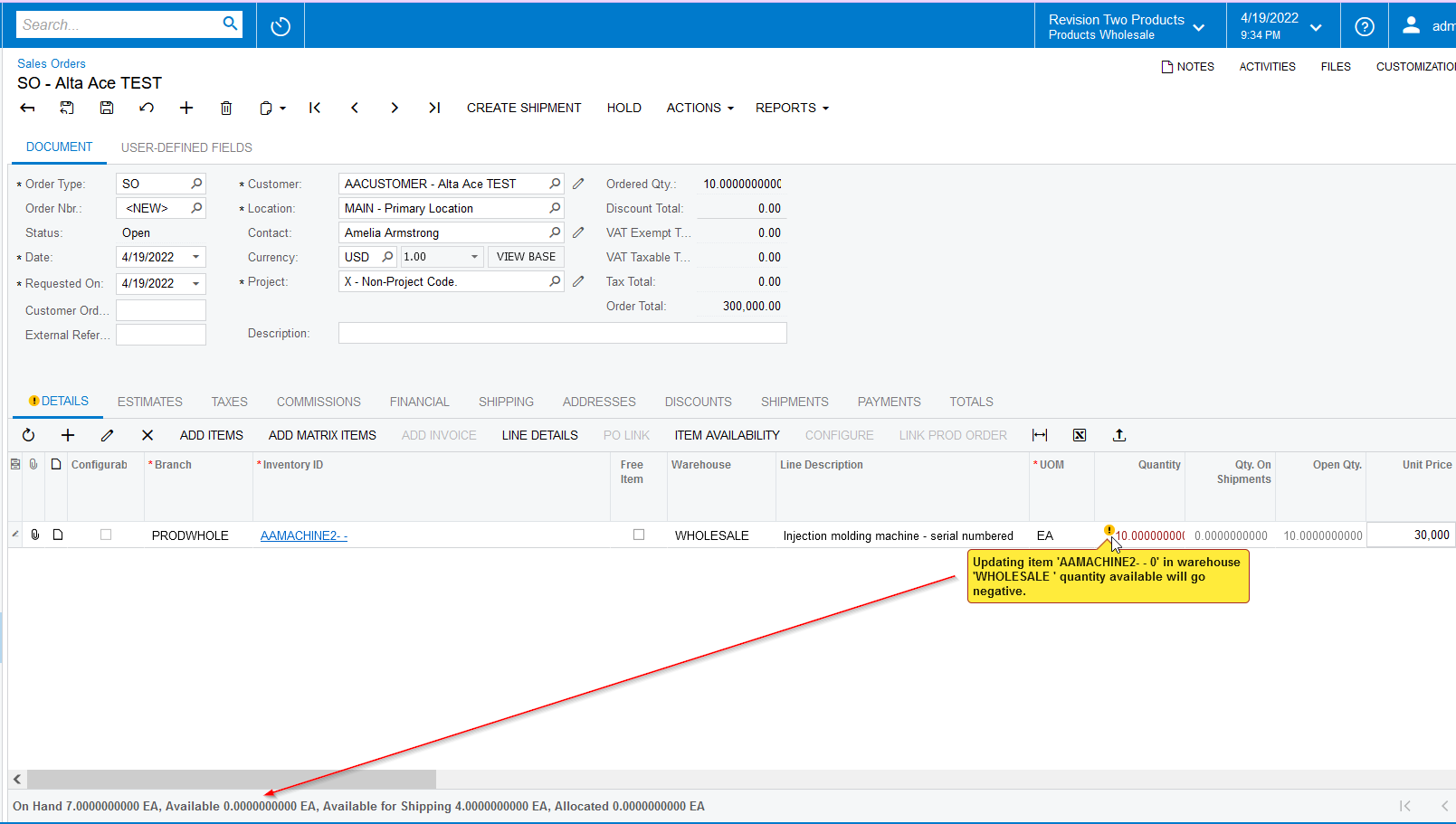
Only some of our users are seeing this message. Is there a permission or something that throws this notice up? Thanks in advance.

Best answer by vkumar

Hi ​@jchan86 

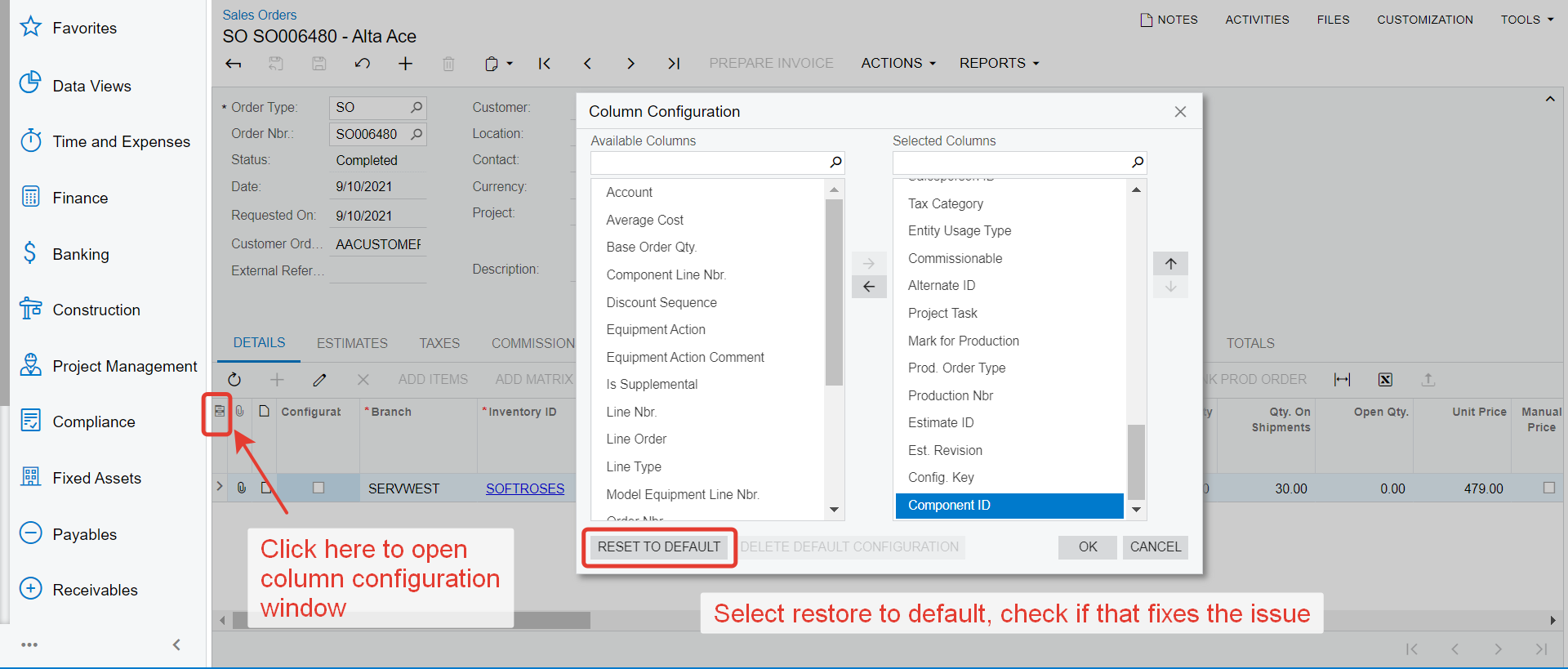
Please try the following and let us know the result.

  • Logon as the user who is having the issue. 
  • Open SO entry screen
  • Open the Column Configuration window 
  • Select ‘Reset to default’
  • Close the session and logon again.

Let us know the result. 
Regards,

View original

21 replies

Laura03
Captain II
Forum|alt.badge.img+20
  • Captain II
  • Apr 19, 2022 7:58 PM UTC

Hello,

It will be helpful to see the error message as well as the screen you are in, in your screen shot. Look for Delay feature of snipping tool.


Laura

Translate

bnaumann
Freshman I
Forum|alt.badge.img
  • Author
  • Freshman I
  • Apr 19, 2022 8:00 PM UTC
This is on the Sales Order screen. Only certain members get this error, not everyone.


Translate

Naveen Boga
Captain II
Forum|alt.badge.img+20
  • Captain II
  • Apr 20, 2022 4:36 AM UTC

Hi, @bnaumann  This is related to Item Available Qty but NOT related to customers.


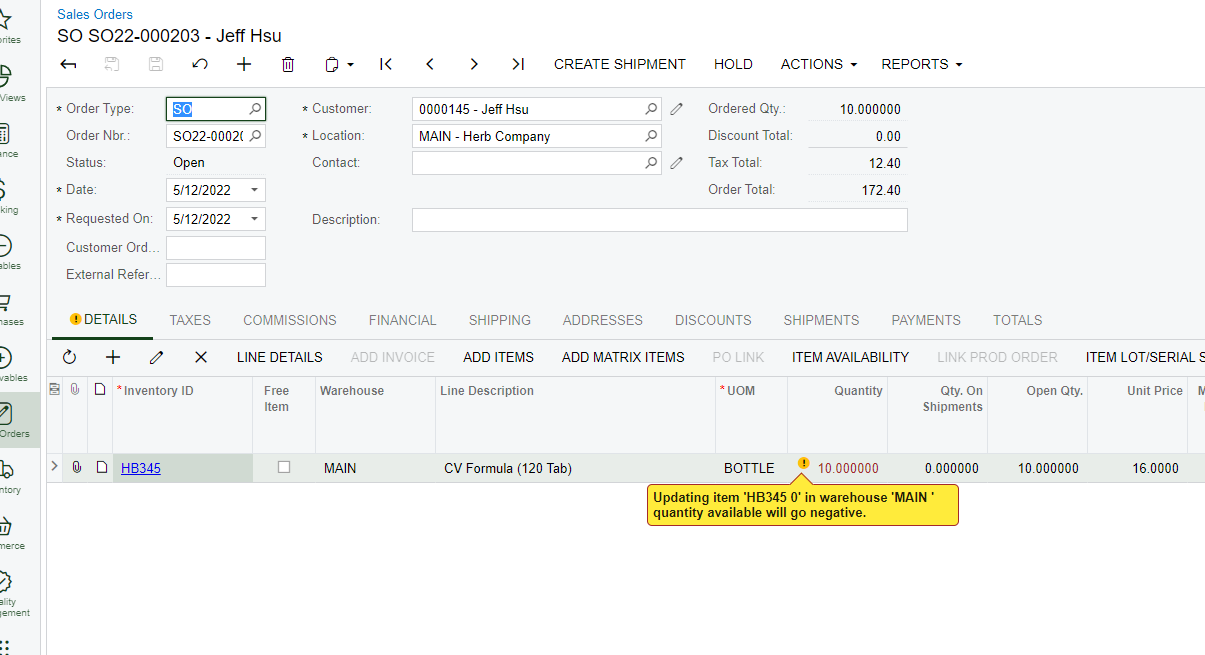
When there is no availability for that Stock Item and trying to place Sales Order with more qty than available, the system will show this warning message. Please find the screenshot for reference.


Translate

Forum|alt.badge.img+12
  • Acumatica Support Team
  • Apr 20, 2022 8:55 AM UTC

Hi @bnaumann 

Please try the following by logging on as the user who has the issue. Let us know if that works. 

Regards,

Translate

bnaumann
Freshman I
Forum|alt.badge.img
  • Author
  • Freshman I
  • Apr 20, 2022 11:16 AM UTC

Hello,

Neither of these worked. The issue is I can see the yellow bubble and others with the same privelages as me cannot see the yellow quantity bubble. We cannot find any reasoning for this.
 

Translate

Laura03
Captain II
Forum|alt.badge.img+20
  • Captain II
  • Apr 20, 2022 11:26 AM UTC

Hi, I am thinking about possible differences in browser, device, or workstation. When you say that others  with the same rights cannot see the warning, are you logged in as them at your device, using your browser, or are you looking over their shoulder at a different device or browser?

If you are logged in as the user (Use log in as feature from top of Users screen) at your workstation using the same browser, this eliminates browser settings and device settings as potential causes of the missing error.

Have you tried clearing browser cache (erase browsing history)? Sometimes when I have unusual results, clearing browser cache has helped.

LB

Translate

bnaumann
Freshman I
Forum|alt.badge.img
  • Author
  • Freshman I
  • Apr 20, 2022 11:28 AM UTC

I will try that once they are in the building. I logged in as both affected users and it does not show the message on my browser/device either.

Translate

bnaumann
Freshman I
Forum|alt.badge.img
  • Author
  • Freshman I
  • Apr 20, 2022 12:37 PM UTC

This also did not work… Same browser versions, permissions, everything. They are both higher on the management chain and have very high credentials and still cannot see the error.

Translate

bnaumann
Freshman I
Forum|alt.badge.img
  • Author
  • Freshman I
  • Apr 20, 2022 8:10 PM UTC


Translate

Chris Hackett
Community Manager
Forum|alt.badge.img
  • Acumatica Community Manager
  • Apr 28, 2022 4:36 PM UTC

Hi @bnaumann have you been able to resolve your issue or do you still need assistance from @laura01 ? Thank you!

Translate

bnaumann
Freshman I
Forum|alt.badge.img
  • Author
  • Freshman I
  • Apr 28, 2022 4:50 PM UTC

I have not found an answer yet. Assistance would be great! Thanks!!

Translate

jhsu64
Freshman II
Forum|alt.badge.img
  • Freshman II
  • May 12, 2022 11:51 PM UTC

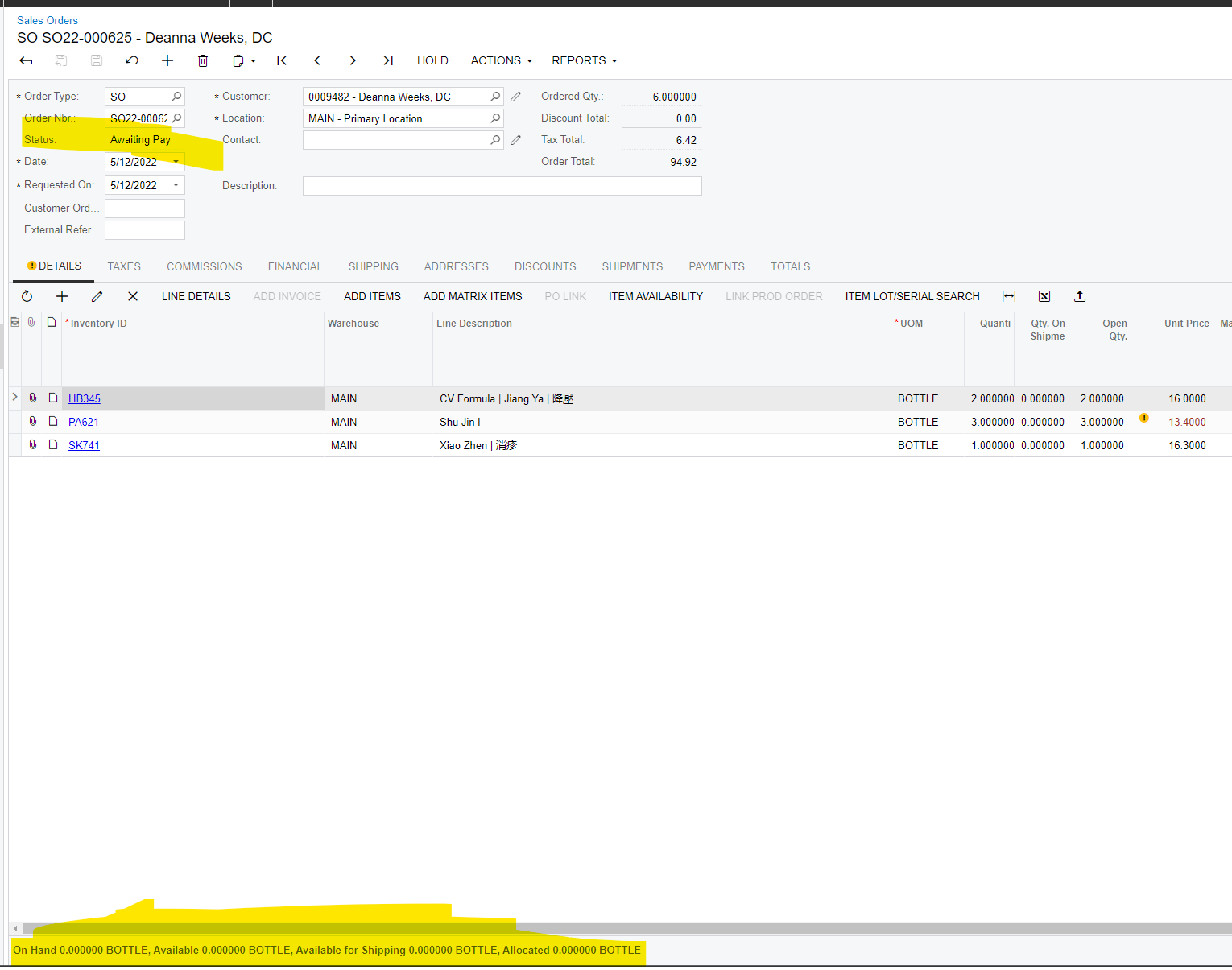
I    might have the same issue. I have admin permissions. Different browser/cleared cache, did a reset to default for columns. On my test tenant I do see the warning though. Is there a check box/setting/drop down like warning for validate min markup in SO preferences? 

Live tenant:

Test Tenant shows warning
​​​​​​


Translate

bnaumann
Freshman I
Forum|alt.badge.img
  • Author
  • Freshman I
  • May 13, 2022 11:17 AM UTC

I    might have the same issue. I have admin permissions. Different browser/cleared cache, did a reset to default for columns. On my test tenant I do see the warning though. Is there a check box/setting/drop down like warning for validate min markup in SO preferences? 

Live tenant:

Test Tenant shows warning
​​​​​​


I am still dealing with this. Hopefully we get an answer soon!

Translate

dales50
Semi-Pro III
  • May 13, 2022 12:03 PM UTC

@bnaumann - I would suggest to create a support ticket so that support can login as the various users and try to duplicate the issue.

Translate

brendan91
Semi-Pro III
Forum|alt.badge.img+1
  • Semi-Pro III
  • Jul 22, 2022 5:53 PM UTC

Did you figure this out? We have the same issue

Translate

bnaumann
Freshman I
Forum|alt.badge.img
  • Author
  • Freshman I
  • Jul 22, 2022 5:54 PM UTC

Did you figure this out? We have the same issue

Never did. Eventually just evened out.

Translate

debbiereed72
Varsity II
Forum|alt.badge.img
  • Varsity II
  • Oct 31, 2024 10:52 PM UTC

I am experiencing the same issue with a customer.  Her user roles are the same as another - the other sees them.  This rules out user roles.  I ruled out things like the web browser and other things by signing in as that user.  When I am signed in as that user, I do not see the negative stock warning.


What could possibly cause this?


Translate

  • Freshman I
  • Feb 4, 2025 12:11 AM UTC

Debbie, 

Were you able to find an answer to this? A customer is experiencing this with one user only. I created a new user with the same roles and the negative warning display as expected. Thanks.

Translate

Forum|alt.badge.img+12
  • Acumatica Support Team
  • Answer
  • Feb 4, 2025 2:30 AM UTC

Hi ​@jchan86 

Please try the following and let us know the result.

  • Logon as the user who is having the issue. 
  • Open SO entry screen
  • Open the Column Configuration window 
  • Select ‘Reset to default’
  • Close the session and logon again.

Let us know the result. 
Regards,

Translate

debbiereed72
Varsity II
Forum|alt.badge.img

​@jchan86 - Resetting the Column Configuration to Default did resolve the issue (as shown above).

Translate

  • Freshman I
  • Feb 4, 2025 6:29 PM UTC

Thank you Vijay and Debbie, 

Confirming “reset to default” worked for me. 


Hi ​@jchan86 

Please try the following and let us know the result.

  • Logon as the user who is having the issue. 
  • Open SO entry screen
  • Open the Column Configuration window 
  • Select ‘Reset to default’
  • Close the session and logon again.

Let us know the result. 
Regards,


Translate