Answer

How to TRUELY mass delete records?

  • October 12, 2022
  • 13 replies
  • 1411 views

Forum|alt.badge.img

How to delete all stock item/non stock item records?

I have uploaded 300k records and I would like to start fresh again. So far I have found nothing to mass delete that amount of records in one go, the closest is https://nexvue.com/acumatica-tips-tricks-how-to-enable-mass-delete-records/ that I can only select all records on a paged result, but I need something like “select all” option that beyond the first page, like in Gmail.

Happy to do it via API if it’s possible, but an UI would be better.

Cheers

James


Best answer by Laura03

Hello,

This morning I created a Data Provider and Import Scenario for you, to delete Stock Items.

You will need to import the attached XML in the Import Scenario, remove my file from the related Data Provider, and attach your own Excel file to the Data Provider.  Your Excel needs only one column labeled Inventory ID,  containing your list of 300,000 items to be deleted.

YouTube and Acumatica Open University have videos you can watch to learn about using import scenarios, if you are new.  Good luck!

13 replies

Forum|alt.badge.img+1
  • Jr Varsity II
  • October 12, 2022

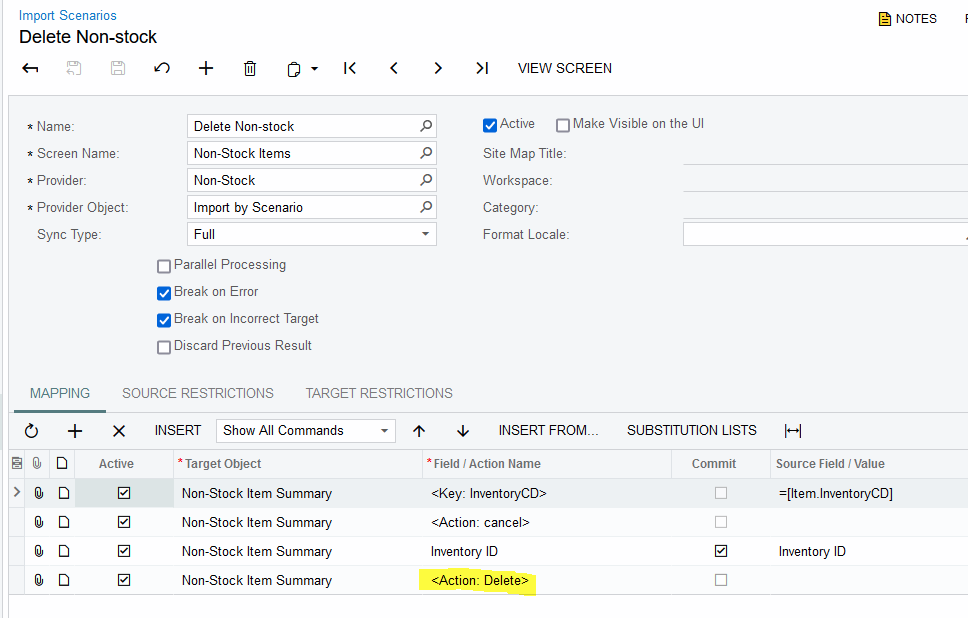
You can set up an Import Scenario to delete records.


Laura03
Captain II
Forum|alt.badge.img+19
  • Captain II
  • October 12, 2022

Hello, here is an example of an import scenario to delete non-stock. Sorry, I don’t have one for stock items handy, but this is quite similar.


Forum|alt.badge.img
  • Author
  • Jr Varsity I
  • October 12, 2022

You can set up an Import Scenario to delete records.

Thanks can you please elaborate a bit further? The import and delete seem contradicting each other.


Forum|alt.badge.img
  • Author
  • Jr Varsity I
  • October 12, 2022

Hello, here is an example of an import scenario to delete non-stock. Sorry, I don’t have one for stock items handy, but this is quite similar.


Thanks, I can’t seem to find “Non Stock” in Provider, what am I missing?


Forum|alt.badge.img
  • Author
  • Jr Varsity I
  • October 12, 2022

Hello, here is an example of an import scenario to delete non-stock. Sorry, I don’t have one for stock items handy, but this is quite similar.


Thanks, I can’t seem to find “Non Stock” in Provider, what am I missing?

I presume I need to define the provider? What type should I choose?


Forum|alt.badge.img
  • Author
  • Jr Varsity I
  • October 12, 2022

Hello, here is an example of an import scenario to delete non-stock. Sorry, I don’t have one for stock items handy, but this is quite similar.


Thanks, I can’t seem to find “Non Stock” in Provider, what am I missing?

I presume I need to define the provider? What type should I choose?

Also, this import scenario seems I need to provide a list of IDs?


Forum|alt.badge.img+1
  • Jr Varsity II
  • October 12, 2022

You can make a provider out of the stock item GI


Forum|alt.badge.img
  • Author
  • Jr Varsity I
  • October 12, 2022

You can make a provider out of the stock item GI

How do I convert a GI into a provider please?


DConcannon
Varsity II
Forum|alt.badge.img+2
  • Varsity II
  • October 12, 2022

Hi @jamesl 

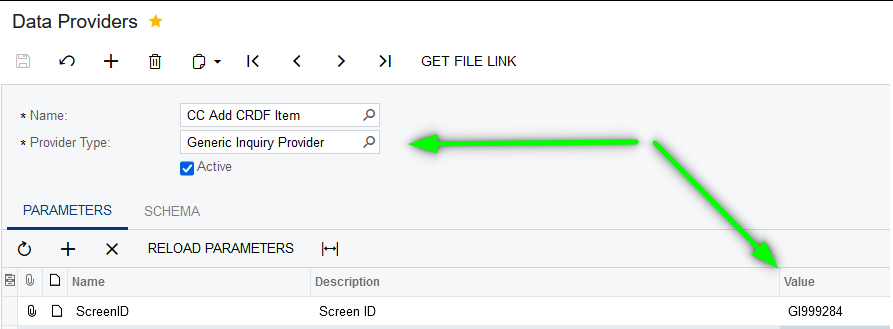
here are some screen shots that should help you create the provider:

Select Active and then Fill Schema Fields


Laura03
Captain II
Forum|alt.badge.img+19
  • Captain II
  • Answer
  • October 13, 2022

Hello,

This morning I created a Data Provider and Import Scenario for you, to delete Stock Items.

You will need to import the attached XML in the Import Scenario, remove my file from the related Data Provider, and attach your own Excel file to the Data Provider.  Your Excel needs only one column labeled Inventory ID,  containing your list of 300,000 items to be deleted.

YouTube and Acumatica Open University have videos you can watch to learn about using import scenarios, if you are new.  Good luck!


Forum|alt.badge.img
  • Author
  • Jr Varsity I
  • October 13, 2022

Hello,

This morning I created a Data Provider and Import Scenario for you, to delete Stock Items.

You will need to import the attached XML in the Import Scenario, remove my file from the related Data Provider, and attach your own Excel file to the Data Provider.  Your Excel needs only one column labeled Inventory ID,  containing your list of 300,000 items to be deleted.

YouTube and Acumatica Open University have videos you can watch to learn about using import scenarios, if you are new.  Good luck!

ok thank you!


Forum|alt.badge.img
  • Author
  • Jr Varsity I
  • October 15, 2022

Hi @jamesl 

here are some screen shots that should help you create the provider:

Select Active and then Fill Schema Fields


thank you


Forum|alt.badge.img
  • Author
  • Jr Varsity I
  • October 15, 2022

Hello,

This morning I created a Data Provider and Import Scenario for you, to delete Stock Items.

You will need to import the attached XML in the Import Scenario, remove my file from the related Data Provider, and attach your own Excel file to the Data Provider.  Your Excel needs only one column labeled Inventory ID,  containing your list of 300,000 items to be deleted.

YouTube and Acumatica Open University have videos you can watch to learn about using import scenarios, if you are new.  Good luck!

thank you