Question

Has anyone gotten the "prepare and import" function to work in import scenario automations?

  • Nov 18, 2026 3:31 PM UTC
  • 2 replies
  • 11 views
  • Translate All

Forum|alt.badge.img+1

Hi everyone! Curious as to if anyone has been able to get the “Import and prepare” function to work properly in Acumatica when you create automation schedules for processing import scenarios? 

I was REALLY hoping that 2026R2 would address this but upon testing in our sandbox it doesn’t seem to be working either. I would love to not have to create 2 automation schedules for each import scenario that we need to prepare and import. 

2 replies

KrunalDoshi
Pro II
Forum|alt.badge.img+9

Hi ​@SBaldwin,

You can run clear data before running Prepare & Import. You still have to run two automation schedules, if this is helpful to you.

You can refer to below post

Here is Beacon from 2026 R2

https://beacon.acumatica.com/r/Form-Reference-Guide/Integration-Forms/Import-Scenarios#target-restrictions-tab

Thanks!

Translate

Steve Milner
Varsity III
Forum|alt.badge.img+7
  • Varsity III
  • Nov 18, 2026 6:38 PM UTC

My replies are created in part with the help of proprietary AI, built with my AI skills, curated and maintained myself. Most replies are tested on local instances before they go up, and all are reviewed before posted.

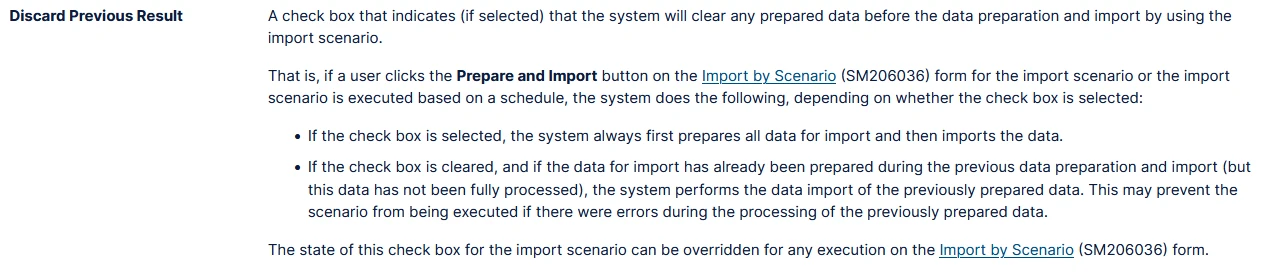
@SBaldwin, one schedule can do it. Open each scenario on the Import Scenarios (SM206025) form and check Discard Previous Result. It’s in the summary area at the top, with Break on Error and Break on Incorrect Target.

With that box cleared, Prepare & Import skips the prepare step whenever the scenario’s status is Prepared or Partially Processed. It only imports the rows left over from last time. Any run where a row fails leaves the scenario at Partially Processed. Every scheduled run after that retries the failed rows and doesn’t pull new data until they all go through. That’s what the Beacon page Krunal linked describes (it’s the screenshot in his reply). The code is the same in 25.101, 26.101 and 26.200, so 26R2 behaves the same way.

With the box checked, every run deletes the old prepared rows, prepares fresh from the source, then imports. Krunal’s Clear Data schedule works because it sets the scenario back to New, so the next Prepare & Import prepares fresh. The checkbox gets you there inside the one run.

Before you flip it, know that the old prepared rows go away with their error messages. A row that failed only gets another try if your source still returns it. Worth a run in your sandbox first.

Translate