Solved

Financial P&L figure show in DashBoard

  • July 6, 2021
  • 8 replies
  • 457 views

Forum|alt.badge.img
  • Jr Varsity II
  • 103 replies

Hi 

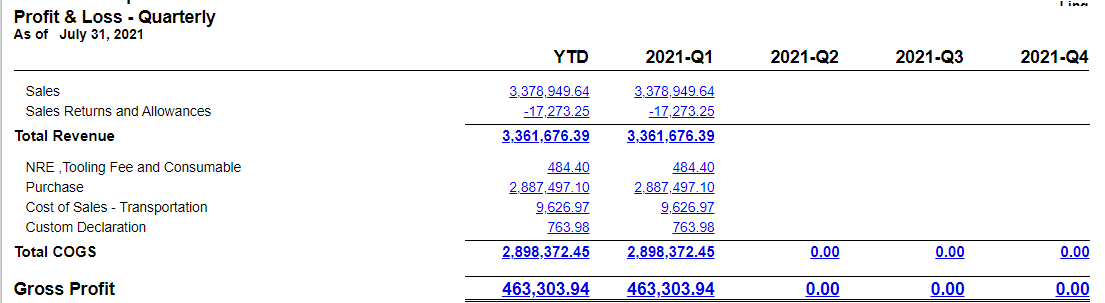
Anyone know that we can link the below P&L in financial report page to Dashboard , which mean we can view the below information in dashboard through a link or other method?


Best answer by TimRodman

Here’s another idea for adding hyperlinks to financial reports on a Dashboard. I personally like using the Description field because it’s so flexible:


8 replies

Irina
Community Manager
Forum|alt.badge.img+8
  • Acumatica Platform Analyst
  • 533 replies
  • July 6, 2021

You can add wiki article as a widget to the dashboard. And in the wiki article, you can include any link.

For more info, refer to the https://help-2021r1.acumatica.com/(W(2))/Help?ScreenId=ShowWiki&pageid=a3e27bde-d9eb-4304-bcef-61e639ddab47 help article.

Also, you can do the following using the same approach:


TimRodman
Pro I
Forum|alt.badge.img+1
  • Pro I
  • 154 replies
  • Answer
  • July 7, 2021

Here’s another idea for adding hyperlinks to financial reports on a Dashboard. I personally like using the Description field because it’s so flexible:


Forum|alt.badge.img
  • Author
  • Jr Varsity II
  • 103 replies
  • July 8, 2021

Hi TimRodMan

Thanks for the youtube link

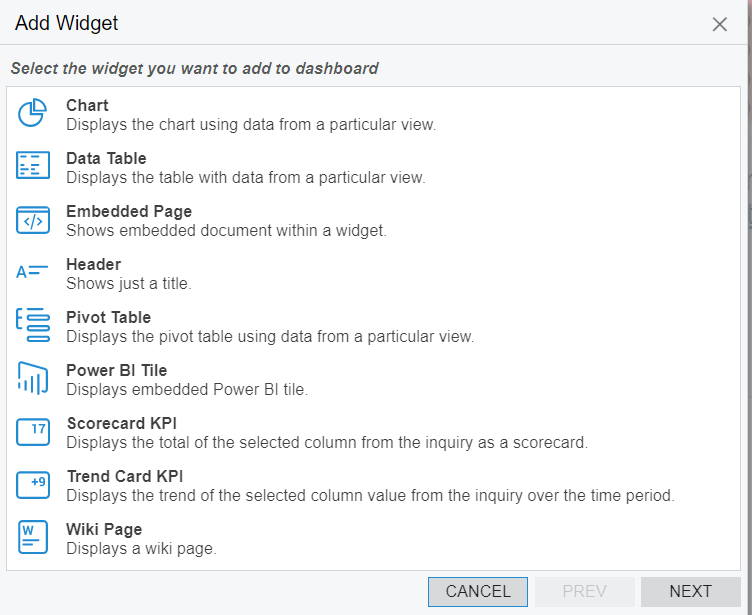
However ,from the dashboard widget that we  is only below but dont have “Link” in the widget .May i know what is the problem?


Forum|alt.badge.img
  • Author
  • Jr Varsity II
  • 103 replies
  • July 8, 2021

You can add wiki article as a widget to the dashboard. And in the wiki article, you can include any link.

For more info, refer to the https://help-2021r1.acumatica.com/(W(2))/Help?ScreenId=ShowWiki&pageid=a3e27bde-d9eb-4304-bcef-61e639ddab47 help article.

Also, you can do the following using the same approach:


Hi Irina

Thanks for the link!

Seem like the 2nd link i cannot access , as below message


TimRodman
Pro I
Forum|alt.badge.img+1
  • Pro I
  • 154 replies
  • July 8, 2021

@erina - The Link Widget is new in Acumatica 2021 R1. You’re probably on an older version of Acumatica, but hopefully upgrading to Acumatica 2021 R1 in the somewhat near future!


Irina
Community Manager
Forum|alt.badge.img+8
  • Acumatica Platform Analyst
  • 533 replies
  • July 8, 2021

@erin Knowledge Base is restricted to users, having active contract with Acumatica.


Forum|alt.badge.img
  • Author
  • Jr Varsity II
  • 103 replies
  • December 19, 2021

@erina - The Link Widget is new in Acumatica 2021 R1. You’re probably on an older version of Acumatica, but hopefully upgrading to Acumatica 2021 R1 in the somewhat near future!

Hi Tim Roadman

How are you ? Hope you are doing well. Currently we are in acumatica 2021R2 version.

Can i check with you if you know how do we add in the finance report - P&L link in dashboard using the dashboard widget “Link” below?


Forum|alt.badge.img
  • Freshman I
  • 14 replies
  • February 13, 2022

@erina - The Link Widget is new in Acumatica 2021 R1. You’re probably on an older version of Acumatica, but hopefully upgrading to Acumatica 2021 R1 in the somewhat near future!

Hi Tim Roadman

How are you ? Hope you are doing well. Currently we are in acumatica 2021R2 version.

Can i check with you if you know how do we add in the finance report - P&L link in dashboard using the dashboard widget “Link” below?


@erina - The Link Widget is new in Acumatica 2021 R1. You’re probably on an older version of Acumatica, but hopefully upgrading to Acumatica 2021 R1 in the somewhat near future!

Hi Tim Roadman

How are you ? Hope you are doing well. Currently we are in acumatica 2021R2 version.

Can i check with you if you know how do we add in the finance report - P&L link in dashboard using the dashboard widget “Link” below?


Hi all - Did you come right with this as I too am kinda struggling to understand the parameter needed