

Question

Error on Approval Owner ID Email

  • September 29, 2026
  • 3 replies
  • 38 views

Forum|alt.badge.img

Hi,

We have created a schedule to run the AP Bill Approval email notification. However, the schedule appears to be failing with the following error:

span style="color:red">Approval.OwnerID.EMail</span>

It seems the issue is related to the Approval Owner ID Email field.

which field I should use to retrieve the approval owner’s email address and achieve the expected result?

I also tried using ((EPApproval_ownerID!EMail)), but it resulted in an “Incorrect Email” error.
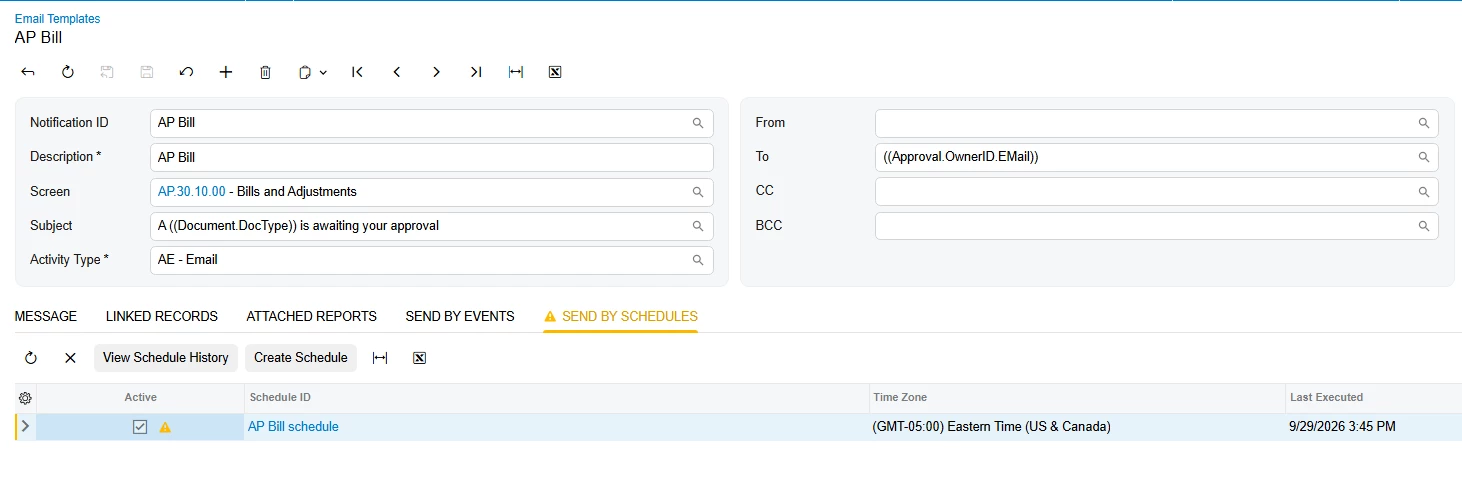
 

Thanks!


3 replies

elijahr83
Jr Varsity II
Forum|alt.badge.img
  • Jr Varsity II
  • September 30, 2026

Hey ​@MichelleW,

Try using:

((Approval.OwnerID.EMail))

in the To field of the notification template.

OwnerID on the Approval record represents the employee currently assigned to approve the document, and the EMail selector should resolve to that employee’s email address.

I would use the Approval object exposed by the notification template rather than referencing EPApproval directly.

Also, I’d verify that the AP Bill has an approver populated on the Approvals tab and that the employee/user has a valid email address configured.

Hope this helps!


Manikanta Dhulipudi
Captain II
Forum|alt.badge.img+16

((Approval.OwnerID.EMail));


((Approval.OwnerID.EMail))((Approval.DocumentOwnerID.EMail));


Please try this.


Forum|alt.badge.img+3
  • Jr Varsity III
  • September 30, 2026

​@MichelleW ,Hi can you please try below suggestion.


  1. Clear the To box completely on the notification template (or the mailing setup on the notification/schedule) and retype it as plain text. Don't paste from another field or an earlier template.
  2. Use the field syntax for the To/CC/BCC boxes, not the body syntax. ((EPApproval_ownerID!EMail)) is body/subject token syntax, so the To box rejects it. In those boxes, use the field picker (the lookup next to the box) or a formula-style reference such as =[Approval.OwnerID.EMail], using the exact path the picker generates.
  3. Check the path segments. They are case-sensitive, and the last segment is the Contact email field (EMail, capital M). OwnerID on an approval record points to a Contact, so OwnerID.EMail is a valid navigation only if the notification's source entity actually exposes the approval record.

Likely root cause to check

If your notification's source is the Bill (Bills and Adjustments), then Approval isn't part of that entity, so the token can't resolve and stays red. In that case, one of these usually works:

  • Base the notification on a source that includes the approval record (for example an approval-based entity or a generic inquiry that joins EPApproval to the Contact), or
  • Use an approval-map-driven notification, where the approver's email is resolved for you, instead of scheduling a separate one.

