Answer

Copying Dashboards in 2024R1

  • September 26, 2024
  • 11 replies
  • 328 views

Forum|alt.badge.img

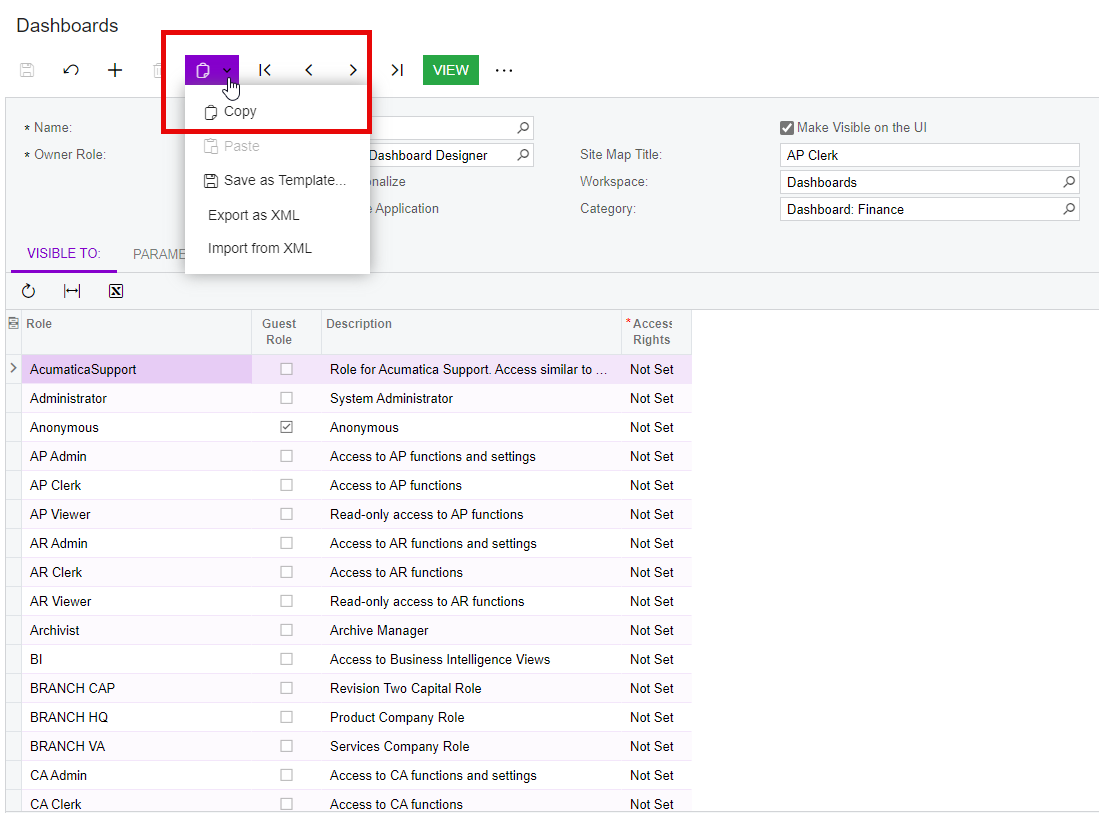
I am having some challenges copying Dashboards in 2024R1.

In 2023R1, when a dashboard is copied and pasted to create a new dashboard the system automatically assigns a new screen ID that is separate from the original DB.  This is exactly what I expect to happen. 

In 2024 R1, when a dashboard is copied, pasted, and then saved then “View” is clicked, the site redirects to the Welcome Screen.  In another scenario, if I attempt to copy, paste, and publish the copied dashboard with a new screen ID it creates the new screen ID but deletes the original DB.

Does anyone have the exact steps on how to copy a dashboard in 2024R1?

Best answer by fosterjeff01

This is definitely a bug that it creates duplicate Dashboards of the same Site ID--and it still exists is 24R2 as well.  Luckily I still had a sandbox to get my old Dashboard back after the new one destroyed it (after being edited for another purpose).  I wouldn’t exactly call this “Solved” until the bug is fixed.

11 replies

Kandy Beatty
Captain II
Forum|alt.badge.img+17
  • Captain II
  • September 26, 2024

Hi @lbrown57 

Are you using the Copy function?


Forum|alt.badge.img
  • Author
  • Freshman II
  • September 26, 2024

Yes, I am. Does it work for you? 


hdussa
Jr Varsity I
Forum|alt.badge.img+1
  • Jr Varsity I
  • September 26, 2024

Hello @lbrown57 ,

In 24R1 site, I tried copying an existing Dashboard and it worked for me. I would check access rights of the role if it is redirecting to the Welcome screen.

Hope this helps!


hkabiri
Acumatica Moderator
Forum|alt.badge.img+8
  • Acumatica Support Team
  • September 26, 2024

@lbrown57 If you use Unpublish and the Publish to the UI with proper settings that should resolve the issue. The problem is at initial copy everything is being copied from the Original Dashboard.

In 2024R1 Make Visible on UI is replaced by Publish to the UI and Unpublish Button to add or remove the Dashboard from SiteMap.


Forum|alt.badge.img
  • Freshman II
  • November 15, 2024

Actually I was just searching for this very thread. One of my colleagues alerted me that upon copy of a dashboard, the new one has the exact same screen ID. So for a time both the old and new appear to be sharing that ID. Granted, you can unpublish the new one, republish and it’ll assign a new ID and give you the opportunity to set some screen rights. Shouldn’t a new copy start out as unpublished to avoid this issue?


fosterjeff01
Freshman II
Forum|alt.badge.img+1
  • Freshman II
  • Answer
  • December 13, 2024

This is definitely a bug that it creates duplicate Dashboards of the same Site ID--and it still exists is 24R2 as well.  Luckily I still had a sandbox to get my old Dashboard back after the new one destroyed it (after being edited for another purpose).  I wouldn’t exactly call this “Solved” until the bug is fixed.


Forum|alt.badge.img
  • Author
  • Freshman II
  • January 23, 2025

Yes! It definitely is a bug. Thank you! 


  • September 11, 2025

Issue I am having is when I do any change to one dashboard anyone else that has access to that dashboard it changes for them. Create a user copy option does not appear. Is there a way to fix it so if a user goes to personalize there dashboard it is only for them. 


alexx
Jr Varsity II
Forum|alt.badge.img
  • Jr Varsity II
  • September 29, 2025

Issue I am having is when I do any change to one dashboard anyone else that has access to that dashboard it changes for them. Create a user copy option does not appear. Is there a way to fix it so if a user goes to personalize there dashboard it is only for them. 

I remember during our initial training in 2021-2022, that each person’s dashboard would be unique to them even if it’s the same kind of dashboard on someone else’s. A colleague recently changed one and I went to look at it for a different reason, and it was the same as what she had changed it to.


  • October 8, 2025

Still cant get the user copy button to pop up. 


  • October 8, 2025