

Solved

Can we setup a Supplier Limit

  • September 23, 2026
  • 3 replies
  • 40 views

Avishka
Freshman II
Forum|alt.badge.img

Hi,

Similar to how a Customer Limit as below;
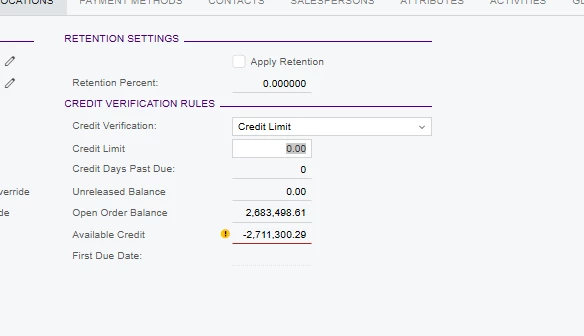
Is there a way to setup a Supplier Limit?

Best answer by Steve Milner

@Avishka Janani's right, there's no built-in supplier limit. If you want the limit stored on the vendor and compared against the open balance, you can do that without code. I built this in 2026 R1 and tested it.

Create a Number attribute on Attributes (CS205000), for example SUPPLIMIT. Add it to your vendor class and enter each vendor's limit on the Attributes tab of the Vendors form.

Then build a generic inquiry on Vendor, APInvoice and CSAnswers. Join Vendor to APInvoice on BAccountID = VendorID, and Vendor to CSAnswers on NoteID = RefNoteID. Conditions: APInvoice.OpenDoc = True, APInvoice.Released = True, APInvoice.DocType does not equal PPM, CSAnswers.AttributeID = SUPPLIMIT. Group by Vendor.AcctCD.

Show the vendor, the name, CSAnswers.Value as the limit, and two formulas.

Open balance, aggregate SUM:
=IIf([APInvoice.DocType]='ADR', 0-[APInvoice.DocBal], [APInvoice.DocBal])

Available:
=CDec(Max([CSAnswers.Value])) - Sum(IIf([APInvoice.DocType]='ADR', 0-[APInvoice.DocBal], [APInvoice.DocBal]))
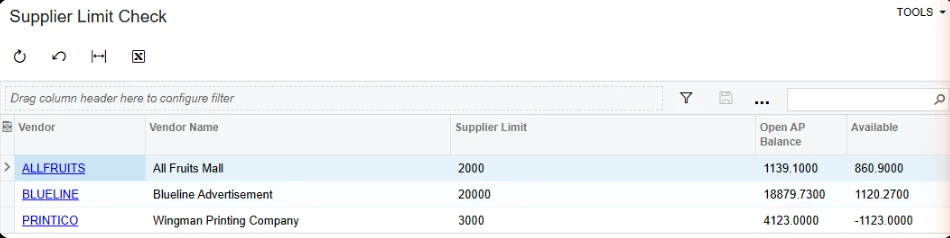
Use CSAnswers. Don't put the attribute field itself on the GI. With grouping on, it fails with "The virtual field ... cannot be used in a condition expression."

Debit adjustments reduce the balance, and prepayments stay out, the same as the Vendors form. It covers open bills, not open POs, and it only reports. It won't stop anything. Blocking a PO over the limit would take a customization.

3 replies

Hi Avishka,

There is no built‑in vendor (supplier) limit feature in Acumatica similar to the customer credit limit. You can review outstanding balances and documents using reports and inquiries like Vendor Summary or AP Balance by Vendor.

To View Vendor Balances • Accounts Payable Guide • Acumatica Beacon.

I hope this helps! Thank you!


Steve Milner
Varsity III
Forum|alt.badge.img+4
  • Varsity III
  • Answer
  • September 23, 2026

@Avishka Janani's right, there's no built-in supplier limit. If you want the limit stored on the vendor and compared against the open balance, you can do that without code. I built this in 2026 R1 and tested it.

Create a Number attribute on Attributes (CS205000), for example SUPPLIMIT. Add it to your vendor class and enter each vendor's limit on the Attributes tab of the Vendors form.

Then build a generic inquiry on Vendor, APInvoice and CSAnswers. Join Vendor to APInvoice on BAccountID = VendorID, and Vendor to CSAnswers on NoteID = RefNoteID. Conditions: APInvoice.OpenDoc = True, APInvoice.Released = True, APInvoice.DocType does not equal PPM, CSAnswers.AttributeID = SUPPLIMIT. Group by Vendor.AcctCD.

Show the vendor, the name, CSAnswers.Value as the limit, and two formulas.

Open balance, aggregate SUM:
=IIf([APInvoice.DocType]='ADR', 0-[APInvoice.DocBal], [APInvoice.DocBal])

Available:
=CDec(Max([CSAnswers.Value])) - Sum(IIf([APInvoice.DocType]='ADR', 0-[APInvoice.DocBal], [APInvoice.DocBal]))

Use CSAnswers. Don't put the attribute field itself on the GI. With grouping on, it fails with "The virtual field ... cannot be used in a condition expression."

Debit adjustments reduce the balance, and prepayments stay out, the same as the Vendors form. It covers open bills, not open POs, and it only reports. It won't stop anything. Blocking a PO over the limit would take a customization.


Avishka
Freshman II
Forum|alt.badge.img
  • Author
  • Freshman II
  • September 23, 2026

Thanks ​@JananiRavichandran44 & ​@Steve Milner!

