

Hi,
Our standard process is to mark the Sales Order line as Mark for PO, which creates the relationship when the Purchase Order is generated.
Can we Manaully Link a PO to a SO when missed this step. (Out of the Box)
Thanks!



Hi,
Our standard process is to mark the Sales Order line as Mark for PO, which creates the relationship when the Purchase Order is generated.
Can we Manaully Link a PO to a SO when missed this step. (Out of the Box)
Thanks!
Best answer by Steve Milner
@Avishka Yes, out of the box. Open the sales order, select Mark for PO on the line, and check that PO Source is Purchase to Order. Save. Then select the line and click PO Link on the Details tab toolbar. In the Purchasing Details dialog, select the PO line, click Save, then save the order.
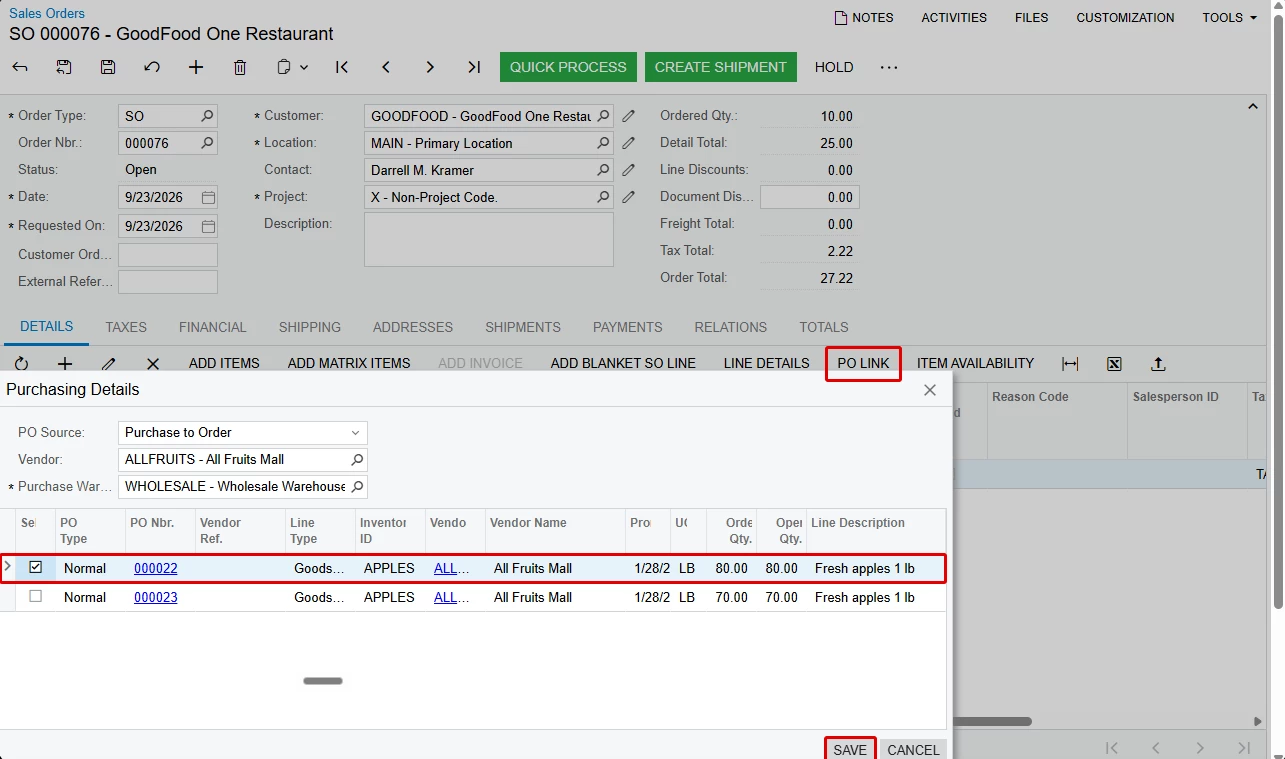
If your sales orders go through approval, put the order on hold first. With approvals on, the lines are read-only whenever the order isn't on hold, so you can't tick Mark for PO.
If the PO doesn't show up in the dialog, look at the PO line. It has to be on a Normal PO for the same item, and its warehouse has to match the Purchase Warehouse in the dialog. The PO can't be on hold, the line can't be completed or canceled, and it needs open quantity that isn't already linked to another order. If the Vendor box in the dialog is filled in, the PO has to be from that vendor.
One side effect worth knowing. Linking turns the whole PO line into Goods for SO, not just the quantity you linked. I linked 10 lb against an 80 lb PO line in a test tenant, and all 80 lb moved from PO Order to Purchase for SO in the item plans. There's more on that in this thread: https://community.acumatica.com/financials-7/linking-new-sales-order-line-to-existing-purchase-order-31923
No account yet? Create an account
Enter your E-mail address. We'll send you an e-mail with instructions to reset your password.


