

Question

Auto Sales Order Shipment (SOS) is not being created

  • April 13, 2026
  • 7 replies
  • 42 views

a case where an auto Sales Order Shipment (SOS) is not being created by the system.

Details:

  • Sales Order quantity: 13
  • Inventory on hand: 15
  • Qty available for shipping: 15
  • Inventory exists at XYZ location and has been available since April 10
  • Inventory is not reserved elsewhere

Despite sufficient availability, the SO line goes to Back Order and no auto SOS is created.

What conditions would prevent Acumatica from auto‑creating the SOS in this scenario?
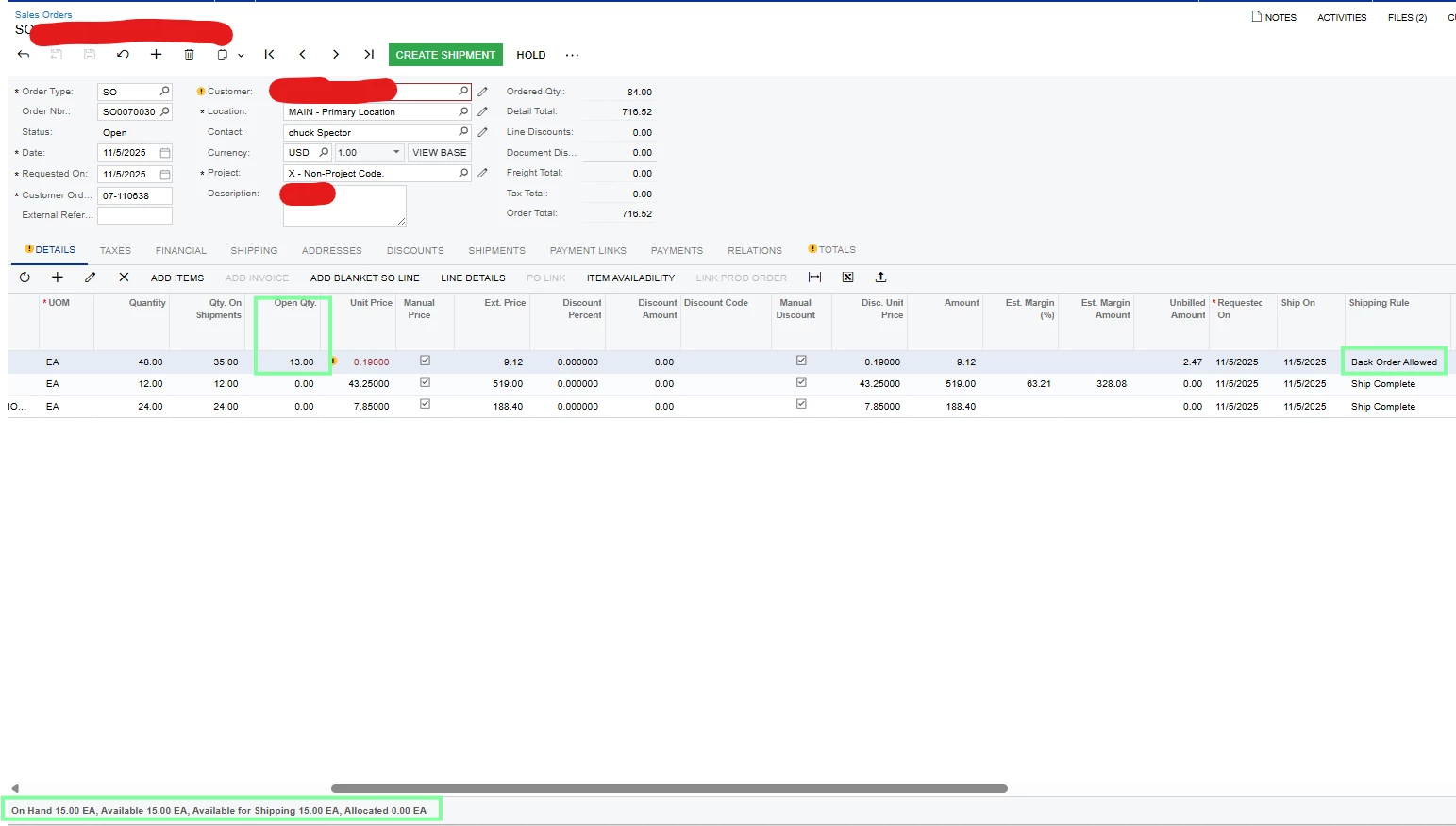
 

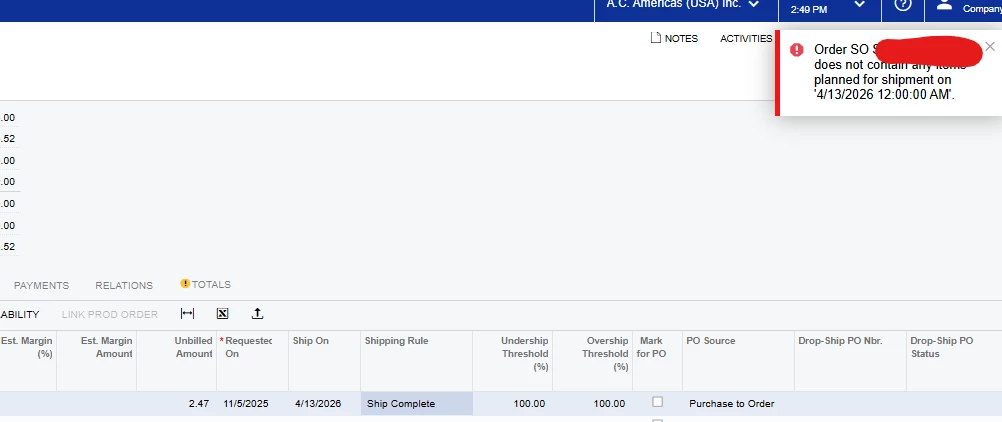
and when I update manually shipping rule and create shipment , below error pop up. 
 

7 replies

nhatnghetinh
Captain II
Forum|alt.badge.img+13
  • Captain II
  • April 14, 2026

Hi ​@Hiralu 

Try deleting the Inventory ID from the first line (Back Order) on the SO screen => Click SAVE => Then add the deleted Inventory ID => Click SAVE => Click "CREATE SHIPMENT"


Best Regards,

NNT


Forum|alt.badge.img
  • Jr Varsity I
  • April 14, 2026

@Hiralu  this is a common error in Acumatica.

Reason: There is NO shipment plan record for that date
 

Missing or invalid shipment plan (INItemPlan) due to date mismatch or no re-planning.

Try once by changing the dates for the shipment and 

  • Open SO line
  • Change Qty (13 → 12 → 13)
  • Save

I hope it will work!


  • Author
  • Freshman I
  • April 14, 2026

thank you for the response , ​@nhatnghetinh I cant delete it has associated SO

@nasir it doesnt let me change the qty , as total qty of 48 , 13 yet to ship and 35 has been already shipped 


mohammadnawaz51
Jr Varsity II
Forum|alt.badge.img+6

@Hiralu can you check any allocation linked to sales order, are you able to create the shipment from shipment screen by adding SO line?


Forum|alt.badge.img
  • Jr Varsity I
  • April 14, 2026

@Hiralu  have you tried by changing the shipment dates?


Forum|alt.badge.img
  • Varsity I
  • April 15, 2026

1. Shipping Rule on SO Line / Order

If the shipping rule is set to:

Back Order Allowed → system may defer shipment

Ship Complete → requires full allocation before creating shipment

Try setting it to Ship Complete = Cancel Remainder or Ship Separately depending on requirement.

2. Item Availability vs Allocatable Qty

Even though:

On Hand = 15

Available = 15


Qty Hard Available

Qty Available for Shipment (SO screen)


Sometimes:

Qty is available globally but not allocatable to SO due to settings.

 3. Warehouse / Location Mismatch

Ensure the SO line warehouse matches where stock exists

Check if:

Location is Sales Valid = true

Location allows picking/shipping

 4. Allocation / Reservation Settings

Check:

Require Allocation enabled on item / warehouse

If allocation is required but not done:

System may push to Back Order

 5. Item Settings (Critical)

Verify in Inventory Item:


Item Type (Stock / Non-Stock)

Require Shipment = true

Default Warehouse / Location


  • Author
  • Freshman I
  • April 16, 2026

@nasir yes I tried changing the date still same issue 

@FarhanaM60 yes everything you listed was on the place correctly .


For now we have created new SO for that item line to generate auto SOS. 


Thank you all for trying to resolve this issue .


