

We are currently on 25R2, still utilizing Classic UI, and have noticed the last couple of weeks that when we create an activity it is not automatically reflecting in the Activity tab. We either have to manually refresh or click to another tab and go back. At first, we thought this was an issue with Edge, as I had no issues when I tested in Firefox or Chrome. However, some users experience issues in Chrome and it works fine for them in Edge. Is anyone else experiencing this, or have suggestions on how this can be fixed? We have already cleared browser histories and caches, reset the Acumatica cache, and restarted the application. Nothing we’ve tried is fixing the inconsistencies.
Solved
Activity record not showing without manual refresh



Best answer by mnecaise
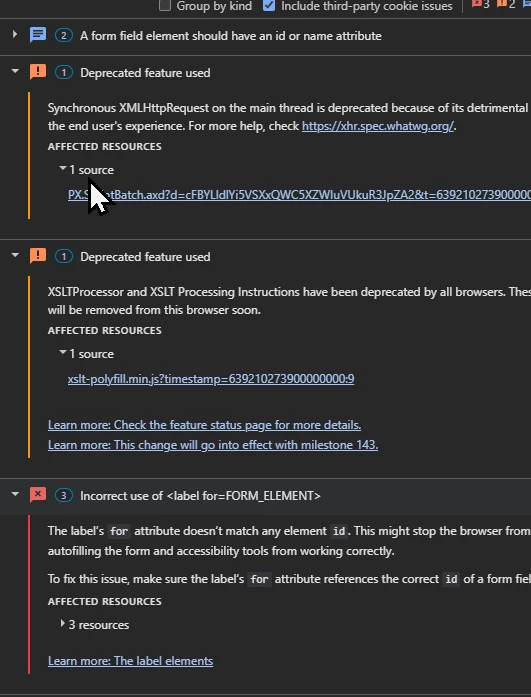
Several other random issues we were experiencing were all fixed by switching to Firefox. I’m not sure if this is the root cause of the issue or not, but I did find several articles discussing how Chrome and Edge will stop supporting XSLT in November and I’m wondering if we’re seeing the beginning depreciation of this technology. Since everything is working for us again by switching our browser, I’m not going to spend a lot of time continuing to dig. Based on the articles, this only affects Classic UI.




Enter your E-mail address. We'll send you an e-mail with instructions to reset your password.