Answer

Using Side Panels to Link Fedex Tracking

  • May 20, 2025
  • 16 replies
  • 163 views

Does anyone know how to add a side panel for UPS/Fedex Tracking hyperlinks? I saw it partially in a video (by Tim Rodman) but it did not show the full steps.

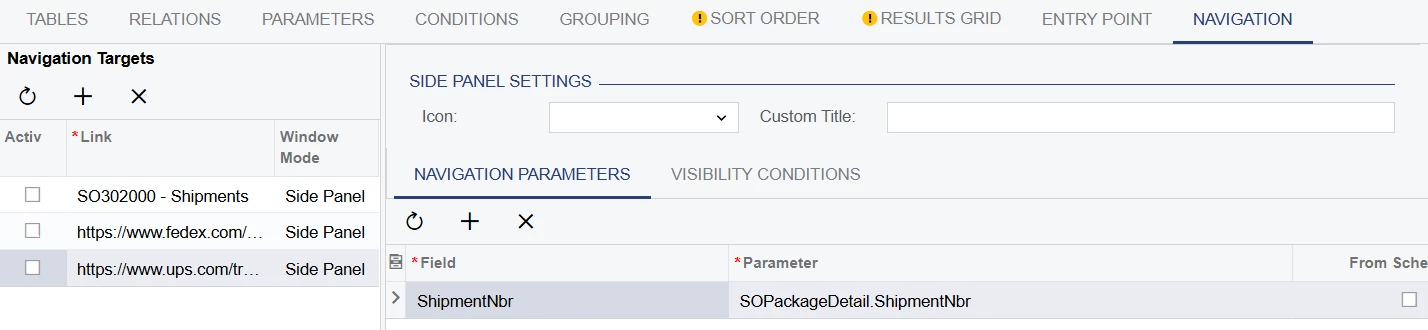
For example, I am not able to put ((Tracknbr) in the Field below, it only allows ShipmentNbr.

We use StarShip for shipments.


Best answer by lairdtim

I wonder if your FedEx URL needs to be updated.  I just looked at an email I had with a Fedex tracker link on it and here’s what it shows:

https://www.fedex.com/fedextrack/?tracknumbers=xxxxx


16 replies

Forum|alt.badge.img+1
  • Semi-Pro I
  • May 20, 2025

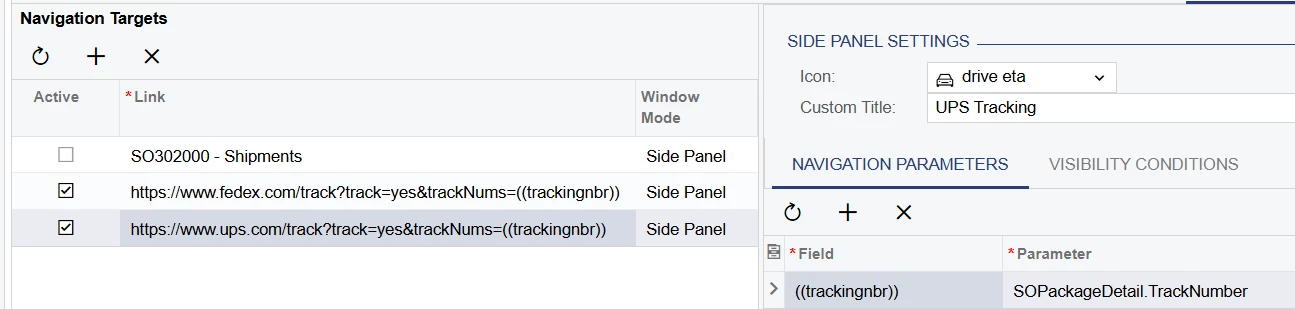
When you create the Link (in the Navigation Targets grid), you provide it a variable that will then become available in the Navigation Parameters screen.  Here’s the URL for ours (we use UPS, but the logic is the same):


https://www.ups.com/track?track=yes&trackNums=((trackingnbr))


Once I put that in, “((trackingnbr))” becomes an option in the Field section of the Navigation Parameters grid.


  • Author
  • May 20, 2025

Thank you! I was able to do that. However, I still cannot connect to UPS or Fedex.

And it looks like it may be passing the Shipment number?


Forum|alt.badge.img+1
  • Semi-Pro I
  • May 20, 2025

I think you’re correct--you’ll need to find the field where the tracking number gets stored in Acumatica (assuming that Starship writes it back).  We use Shipstation, so my field wouldn’t really help you at all.


  • Author
  • May 20, 2025

I did find the correct field but I still cannot connect to either UPS or Fedex. 


Forum|alt.badge.img+1
  • Semi-Pro I
  • May 20, 2025

Can you share a screenshot that shows the full URL in the Navigation Target grid?


  • Author
  • May 20, 2025

It turns out we do not have the URL inside Acumatica, just the tracking number.

Could that be the problem?


Forum|alt.badge.img+1
  • Semi-Pro I
  • May 21, 2025

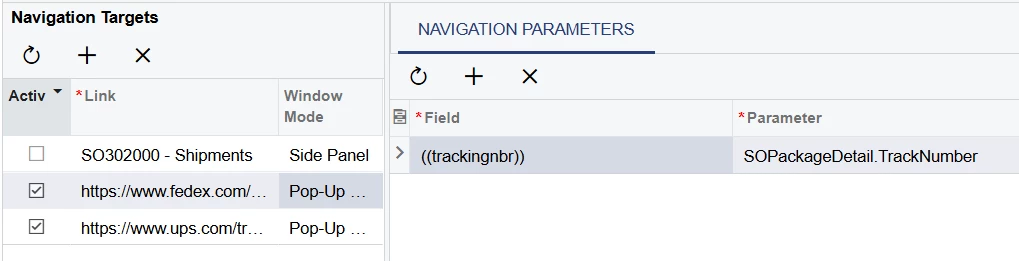
The URL only needs to be in the Navigation Targets grid and you just need to be able to provide the tracking number.  What you shared looks correct.  I’ll admit I’ve never tried it as a sidepanel, only as a pop up window.


  • Author
  • May 21, 2025

Well Eureka! A pop-up window works! Good enough for me!!

However, it only goes to the UPS tracking. How do I get the Fedex tracking Pop-Up to work when I select a fedex tracking number?


Forum|alt.badge.img+1
  • Semi-Pro I
  • May 21, 2025

Since you assign a navigation option to a field in the GI, your best bet is to have two columns, one for FedEx and one for UPS.  I think all UPS trackers still start with “1Z”, so you could do a formula in two separate columns:

UPS Tracker:
=if(left([SOPackageDetail.TrackNumber], 2)=’1Z’, [SOPackageDetail.TrackNumber], ‘’)

FedEx Tracker: 
=if(left([SOPackageDetail.TrackNumber], 2)=’1Z’, ‘’, [SOPackageDetail.TrackNumber])


  • Author
  • May 21, 2025

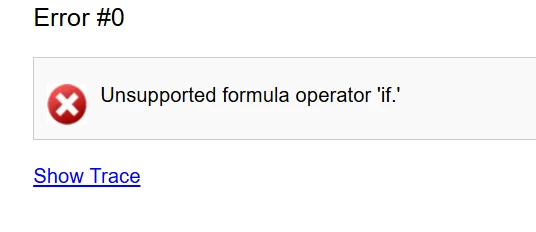
The validation passed but I got an error message:

Here’s my formula:

=if(left([SOPackageDetail.TrackNumber], 2)=’1Z’, [SOPackageDetail.TrackNumber], ' ')


Forum|alt.badge.img+1
  • Semi-Pro I
  • May 21, 2025

Oops!  Sorry, I mix my Excel and GI formulas all the time.  In the GI, it needs to be iif (with two “i”s).


  • Author
  • May 21, 2025

Getting closer!

With this formula, it is leaving the tracking number blank in the pop-up window.

=iif(left([SOPackageDetail.TrackNumber], 2)=’1Z’, ' ', [SOPackageDetail.TrackNumber])

This is in the navigation target:

https://www.fedex.com/tracking?tracking=yes&trackingNums=((trackingnbr))


Forum|alt.badge.img+1
  • Semi-Pro I
  • May 21, 2025

I wonder if it may be how you’re using the same variable for both navigation items.  Maybe try using 

=((trackingnbrF))

for the FedEx URL and 

=((trackingnbrU))

for UPS, and then pointing both of them to your SOPackageDetail.TrackNumber field.


  • Author
  • May 21, 2025

Same result...UPS is working and Fedex works except it will not populate the tracking number. 😒

Still, this is better than where I started - Thank you for your help!!


Forum|alt.badge.img+1
  • Semi-Pro I
  • Answer
  • May 21, 2025

I wonder if your FedEx URL needs to be updated.  I just looked at an email I had with a Fedex tracker link on it and here’s what it shows:

https://www.fedex.com/fedextrack/?tracknumbers=xxxxx


  • Author
  • May 21, 2025

YES! Working now……….THANK YOU so much!! 😅