

Answer

Uploading Sales Price Worksheet - Does not see first row of EXCEL data for column mapping

  • July 8, 2024
  • 3 replies
  • 55 views

Forum|alt.badge.img+5

Hello,

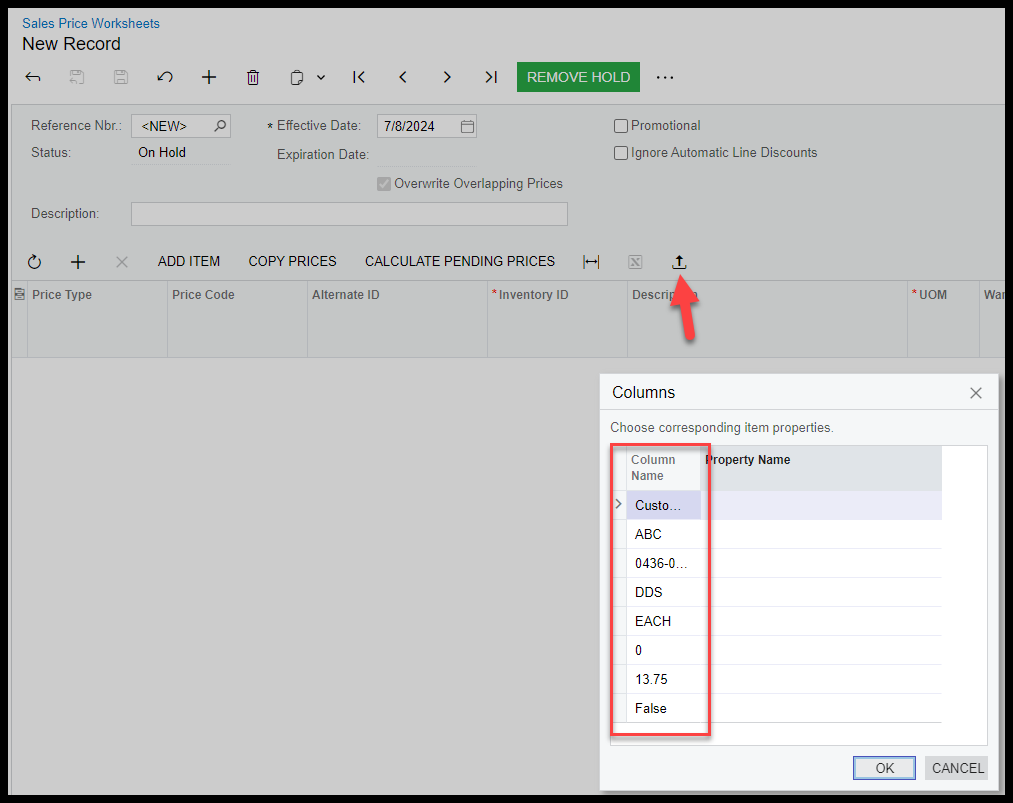
The column name shown in the image above is row 2 in the EXCEL file.  Row 1 is the column headers.  I have copied and pasted values into a new spreadsheet etc. trying to get past this.  Seems to be an EXCEL thing but I cannot find how to get past this.

Best answer by ltussing03

Kandy, thanks for the response.  I discovered they had blank rows in the data.  Made it get wonky.  I cleaned up the blank rows and it works fine.

Thanks!

3 replies

Kandy Beatty
Captain II
Forum|alt.badge.img+17

Hi @ltussing03 

Can you share the excel?


Forum|alt.badge.img+5
  • Author
  • Captain II
  • Answer
  • July 8, 2024

Kandy, thanks for the response.  I discovered they had blank rows in the data.  Made it get wonky.  I cleaned up the blank rows and it works fine.

Thanks!


Kandy Beatty
Captain II
Forum|alt.badge.img+17

Kandy, thanks for the response.  I discovered they had blank rows in the data.  Made it get wonky.  I cleaned up the blank rows and it works fine.

Thanks!

Glad you got it Larry!
