



Solved

Unable to close an unpaid payment link — “Cannot Change item list when invoice is closed

  • Nov 3, 2026 11:08 AM UTC
  • 2 replies
  • 30 views
  • Translate All

Manikanta Dhulipudi
Captain II
Forum|alt.badge.img+16

We are receiving the following error when attempting to close a payment link for a sales order:

Cannot Change item list when invoice is closed

Current situation:

  • No payment has been made through the payment link.

  • No shipments have been created for the sales order.

  • Clicking Close Payment Link returns the error above and prevents us from closing the link.

We expected to be able to close the payment link even though the order is unpaid and has not been shipped.
Best answer by kyle90

We recently had this happen as well - We wanted to cancel the Sales Order but it wouldn’t allow us to do so without closing the payment link, but the payment link wouldn’t close with the same “Cannot Change item list when invoice is closed” error


Solution:

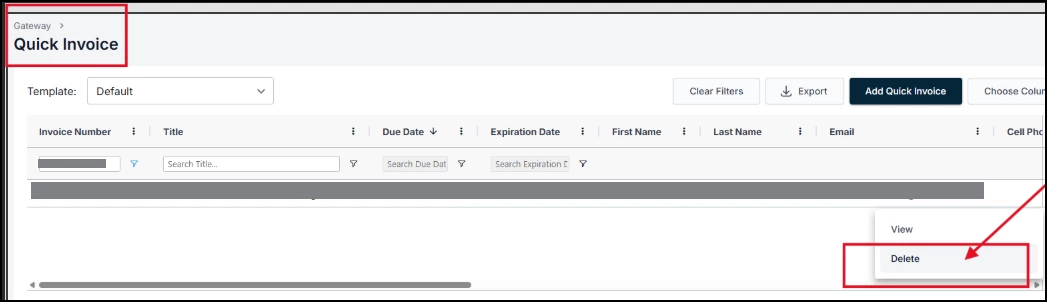
Login into the Fortis gateway, go to the "Location" corresponding to the Acumatica Processing Center and then open the Quick Invoices

Search by SO and you should be able to close the transaction but selecting delete from the three-dot menu on the far right of that line item

This closes the payment link, you can then re-sync in Acumatica either on the transaction or via the processing screen and you should be able to close the Sales Order


View original

2 replies

Forum|alt.badge.img+4
  • Captain II
  • Answer
  • Nov 3, 2026 7:48 PM UTC

We recently had this happen as well - We wanted to cancel the Sales Order but it wouldn’t allow us to do so without closing the payment link, but the payment link wouldn’t close with the same “Cannot Change item list when invoice is closed” error


Solution:

Login into the Fortis gateway, go to the "Location" corresponding to the Acumatica Processing Center and then open the Quick Invoices

Search by SO and you should be able to close the transaction but selecting delete from the three-dot menu on the far right of that line item

This closes the payment link, you can then re-sync in Acumatica either on the transaction or via the processing screen and you should be able to close the Sales Order


Translate

Forum|alt.badge.img+1

We just discovered we have thousands of open payment links for closed invoices but cannot sync because of this same error.

How can we fix this? And what is the correct workflow for invoices that have payment links generated for them but end up getting paid with an alternate payment method such as a check to make sure the links get closed?

Translate