Question

Stop generating customer statement for the branch not delivering to the customer anymore.

  • May 11, 2022
  • 6 replies
  • 178 views

Forum|alt.badge.img+6

Hello,

        We have multiple branches, like branch 1 and branch 2. For customer A, both branches served the customer years ago and also issuing invoices separately.

        However, starting from this year, only branch 2 is serving the customer.

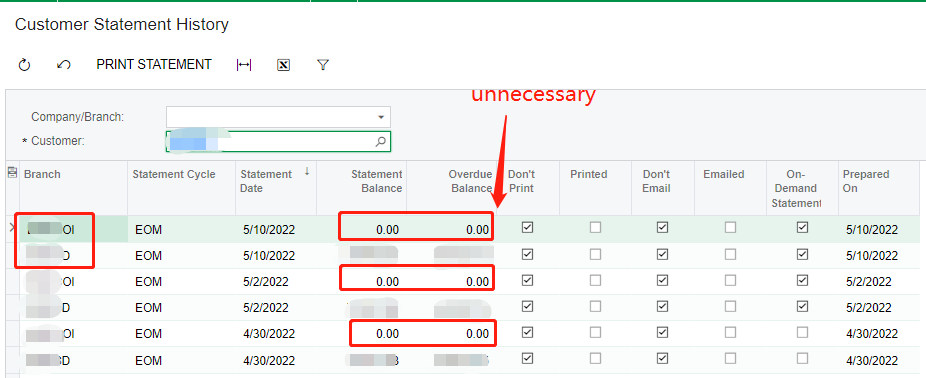
But every time, when we prepare customer statement for Customer A.

 It looks like system also generate 2 statements, 1 is for Branch 1 and the other is for branch 2.
Branch 1 statement is empty and unnecessary.

      Is there a way to excluding branch 1?


6 replies

Forum|alt.badge.img+6
  • Author
  • Captain II
  • May 11, 2022

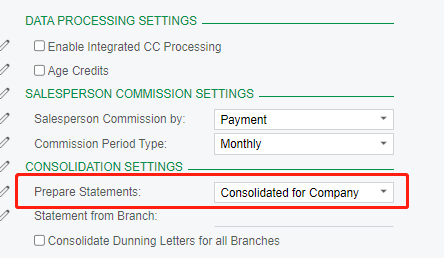
by the way, even if we set “consolidated for company”,

it did not work.


Kandy Beatty
Captain II
Forum|alt.badge.img+17

HI @ray20 

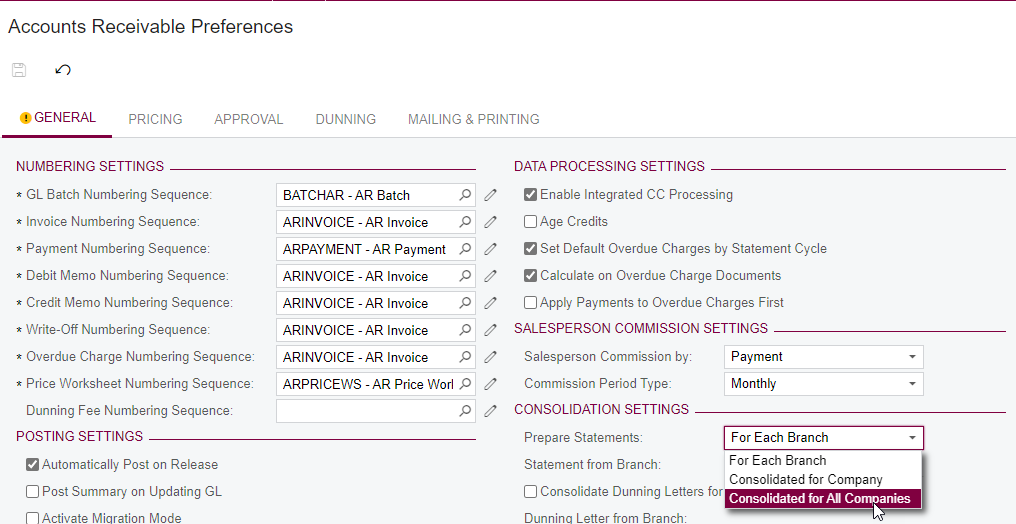
Mark it for Consolidate for All Companies


  • Consolidated for All Companies: Customer statements from different branches will be consolidated. If you select this option, you need to select the branch that will be specified in consolidation statements in the Statement From box. (This option appears if the Multiple Base Currencies feature is disabled and the Multicompany Support feature is enabled on the Enable/Disable Features form.)

Forum|alt.badge.img+6
  • Author
  • Captain II
  • May 12, 2022

@kbeatty21 
Thank you, it is a way to go. But it can not perfectly solve my situation.

Because “consolidated for all companies” is an overall setting, right?

For customer A, we serve with company 1, branch 2
But for customer B, we serve with company 2
for customer C, we server with company 3

So, we can NOT consolidated for all companies.   


Kandy Beatty
Captain II
Forum|alt.badge.img+17

@kbeatty21 
Thank you, it is a way to go. But it can not perfectly solve my situation.

Because “consolidated for all companies” is an overall setting, right?

For customer A, we serve with company 1, branch 2
But for customer B, we serve with company 2
for customer C, we server with company 3

So, we can NOT consolidated for all companies.   
 

I thought about that as well. Try to change the setting, save, and test the statements. Then I would revert back to the setting you have now. Surprisingly that works sometimes. 


Forum|alt.badge.img+6
  • Author
  • Captain II
  • May 12, 2022

@kbeatty21  I am sorry, I did not quite understand. Are you suggesting we can change the setting temporarily when we prepare statement for customer A.  After the statement is prepared, then we can revert back?


Kandy Beatty
Captain II
Forum|alt.badge.img+17

Yes, you can then reprepare the statements.