Answer

Show All Documents Permissions

  • March 28, 2024
  • 3 replies
  • 48 views

Jeff96
Captain II
Forum|alt.badge.img+4

I’m trying to give a user permission to click “show all documents” on the customer details screen, but it doesn’t seem to work. 

What am I missing here?

 

Best answer by ed.goodman

@Jeff96 

Check and confirm that the role has proper access to the levels above the Show All Documents node as Acumatica does not support the increase of access rights at lower levels.
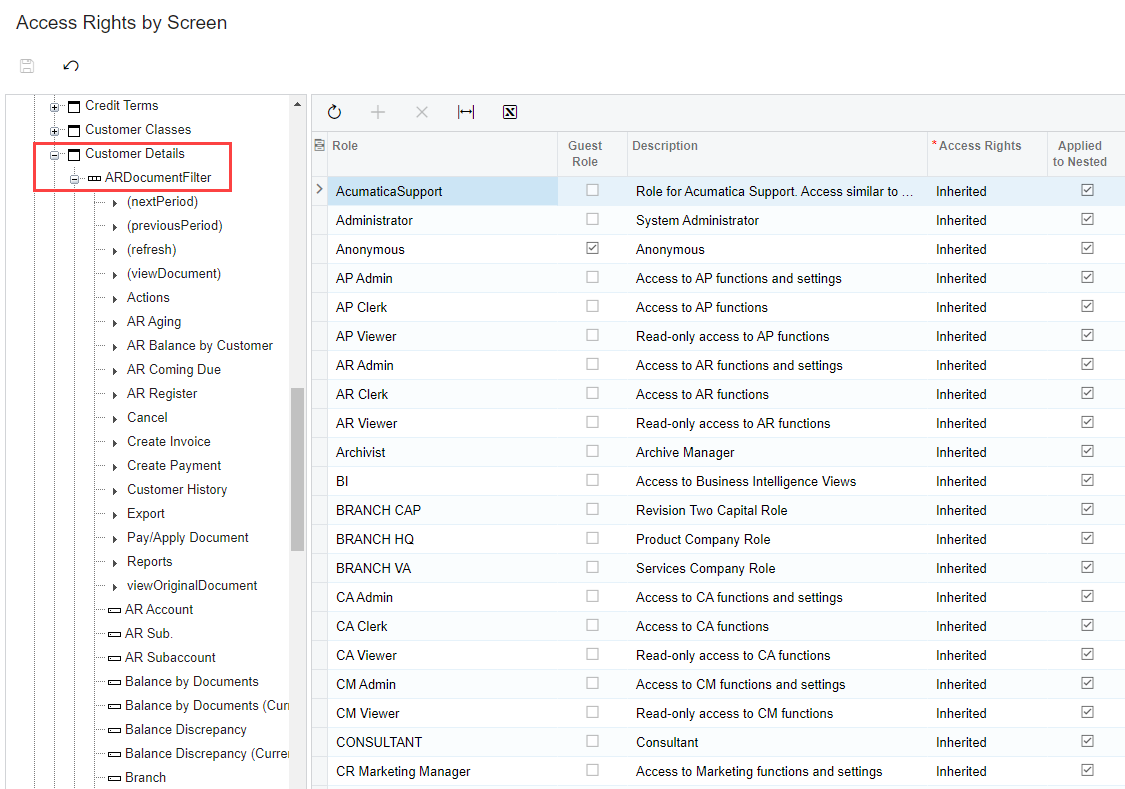
 

For example, if those levels above are View Only, Acumatica will not allow Edit access for the Show All Documents command at a lower level.

3 replies

Manikanta Dhulipudi
Captain II
Forum|alt.badge.img+15

Hi @Jeff96 

Could you please Update the ScreenID or screenshot to assist here?


ed.goodman
Acumatica Employee
Forum|alt.badge.img+4
  • Acumatica Employee
  • Answer
  • March 28, 2024

@Jeff96 

Check and confirm that the role has proper access to the levels above the Show All Documents node as Acumatica does not support the increase of access rights at lower levels.


For example, if those levels above are View Only, Acumatica will not allow Edit access for the Show All Documents command at a lower level.


Jeff96
Captain II
Forum|alt.badge.img+4
  • Author
  • Captain II
  • March 28, 2024

@Jeff96

Check and confirm that the role has proper access to the levels above the Show All Documents node as Acumatica does not support the increase of access rights at lower levels.


For example, if those levels above are View Only, Acumatica will not allow Edit access for the Show All Documents command at a lower level.

Thank you!