Solved

ShipStation Connection 2025R2

  • March 23, 2026
  • 9 replies
  • 50 views

Forum|alt.badge.img

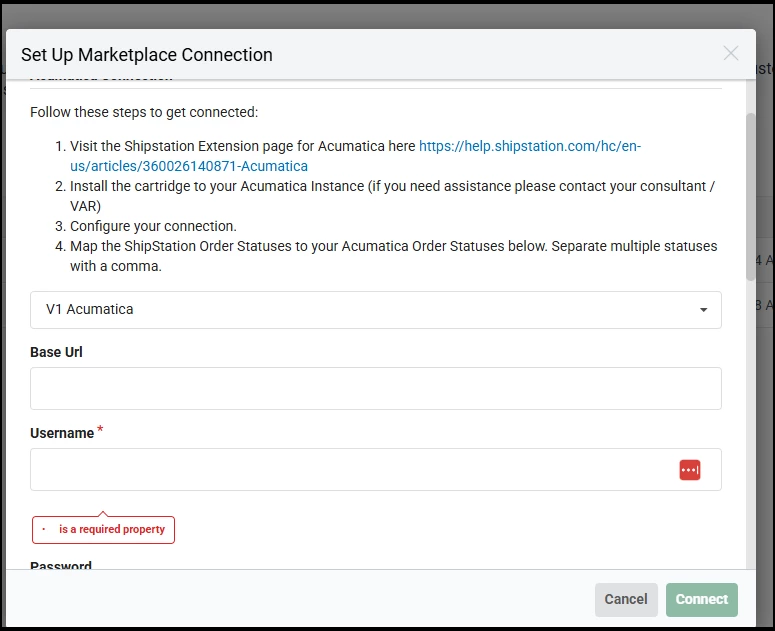
Has anyone successfully configured a ShipStation connection with 25R2?  I imported the customization package, entered the configuration in Acumatica, then created a store in ShipStation. I received the message that the connection was successful, but no shipments are imported even for a manual refresh.  In fact, I don’t even see login activity in the request profiler.  The account information and credentials are correct, and I can hit the web service endpoint from Postman to receive shipment details for the date range.  I am working with ShipStation Support, but response time is slow with little helpful information provided.  I’m aware of the currency rate issue that can break the connection attempt from ShipStation if not configured, so that’s not the issue.  I don’t know if it’s a design flaw or a bug, but if you attempt to edit the connection details after setting up a successful connection, the screen is blank.  I’ve repopulated it many times and each time it comes back blank.

Here is what the Edit connection screen shows after a “successful” setup message:
 

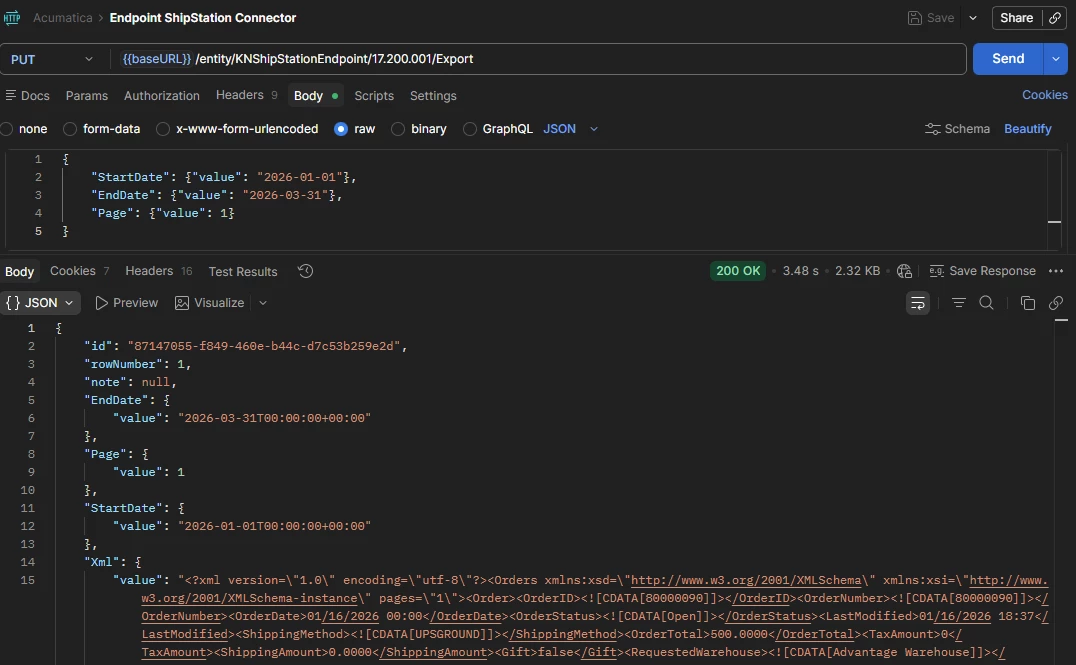
And here is my Postman call indicating that the web service endpoint is functional in Acumatica:
 

Any insight would be appreciated.  Thanks.



Best answer by bbohn

I was able to get it working by removing everything on both sides and starting over.  I unpublished the ShipStation customization package then republished it.  The settings from the DB table for the configuration were still there, and although it shouldn’t affect the shipment pull, I did delete the API keys and recreate them.  I set my old store to inactive in ShipStation and created another one.  Again, the message was displayed that the connection was set up successfully, but this time, the shipment with today’s date that I was expecting to show up was imported.  There must have been something inconsistent or a conflict that wasn’t surfaced.  ShipStation could do a much better job by logging or messaging on that side to help troubleshoot.  Thanks.

9 replies

Manikanta Dhulipudi
Captain II
Forum|alt.badge.img+16

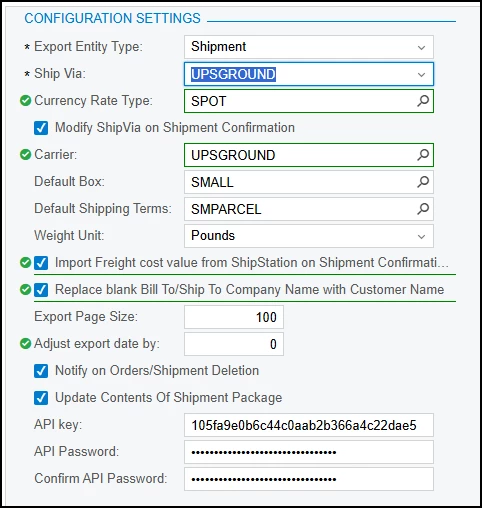
@bbohn Did you follow the guide for connecting shipstation document? Can you also share your shipstation configuration screen?


Forum|alt.badge.img
  • Author
  • Varsity III
  • March 23, 2026

@bbohn Did you follow the guide for connecting shipstation document? Can you also share your shipstation configuration screen?

Yes, although as I’ve reported to support, the documentation is full of inconsistencies.  I should at least see the login attempts in the request profiler event log, but I’m not.  Here is the config screen:


Manikanta Dhulipudi
Captain II
Forum|alt.badge.img+16

@bbohn Is your connection is successful, did you unpublished all other packages and verify this?


Manikanta Dhulipudi
Captain II
Forum|alt.badge.img+16

@bbohn Can you try the change the date to 2-5 or 10 and verify this.


Forum|alt.badge.img
  • Author
  • Varsity III
  • March 23, 2026

Changing the export date doesn’t change the results.  And ShipStation is indicating that the connection is successful when configured and saved, although the details are not visible when going back to edit the connection.  I’m not sure if that related or not.  I’m not sure what unpublishing everything else accomplishes since the endpoint/screen appears to be working from Postman. Thanks.


Forum|alt.badge.img
  • Author
  • Varsity III
  • March 23, 2026

Removed statement about it working one time.  The only entries in the log are from my Postman requests.  .

It’s very difficult to troubleshoot without any logging or messaging in ShipStation.  I may try unpublishing and reinstalling from scratch then will report back.  I had no issues with EasyPost, which is a different connection method.


Forum|alt.badge.img
  • Author
  • Varsity III
  • Answer
  • March 23, 2026

I was able to get it working by removing everything on both sides and starting over.  I unpublished the ShipStation customization package then republished it.  The settings from the DB table for the configuration were still there, and although it shouldn’t affect the shipment pull, I did delete the API keys and recreate them.  I set my old store to inactive in ShipStation and created another one.  Again, the message was displayed that the connection was set up successfully, but this time, the shipment with today’s date that I was expecting to show up was imported.  There must have been something inconsistent or a conflict that wasn’t surfaced.  ShipStation could do a much better job by logging or messaging on that side to help troubleshoot.  Thanks.


Forum|alt.badge.img
  • Author
  • Varsity III
  • March 23, 2026

And just to cover the blank “edit connection” screen that I mentioned above, ShipStation Support replied that it’s a known limitation with the design.  Ugh.


Chris Hackett
Community Manager
Forum|alt.badge.img
  • Acumatica Community Manager
  • March 24, 2026

Thank you for sharing your solution with the community ​@bbohn!